AI Tools for Productivity

Discover the best Productivity AI tools to enhance your productivity and creativity.

Page 62 of 114 • 1361 total tools

In today’s busy world, staying productive can feel like a real challenge. With so much to do, constant notifications, and distractions everywhere, having the right tools to manage your time well is more important than ever. That’s where AI productivity tools come in—they’re designed to make your work smoother, handle repetitive tasks for you, and keep you organized.

These smart solutions have come a long way recently. They’ve gone from simple task managers to complete systems that can adapt to what you need. Whether you’re trying to organize your day better, improve how your team works together, or finally tackle that huge inbox, the right AI tools can make a big difference.

As I looked into the best AI productivity tools out there, I tried out several apps that promise to make you more efficient and focused. From smart schedulers to new project management systems, there are tons of options to help you get your time back.

So, if you’re ready to boost your productivity and make the most of your workday, you’re in the right place. Here’s a list of great AI productivity tools that are definitely worth checking out. Let’s explore how to work smarter together!

The best AI Productivity Tools

  1. Perplexity for automating tasks and helping with management.
  2. Small PDF.com for smoother document management for teams.
  3. Gamma for document creation tools that save time.
  4. Odoo for a task management and collaboration app.
  5. Zoom for analyzing and summarizing meeting content.
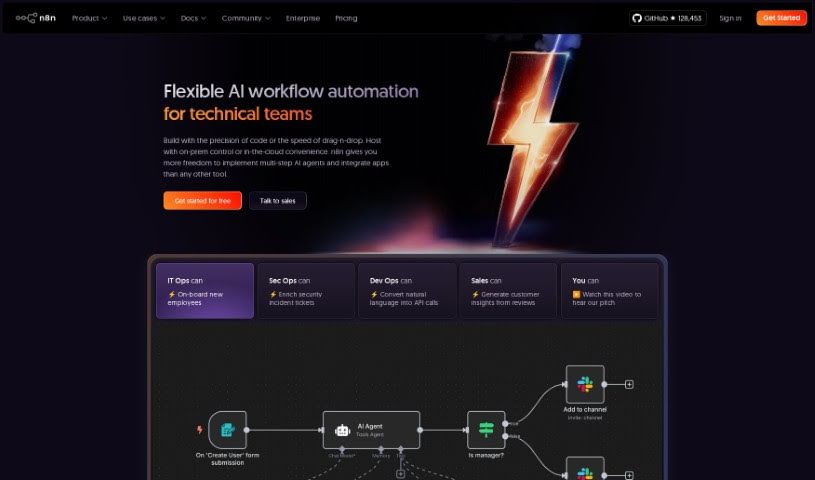
  6. N8N for smoother team onboarding processes.
  7. Prezi for engaging team collaboration sessions.
  8. Tableau for creating reports and dashboards more easily.
  9. Data Camp for efficient team collaboration workflows.
  10. Otter.ai for getting action items from meetings without the fuss.
  11. Tenorshare for easily summarizing long PDF documents.
  12. Slidesgo for creating professional presentations efficiently.
  13. Facecheck Id for streamlining identity verification tasks.
  14. HIX.AI for boosting writing speed with smart tools.
  15. Tactiq for automating meeting notes for teams.
How do AI productivity tools work?

AI productivity tools use machine learning to look at how you work and make your tasks more efficient. These tools are built to handle lots of information, spotting patterns and your preferences to help smooth out your workflows. By understanding how you use different apps, AI can suggest personal improvements to boost your productivity.

Basically, these tools use natural language processing (NLP) to understand and respond to what you ask. For example, they can schedule meetings, set reminders, or create reports just by understanding simple requests. This saves you time and cuts down on manual work.

Many AI productivity apps connect with popular tools like calendars, email, and project management software. This connection lets them gather information and automate tasks across different places. As a result, you get a smooth, connected experience that improves how you work day-to-day.

AI productivity tools also learn from how you use them to get better over time. The more you use a tool, the better it gets at guessing what you need and offering helpful suggestions. This ability to adapt is what makes AI tools increasingly valuable for improving productivity for both individuals and teams.

Plus, these tools can look at data about how you complete tasks and suggest ways to improve. For instance, if you often miss deadlines, the AI might suggest better ways to manage your time. By giving you useful insights, AI productivity tools help you work smarter, not just harder.

In the end, AI productivity tools show how technology can change everyday tasks into more efficient processes. By automating routine jobs and offering personal insights, they help you focus on what’s most important—hitting your goals and being more effective overall.

Our best AI productivity tools at a glance

RankNameBest forPlans and PricingRating
1PerplexityAutomating tasks and helping with management.N/A4.70 (10 reviews)
2SmallPDF.comSmoother document management for teams.Paid plans start at $9/month.4.73 (11 reviews)
3GammaDocument creation tools that save time.N/A4.79 (19 reviews)
4OdooA task management and collaboration app.N/A4.67 (6 reviews)
5ZoomAnalyzing and summarizing meeting content.Paid plans start at $15.99/month.4.73 (11 reviews)
6N8NSmoother team onboarding processes.Paid plans start at $50/month.4.58 (12 reviews)
7PreziEngaging team collaboration sessions.Paid plans start at $19/month.4.18 (11 reviews)
8TableauCreating reports and dashboards more easily.N/A4.70 (43 reviews)
9DataCampEfficient team collaboration workflows.Paid plans start at $25/month.4.71 (24 reviews)
10Otter.aiGetting action items from meetings without the fuss.Paid plans start at $13.59/month.4.73 (11 reviews)
11TenorshareEasily summarizing long PDF documents.N/A4.64 (11 reviews)
12SlidesgoCreating professional presentations efficiently.N/A4.68 (22 reviews)
13Facecheck IdStreamlining identity verification tasks.N/A4.42 (19 reviews)
14HIX.AIBoosting writing speed with smart tools.N/A4.36 (11 reviews)
15TactiqAutomating meeting notes for teams.N/A4.64 (11 reviews)
Screenshot of Mindshow

Mindshow

Freemium

Mindshow is a really cool creative platform that lets you make, share, and even experience animated movies right in virtual reality. It is your personal VR animation studio! You get to pick from all sorts of characters, cool scenes, and fun props to build your very own stories. The tools for animating and editing are super intuitive, meaning you don't need to be a seasoned artist to jump in. Mindshow's whole goal is to make storytelling easy and enjoyable for absolutely anyone. You can literally bring your wildest ideas to life by acting out scenes, recording yourself, and then sharing what you've made with the Mindshow community. It's a place where you can really explore your creativity and connect with other people who love telling stories.

Screenshot of Mindy

Mindy

Freemium

Mindy is a virtual assistant designed to help you with all sorts of things, like doing research, shopping, or getting your meetings organized. It works by using your emails to help you manage your day-to-day activities, whether you're at home or at work. It is your personal Chief of Staff. You just send Mindy a message with what you need done, and it can actually go ahead and do things like schedule events for you, using the details you provide. People seem to really like Mindy, saying it's great for searching, summarizing, writing, and scheduling tasks, all right from your inbox. It really fits into your life easily, offering AI help to make those tricky tasks much simpler.

Screenshot of Mintlify

Mintlify

Freemium

Mintlify is a platform built to help you create beautiful, user-friendly documentation. It's designed for both developers and content creators, offering a really smooth experience for building and keeping your documentation up-to-date. Because it's powered by MDX and takes a developer-first approach, you can easily connect your documentation right to your codebases. Mintlify also focuses on top-notch performance to make sure users have a great experience, and it even includes analytics right out of the box so you can see how people are using your docs. Plus, it brings in AI features to make your documentation even more powerful.

Screenshot of Missive

Missive

Freemium

Missive is a handy all-in-one tool designed to bring your email, group chat, and task management together in one place. It's built to make both team communication and getting things done much smoother. It is a central hub that simplifies how your team collaborates and stays organized. With Missive, you can easily handle your personal and work emails, keep conversations tidy, set up specific chat rooms for your teams or projects, and keep track of all your tasks without missing a beat. Plus, it offers some neat extras like message templates, read receipts, and keyboard shortcuts you can customize, all aimed at making you more productive.

Screenshot of Mixpeek

Mixpeek

Freemium

Mixpeek is a smart platform that helps developers get important information from all sorts of files – think videos, images, audio, and documents. It uses custom AI models to process this unstructured data, so you can spend less time prepping files and more time actually understanding them. Basically, Mixpeek securely connects to your data sources, indexes everything in real-time using hundreds of models, and then lets you analyze that indexed data. This lets you build custom applications and uncover really valuable insights.

Screenshot of Moderated

Moderated

Freemium

Moderated is a tool designed to make team communication feel more human, even when it's AI-assisted. It's all about helping teams talk to each other more effectively. The goal here is to make team interactions smoother, boost collaboration, and ultimately, get more done. It’s pretty straightforward to get started with, offering simple sign-up and login options. Under the hood, it uses machine learning and natural language processing to help guide conversations and make discussions more productive. Right now, it's in a beta phase, so it's focused on managing how teams communicate, spotting patterns in those conversations, and making discussions better overall. Keep in mind, though, since it's still in beta, some of the machine learning details aren't fully public yet, and you'll need to see if it fits exactly what your team needs.

Screenshot of Modern Query

Modern Query

Freemium

ModernQuery is a tool built to make your website's search function much better. It uses generative AI and conversational search, kind of like chatting with ChatGPT, right on your site. It's a no-code solution, meaning you don't need to be a programmer to use it. You can easily tweak search results with a simple point-and-click interface, and it even offers autocomplete suggestions to help visitors find what they're looking for faster. Whether you have a small business site, a personal blog, or a larger company website, ModernQuery is designed to improve the search experience for everyone.

Screenshot of ModularMind

ModularMind

Freemium

ModularMind is a really neat No-Code AI Builder tool designed to make your productivity workflows simpler and more efficient. It is your personal assistant for automating repetitive tasks, so you don't have to start from scratch every time. What's cool is that it taps into community insights, lets you build workflows piece by piece (hence 'modular'), and connects easily with various AI models, including advanced machine learning ones. The best part? You don't need to be a coder to use it. Its user-friendly interface means you can quickly build custom workflows and automate tasks, making it super accessible, especially with its budget-friendly pricing.

Screenshot of Moments

Moments

Freemium

Moments is a Personal Relationship Manager built to help you keep up with and strengthen both your personal and professional connections. It gives you tools to organize your contacts, figure out who to reach out to and when, and actually engage with them at the right moments. It is your go-to for managing social connections and getting better at them, with features like Social To-Dos, Social Circles, Events and Reminders, a Social Feed, and the AI Composer for crafting personalized messages. It's available for download on iOS devices and really aims to be a helpful companion for building those meaningful relationships.

Screenshot of Monday Ai

Monday Ai

Freemium

Monday AI is a really impressive platform that uses AI to help you get more done and automate tasks across your business. It is a smart assistant for your team. It's built using the powerful capabilities of Azure OpenAI, which means it can help your team work smarter, be more creative, and generally just get things done more efficiently. You'll find features like AI that helps manage your work and makes workflows smoother, tools for creating great content, and even custom AI solutions for specific needs like understanding customer feelings. Plus, it makes working together easier with things like automatic task generators and Kanban boards, all boosted by AI. And don't worry about security; Monday AI handles your data safely in the right regions (US/EU).

Screenshot of MonitUp

MonitUp

Freemium

MonitUp is an AI-powered time tracker designed to help you be more productive. It keeps an eye on your computer activities and gives you useful insights. With MonitUp, you can get a better handle on your time, cut down on distractions, and really zero in on what matters most. The platform takes screenshots, tracks which apps you're using, sorts your activities for personalized reports, and even offers AI-driven tips to help you work smarter.

Screenshot of Monterey AI

Monterey AI

Freemium

Monterey AI was started by Chun Jiang and Ben Kramer. They initially built a tool to help product teams with their documentation. Later, they broadened their scope to create an AI copilot specifically for product insights. Their big goal? To build the first AI platform for product analytics that really digs into qualitative data. The team behind Monterey AI is pretty impressive, with folks who've worked at places like Uber, Scale AI, and MIT, bringing a wide range of experience. Essentially, Monterey AI wants to completely change how businesses make sense of qualitative data, using AI to quickly uncover actionable insights.

Stay Updated with AI Tools

Get weekly updates on the latest AI tools, trends, and insights delivered to your inbox

Join 25,000+ AI enthusiasts. No spam, unsubscribe anytime.