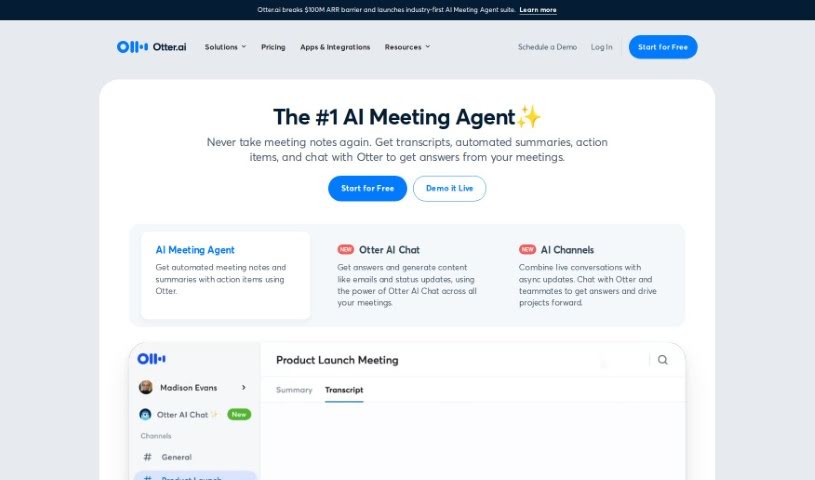
Screenshot of Otter.ai

Otter.ai

Discover what Otter.ai is and how to make the most of it in 2025. We'll cover its key features, how it stacks up against other AI note-takers, and practical tips for using it.

Screenshot

What is Otter.ai?

Otter.ai is a smart AI Meeting Assistant that’s really good at transcribing meetings in real-time, taking notes automatically, and even creating summaries. It is your personal meeting helper! It can transcribe conversations live on platforms you probably already use, like Zoom, Google Meet, and Microsoft Teams. Plus, it’s clever enough to pull out action items and can connect with tools like Salesforce and Hubspot, making your workflow much smoother. You can use Otter.ai pretty much anywhere – on your computer, or through its apps for iOS and Android. They also have a special version called OtterPilot for Sales, which is designed to pull out key sales insights, help write follow-up emails, and generally make things easier for businesses, schools, media folks, and sales teams. Otter.ai offers different pricing options, and there’s even a discount for students and teachers with eligible email addresses. Some of its standout features include that live transcription, those handy AI Meeting Summaries, easy integration with CRM systems, and compatibility with popular video conferencing tools.

Who created Otter.ai?

Sam Liang is the founder behind Otter.ai. This company is really changing the game for how we manage meetings, thanks to its AI Meeting Assistant. It provides live transcription, automated note-taking, and AI-generated summaries, all aimed at boosting your productivity. Otter.ai also connects with CRM platforms like Salesforce and Hubspot, partly through its OtterPilot for Sales feature. It works seamlessly with popular video conferencing tools such as Zoom, Google Meet, and Microsoft Teams, making it a great fit for all sorts of groups – businesses, schools, media outlets, and sales teams alike.

What is Otter.ai used for?

Otter.ai is incredibly versatile, helping you with a bunch of meeting-related tasks:

  • It automatically takes notes and creates summaries, even pulling out action items with OtterPilot.
  • You get real-time transcription during meetings on platforms like Zoom, Google Meet, and Microsoft Teams.
  • It’s great at spotting and extracting action items, which really helps boost productivity.
  • You can generate clear, informative meeting summaries quickly.
  • It integrates smoothly with CRM platforms like Salesforce and Hubspot, simplifying your workflow.
  • It can even capture slides during meetings and then create AI-generated summaries.
  • It’s designed to improve communication and collaboration for businesses, schools, media, and sales teams.
  • You get live transcription during meetings on popular platforms like Zoom, Google Meet, and Microsoft Teams.
  • Action items are automatically extracted from your meetings.
  • Concise AI-generated meeting summaries are created for efficient communication.
  • Integration with CRM platforms like Salesforce and Hubspot makes workflows seamless.
  • It enhances communication and collaboration across businesses, schools, media, and sales teams.
  • You can capture slides as they appear during meetings.
  • Action items can be identified and assigned to your teammates.
  • Features like advanced search, export, and playback really help with collaboration.
  • It automatically captures and summarizes your meeting discussions as they happen.
  • You can create custom vocabulary and tag speakers, which is a big help for team collaboration.
  • Action items are automatically extracted and assigned, making meetings more productive.
  • It integrates with CRM platforms like Salesforce and Hubspot via OtterPilot for Sales.
  • You can chat directly with Otter and your teammates using Otter AI Chat.
  • Adding teammates to your workspace makes collaboration much easier.
  • With Pro and Business plans, you get shared custom vocabulary, speaker tagging, and action item assignments for your team.
  • Advanced search, export, and playback features are available.
  • Action items are automatically extracted and assigned from meetings, boosting productivity.
  • Integration with CRM systems like Salesforce and Hubspot streamlines your workflows.
  • Its chat tool makes it easy to pull out information and create follow-up content.
  • It’s truly revolutionizing how people and teams manage meetings with its powerful AI Meeting Assistant.
  • It streamlines workflows and boosts productivity across all sorts of business functions.
  • It’s perfect for communication and collaboration, working smoothly with popular platforms like Zoom, Google Meet, and Microsoft Teams.

Who is Otter.ai for?

Otter.ai is a fantastic tool for a wide range of professionals and teams:

  • Sales professionals
  • Business professionals
  • School professionals
  • Media professionals
  • Anyone focused on enhancing collaboration
  • Schools and educators
  • Sales teams
  • Teams across various industries, including business, sales, media, and education.

How to use Otter.ai?

To get the most out of Otter.ai, here’s a simple guide:

  1. First, sign up for an account on the Otter.ai website.
  2. You can access Otter.ai through your web browser, or if you prefer, download the app on your iOS or Android device for flexibility.
  3. Use Otter’s AI Meeting Assistant during your meetings for real-time transcription, automatic note-taking, and AI-generated summaries.
  4. Make sure to use the real-time transcription feature to capture conversations across platforms like Zoom, Google Meet, and Microsoft Teams.
  5. Don’t forget to automatically extract action items from your meetings – it’s a real productivity booster.
  6. Generate concise meeting summaries that highlight the important information, saving you time and keeping everyone in the loop.
  7. If you’re in sales, integrate OtterPilot for Sales to easily push your call notes directly to CRM platforms like Salesforce and Hubspot for seamless workflow integration.
  8. Use the Otter AI Chat feature to extract information and create follow-up content with ease.
  9. Take advantage of features like advanced search, export, and playback to really enhance your productivity.
  10. Explore the different pricing plans available – they have options for Basic, Pro, Business, and Enterprise users, so you can find one that fits your needs perfectly.

By following these steps, you’ll be able to effectively use Otter.ai for all your meeting transcription, note-taking, and collaboration needs, which will really help improve communication and boost productivity in many different situations.

Related AI Tools

Discover more tools in similar categories that might interest you

Stay Updated with AI Tools

Get weekly updates on the latest AI tools, trends, and insights delivered to your inbox

Join 25,000+ AI enthusiasts. No spam, unsubscribe anytime.