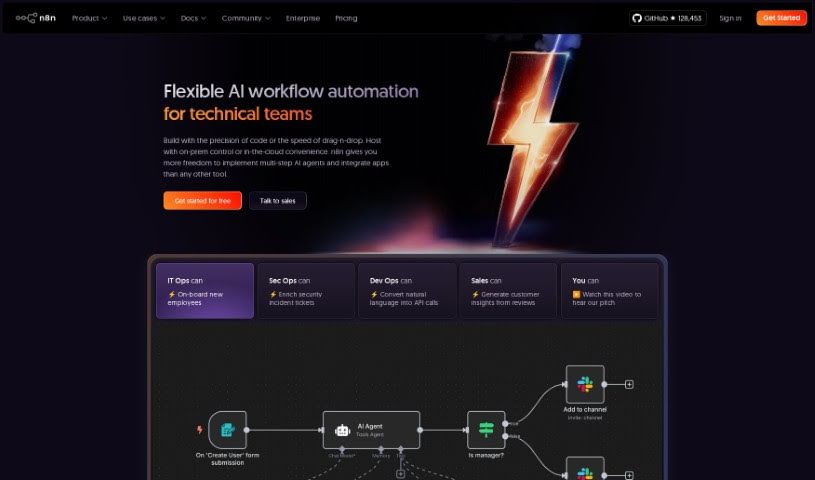
Screenshot of N8N

N8N

Discover what N8N is and how to use it effectively in 2025. We'll explore its features and compare it to other project management tools.

Screenshot

What is N8N?

N8n.io is a really flexible workflow automation tool that’s pretty easy to use, especially for technical teams. It lets you build complex automations without needing to directly manage APIs yourself. You can install it on your own servers (on-premises), use their cloud service, or even download a desktop app to make your operations run smoother. With n8n, you can create workflows that connect data seamlessly, use handy templates, and automate tasks. You can do this visually with a no-code approach, or if you’re comfortable with it, use JavaScript for more intricate data handling. The tool grows with your business, and if you host it yourself, you keep full control over your data. Plus, it offers features like external storage, debugging tools, security integrations, ways for teams to collaborate, and even dedicated support with Service Level Agreements (SLAs) for enterprise clients. n8n also has different pricing plans to fit various needs, including a free Community Edition and special plans for startups and larger companies.

Who created N8N?

N8N.io was actually created by Aurélien Aubert, who works as a Lead Growth Engineer at Spendesk. He designed n8n.io specifically for technical teams who want to build complex automations but would rather avoid the usual headaches of dealing with APIs. It comes with user-friendly templates that make it simple to create workflows for connecting data smoothly. You can connect to APIs without coding for basic task automation, or if you need to do more complex data manipulation, you can use JavaScript. n8n.io offers a lot of flexibility and can scale up as your business grows.

What is N8N used for?

Here are some common ways people use N8N:

  • Onboarding: Automatically bring new team members on board and set up their accounts.
  • Security: Help enrich security incident tickets with more information.
  • Code Analysis: Analyze GitHub Pull Requests for vulnerabilities using AI.
  • CRM Enrichment: Make your HubSpot company data richer by analyzing a company’s website with AI.
  • Agent Building: Create autonomous, multi-step agents that can perform complex tasks.
  • Data Interaction: Chat with your own data or tools.
  • Product Integration: Easily connect n8n to your own products.
  • Model Flexibility: Use any AI model, including ones you host yourself.
  • Iterative Workflows: Run your workflows, tweak them, and repeat the process.
  • Mission-Critical Uptime: Keep your important automations running reliably using different environments.
  • Coding Options: Write your automation steps in JavaScript or Python.
  • Workflow Iteration: Run, tweak, and repeat your workflows as needed.
  • Task Automation: Automate simple tasks or handle more complex data manipulation using no-code API connections.
  • Custom Code Steps: Write your own code steps within workflows using JavaScript or Python.
  • Library Integration: Use external npm or Python libraries to extend functionality.
  • Version Control: Manage your workflows with synced environments via Git.
  • Secure Access: Implement Single Sign-On and LDAP for secure access.

Who is N8N for?

N8N is a great tool for a variety of roles and teams, including:

  • IT Operations (IT Ops)
  • Security Operations (SecOps)
  • DevOps
  • Sales teams
  • Software engineers
  • And generally, any technical teams looking for powerful automation.

How to use N8N?

Getting started with N8N.io is pretty straightforward. Here’s a breakdown of the steps:

  1. Installation and Setup:
    • First, decide how you want to use it: install it on your own servers (on-premises), download the desktop app, or sign up for their cloud service.
    • You’ll find user-friendly templates that make creating your first workflows a breeze.
  2. Creating Automations:
    • For simpler tasks, you can use the no-code API connections.
    • If you need to do more complex data manipulation, you can dive into JavaScript.
    • You can build intricate scenarios with multiple triggers and even pause workflows to wait for external events.
  3. Scaling and Control:
    • As your needs grow, n8n can scale with you, offering flexible options for handling bulk operations and debugging.
    • If you host it on your own infrastructure, you get complete control over your data and security.
  4. Workspace Environments:
    • Keep your critical automations running smoothly by using synced environments like Development, Staging, and Production.
    • For enhanced security, you can use features like Single Sign-On, LDAP, and external logging.
  5. Subscription Plans:
    • Choose the plan that best fits your team’s needs – options include Starter, Pro, or Enterprise.
    • These plans offer features like streaming data, bulk operations, workflow history, developer tools, and version control with Git.
  6. Collaboration and Support:
    • Work effectively with your team using unlimited users, shared projects, and integration with external secret stores.
    • Enterprise plans come with dedicated support and SLAs.
  7. Community and Resources:
    • Join a large community of users to share knowledge and get support.
    • Explore the vast possibilities of N8N.io to automate your workflows efficiently and effectively.

Following these steps will give you a solid guide to using N8N.io for powerful workflow automation, better collaboration, and scalable operations.

Related AI Tools

Discover more tools in similar categories that might interest you

Stay Updated with AI Tools

Get weekly updates on the latest AI tools, trends, and insights delivered to your inbox

Join 25,000+ AI enthusiasts. No spam, unsubscribe anytime.