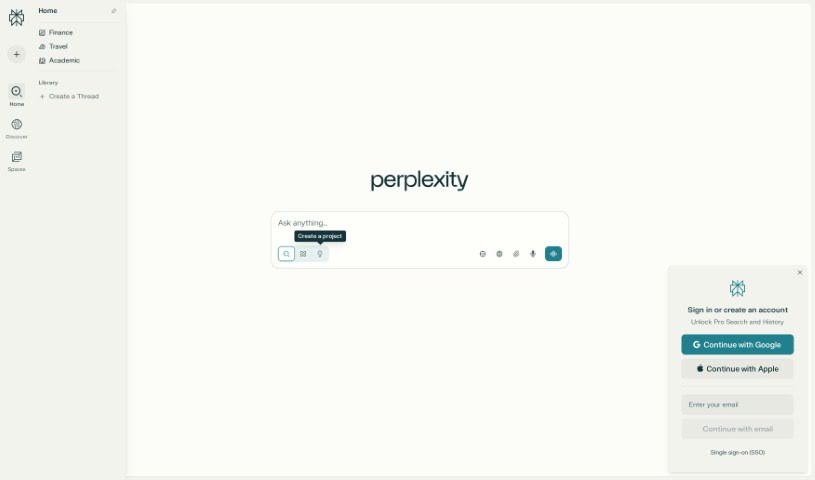
Discover what Perplexity AI is and how to use it effectively in 2025. We'll explore its features, compare it to other search engines, and show you how to get the most out of this powerful tool.

Perplexity AI is a really handy tool that gives you quick, clear answers to your questions. It’s like a search engine, but with a smart AI twist, making it super easy to find exactly what you’re looking for. In March 2025 alone, Perplexity AI saw a massive 174.10 million visits, which just goes to show how popular and helpful people find it.
Its research features let you dive deeper into topics, and it’s incredibly user-friendly with a clean design, a voice option, and a smart answer engine. Plus, it saves you precious time by summarizing key information, so you get the most important details without delay.
Perplexity AI is a smart search engine powered by artificial intelligence. It answers your questions clearly and quickly. Instead of just giving you a list of links like Google often does, Perplexity provides concise, easy-to-understand answers and, importantly, shows you exactly where that information came from.
As it’s grown, Perplexity has also introduced a feature called “Pages.” This lets users create and share their own web pages, using content that the AI helps generate.
You can use Perplexity AI on its website, through mobile apps for both Android and iPhone, or even as a Chrome extension. It’s a fantastic tool if you’re looking for fast, reliable answers online.
Perplexity AI was founded in 2022 by four talented individuals:
Perplexity AI is designed to help people quickly find accurate and clear answers to their questions, using its built-in search engine. Unlike traditional search engines like Google, which often give you a long list of websites, Perplexity provides short, direct answers and always includes the sources of its information.
Here are some of the main ways people use Perplexity AI:
Perplexity AI is accessible to everyone. Whether you’re a student, a professional, or just someone who’s curious about something, you can use its AI-generated material for free. Just head over to their website or download the mobile app.
Here’s a look at who can benefit from using Perplexity AI:
Yes, Perplexity AI offers both free and paid options, depending on what you need.
Free Plan: You can use Perplexity for free without even needing to create an account. The free version gives you access to basic features like Quick Search, but you’re limited to 5 Pro Searches every 4 hours.
Perplexity Pro (Paid Plan): The Pro version costs $20 per month. It includes unlimited Pro Searches, access to advanced AI models like GPT-4, Claude 3.5 Sonnet, and Llama 3. You also get extra features such as Deep Research, Enterprise security features, the ability to upload files for analysis, and enhanced shopping tools.
| Feature | Perplexity AI | ChatGPT |
| Main Use | Acts like a smart search engine. | Functions like a custom AI chatbot. |
| Gives Answers From | Searches the internet in real-time. | Uses the information it was trained on. |
| Good For | Quick answers with links and facts. | Longer conversations, learning, writing, and coding assistance. |
| Can Chat Like a Friend | Not really; it focuses more on answering questions directly. | Yes, it feels more like talking to a helpful assistant. |
| Free to Use | Yes | Yes |
| Paid Version | $20/month | $20/month |
| Best For | Finding facts quickly with proof. | Deep learning, creative writing, code help, and general chatting. |
| Feature | Perplexity AI | DeepSeek |
| Main Purpose | Provides direct, accurate answers with source citations. | Focuses on advanced data analysis and pattern recognition in large datasets. |
| Best For | Quick answers, research, and learning. | Data-heavy tasks, coding, and technical problem-solving. |
| Data Sources | Gets live info from the internet, citing sources. | Processes vast datasets, including unstructured data, to find patterns. |
| User Interface | Simple and user-friendly, suitable for general users. | More technical interface, better suited for professionals. |
| Limitations | May lack depth in highly technical computations. | Too complex for non-technical users. |
| Pricing | Offers a free version; the Pro version is available at $20/month. | Pricing details aren’t publicly disclosed and may vary based on usage and requirements. |
| Feature | Perplexity AI | Claude |
| Main Purpose | The search engine provides direct answers with source citations. | Conversational AI assistant designed for natural, human-like interactions. |
| Data Source | Retrieves real-time information from the internet. | Generates responses based on its training data. |
| Unique Strength | Provides concise answers with transparency by citing sources. | Excels at maintaining context and providing nuanced, human-like responses. |
| Best For | Quick fact-checking, research, and retrieving up-to-date information. | Engaging in detailed conversations, creative writing, and coding assistance. |
| Pricing | Free. The pro version costs $20/month. | Free. The paid version costs $18/month. |
| Feature | Perplexity AI | Gemini |
| Main Use | Focuses on searching the web for accurate, real-time information. | Designed for creative tasks, reasoning, and multimodal inputs (text, images, audio, video). |
| Speed | Very fast at retrieving web-based answers. | Slightly slower when handling complex multimedia tasks. |
| Information | Always up-to-date (searches the web). | Limited to what it learned in training. |
| Coding Skills | Can generate simple code and assist with debugging. | Excels at coding tasks, including translating code between languages and fixing errors. |
| Limitations | Limited in handling creative or multimedia inputs; shorter memory span. | Sometimes provides inaccurate or strange answers; lacks source transparency. |
You can use Perplexity AI either through its website or by downloading the Windows app for unlimited free searches daily. Here’s how to get started:
Head over to the Perplexity AI website at www.perplexity.ai or download the Perplexity AI Windows app directly from their official site.
Once you’ve downloaded it, install it by running the setup file. Then, click Sign Up and use your email, Google, Apple, or company login to create your account.
Once you’re logged in, simply type your question into the large search bar. You can even choose the type of answer you’re looking for by clicking the Globe button. You can select from different models:

If you’re in a hurry, prefer speaking to typing, or find using a keyboard difficult, just click the small Microphone icon located on the right side of the typing box. The app will listen and automatically convert your voice into text.

Need to upload a file, like a PDF or an image? Simply click the Paperclip icon. After uploading, you can ask questions about the file’s content, and Perplexity will provide answers based on what’s inside. Your free account allows you to upload up to 10 files.

If you need to conduct more in-depth searches on a topic, just select the Deep Research option. This will give you longer, more detailed answers that explain things thoroughly. It’s great for finding facts, understanding complex subjects, and discovering information that basic searches might miss.
Once you receive your answer, you have several helpful options:


Perplexity AI serves as an efficient assistant that can help you with academic writing, generating content, code generation, engaging in back-and-forth queries, and providing accurate responses with citations.
To use this excellent tool on your mobile phone, follow these steps:
For Android devices, open the Google Play Store, search for “Perplexity AI,” and then download and install the app.
For iOS devices, go to the App Store, search for “Perplexity AI,” and download and install it. Keep in mind that the Perplexity Assistant feature is currently only available for Android devices.
You can start using the app right away without creating an account. However, for a more personalized experience and to save your search history, you can sign in using your Google, Apple, or company account.
Open the app and type various questions into the search bar. You can also tap the Microphone icon to ask your question using your voice. Perplexity will respond with answers and include the original sources, allowing you to easily check the information yourself.
Tap the Paperclip icon to upload files to Perplexity AI. Once a file is uploaded, you can ask questions about it, and Perplexity will provide answers based on the file’s contents.
Launch Perplexity Assistant by swiping from the bottom-left of your screen towards the center, or by pressing and holding your phone’s home or power button, depending on your device.
The assistant can handle basic questions, send emails, make reservations, provide custom instructions, recognize objects using your phone’s camera, and help with your daily tasks.
Tap on the Library section to view your search history and any saved responses. You can also create “Spaces” with custom instructions to organize different research topics or projects.
When you receive a response, tap the Share icon to send it to others via a link or social media. You can also export the response by selecting the Three dots in the top-right corner.
Perplexity AI Spaces is a feature that lets users organize their research and collaborative efforts into dedicated workspaces. Here’s a step-by-step guide on how to use them:
To create a Space, click on the Spaces option in the left-side menu of the Perplexity interface. Then, select Create a Space.

Start by giving your Space a unique name as the title. Then, add a detailed description to explain its purpose. If you’re a Pro user, you can also choose the AI model you prefer to use.

To upload documents, click on Files and then select the Plus (+) icon. Once uploaded, these files will be accessible in all threads within that Space.
(Spaces allow users to upload up to 50 files, which can include PDFs, documents, and other reference materials.)
Add people to your Space by clicking on the Invite option.

Add some links to your Space by selecting Links.

Spaces are great for organizing your research by topic or project. You can also customize AI responses by adding specific prompts or choosing a preferred model.
For example:
If you decide you want to delete your space, just click on the Three dots in the top-right corner and select Delete Space.

Perplexity AI makes it quite easy to change your avatar. Just follow these steps:

Updating your username on Perplexity AI is a quick and simple process. Just follow the steps below based on the device you’re using:

You can customize the look of Perplexity AI on both your desktop and mobile phone. Here’s how to change the theme:

If you’re using Perplexity AI on multiple devices or suspect any unusual activity on your account, it’s a good idea to sign out from all sessions at once. Here’s how you can do it:

You can generate images using Perplexity AI, but this feature is available only for Pro subscribers. Perplexity AI uses advanced models like Playground V2.5, DALL-E 3, and Stable Diffusion XL for image generation. You can create up to 50 images per day, but remember these images are for personal, non-commercial use only.
Here’s how it works:
To switch between AI models on Perplexity AI, you’ll need an active subscription. Here’s how you can do it:
Managing your watchlist on Perplexity AI involves tracking sports teams and stocks through a homepage widget. Here’s how you can manage it:
Sign in to your Perplexity account. Go to Personalize and then Watchlists.

Add sports teams or stocks to your watchlist by clicking on Save. This feature lets you keep track of updates and news related to the items you’ve selected.

You can customize your watchlist by removing items you no longer want to track. This is usually done by clicking the Cross (X) next to each item. Perplexity AI might introduce more features like notifications and a settings tab for easier watchlist management in future updates.
To delete threads on Perplexity AI, you can follow these simple steps:

To effectively use Perplexity AI for news updates in politics, the stock market, and sports, follow these steps and tips:
Perplexity AI searches the web in real time, making it perfect for fast-moving news topics. Just ask questions like:
After typing your query, use the Deep Research feature to make your searches more specific. For instance, choose “Finance” for stock market news or “Sports” for sports updates. This helps you find more relevant and accurate information.
Perplexity can summarize and compare ideas from different articles. If you want a clear overview of a political topic or stock market trend, ask it to summarize the main points from various sources and highlight the differences.
You can learn more by asking follow-up questions. For example, after getting a stock market update, ask, “What is affecting the market today?” or after political news, ask, “How might this impact the upcoming elections?” This allows you to explore topics more deeply.
The Discover tab shows news headlines across different areas like politics, finance, and sports. The Spaces tab lets you organize and keep track of topics and questions you follow regularly, helping you stay updated on the news.
The Pro version offers more powerful search tools, helps with challenging questions, and provides faster results. It’s ideal if you need detailed analysis or regular updates on news topics.

Perplexity helps you save time by providing smart answers without you having to scroll through numerous websites. Here’s a guide on how you can use it for product recommendations:
Open your preferred internet browser, like Chrome, Safari, or Firefox. In the address bar at the top, type www.perplexity.ai and press Enter on your keyboard.
Once the website loads, you’ll see a large white box in the center that says “Ask anything…” This is where you’ll type your question.
Click inside the search box and type a clear question about the product you’re looking for. For example, you could ask:
After typing your question, press Enter on your keyboard or click the Arrow button.
Perplexity will then display a short, clear answer with product suggestions. It might also include a list of options, reasons why each one is a good choice, and links to where you can learn more. These links often lead to trusted websites like Amazon or tech blogs.
If you need more details, you can continue asking related questions. For instance:
Perplexity remembers the context, so you won’t need to repeat the full question.
You might see a button called Deep Research for even better results. While it might take a bit longer, the AI will thoroughly search the internet to find you the best product recommendations.
After reviewing the suggestions, you can decide which product best suits your needs. If you want to buy it or check more details, simply click on the links provided in the answer.

You can use Perplexity AI to get programming help. It saves time, explains code clearly, and provides working examples. Follow the steps below to use this AI for your programming needs:
Go to your internet browser and type www.perplexity.ai. Once the website loads, you’ll see a large white box that says “Ask anything…”. This is where you’ll type your programming question.
You can ask any programming question you need help with. After typing your question, press Enter or click the Arrow button next to the search box.
For example:
If you don’t fully understand an answer or want more details, you can ask a follow-up question. For instance:
Perplexity will continue the conversation and help you with more information without needing you to repeat the original question.
If you want more technical or detailed programming help, you can use the Deep Research option. This makes the answers even more focused on programming and code-related questions.
If Perplexity provides you with code examples, you can easily copy them. To copy the code, select it with your mouse, right-click, and choose Copy. Then, you can paste the code into your code editor or use an online code editor like Replit.com or JSFiddle.net to try it out and see how it works.

Perplexity AI can help you save time and resources by automating repetitive CRM tasks. Check out the steps below to learn more:
Use tools like Make or Albato to connect Perplexity AI to your CRM without needing any coding. These platforms help you set up automatic actions and events, so when something happens in your CRM, it can trigger a task in Perplexity AI.
You can automatically create or update contacts, deals, and other records in your CRM based on AI-generated data. Perplexity AI can also help log communications or notes directly into CRM records and analyze customer interactions to provide useful insights.
Respond to customer questions with personalized answers from Perplexity AI. It can also automatically follow up with customers and improve communication by integrating with messaging tools like WhatsApp.
Connect Perplexity AI with tools like Google Sheets to analyze CRM data. It can help create reports or generate important insights for your sales and marketing teams.
| Pros | Cons |
| Answers your questions very fast and clearly. | Gives short answers unless you choose “Deep Research”. |
| It uses trusted sources that you can see. | You can’t change its appearance beyond light/dark mode. |
| It has different search modes. | The voice assistant only works on Android, not iPhone. |
| You can use it without paying. | |
| Use it on your phone or computer. | |
| Best used for news and research. |
It’s possible. Turnitin has specialized tools that can sometimes detect if text has been written by AI, including content from Perplexity AI.
Perplexity is an AI-powered search engine that provides smart answers with source links, but if a student copies the full answer and pastes it into an assignment without making any changes, Turnitin might flag it as AI-generated.
Benefits include getting real-time, accurate information, personalized assistance, and comprehensive AI-generated responses all in one place, which makes it efficient for tasks like travel planning.
Yes, Perplexity offers an Enterprise Pro version that includes features like advanced AI models, file connectors, and a wide range of user management tools, making it suitable for business use.
Perplexity AI is excellent for quick answers with live web data and source links, making it ideal for research. ChatGPT, on the other hand, offers more in-depth help, creative writing capabilities, and conversational support. It’s best to use Perplexity for facts and ChatGPT for deeper, more creative tasks.
Users can report issues by emailing [email protected] or by using the flag icon located below answers to report inaccuracies.
Discover more tools in similar categories that might interest you
Get weekly updates on the latest AI tools, trends, and insights delivered to your inbox
Join 25,000+ AI enthusiasts. No spam, unsubscribe anytime.