AI Tools for Creative

Discover the best Creative AI tools to enhance your productivity and creativity.

Page 87 of 114 • 1360 total tools

Creativity today is changing fast, and AI is becoming a super helpful partner. Whether it’s creating amazing visuals or writing music, AI creative tools are making the art process more accessible and exciting. But with so many options out there, finding the right one for your creative needs can feel a bit overwhelming.

Things have really changed in just a few years. AI tools aren’t just for special uses anymore; they’re smoothly fitting into our everyday creative work. These new technologies can make your projects better, save you time, and even lead you to explore artistic ideas you hadn’t considered before.

I’ve spent a good amount of time exploring the world of AI creative tools, looking into everything from graphic design apps to music software. Since I love seeing how technology and creativity come together, I wanted to share what I found about the best tools available right now.

So, whether you want to make eye-catching visuals or come up with fresh concepts, there’s a tool out there just for you. Let’s dive into the best AI creative tools that can take your artistic projects to the next level and change how you create.

The best AI Creative Tools

  1. Canva for designing social media posts
  2. Character AI for brainstorming story ideas and concepts.
  3. Janitor AI for quickly crafting unique story ideas.
  4. Remove.bg for instantly removing backgrounds from design projects
  5. Leonardo AI for generating dynamic artwork for designers
  6. Photopea for designing stunning graphics and illustrations.
  7. Photoroom for improving photos for creative projects
  8. Pixelcut for designing eye-catching product ads
  9. Pixlr for designing great graphics with ease
  10. Midjourney for visual storytelling through art prompts.
  11. AI Face Swap for creating unique memes for social media.
  12. Cutout.pro for creating dynamic backgrounds for art
  13. Remaker for AI-powered image creation for unique designs.
  14. Ideogram for logo design and customization.
  15. Openart for experimenting with unique artistic styles
How do AI creative tools work?

AI creative tools work by using advanced algorithms that learn from all sorts of data. They look at patterns in creative works—like art, music, or writing—which helps them copy styles and create new, original pieces. It’s a bit like how human artists get inspired by different things they see or hear.

At their core, these tools often use neural networks. These are specially built to understand and interpret human creativity. The networks are trained on huge amounts of data, including works from many different styles and formats, so they can learn and adapt to various approaches.

When you give a prompt—like a topic for a story, a theme for a painting, or a music genre—these AI tools use the patterns they’ve learned to generate fitting responses. They essentially guess which elements should go together to make content that feels cohesive and engaging.

What’s really interesting is that AI creative tools don’t just repeat what they’ve learned; they can actually be innovative. By blending styles or drawing from less common influences, they can produce work that surprises and inspires, offering a fresh take even on familiar subjects.

As technology keeps advancing, these creative tools are getting more capable. This means we can have richer interactions, with users and AI working together more smoothly. Often, this leads to amazing artistic creations that combine human ideas with computer power.

If you’re curious about the technical side of these tools, looking into neural networks and creative AI applications can offer more insight into how they bring artistic ideas to life.

Our best AI creative tools at a glance

RankNameBest forPlans and PricingRating
1CanvaSocial media post designN/A4.73 (11 reviews)
2Character AIGBrainstorming story ideas and concepts.N/A4.64 (11 reviews)
3JanitorAICrafting unique story ideas quickly.N/A0.00 (11 reviews)
4Remove.bgInstant background removal for design projectsPaid plans start at $0.2/image.4.82 (11 reviews)
5Leonardo AIDynamic artwork generation for designersPaid plans start at $9/month.4.73 (11 reviews)
6PhotopeaDesign stunning graphics and illustrations.N/A4.67 (12 reviews)
7PhotoroomEnhancing creative project photosPaid plans start at $7.50/month.4.74 (38 reviews)
8PixelcutDesigning eye-catching product adsN/A4.64 (11 reviews)
9PixlrDesigning stunning graphics effortlesslyPaid plans start at $0.99/month.4.73 (11 reviews)
10MidjourneyVisual storytelling through art prompts.N/A4.73 (11 reviews)
11AI Face SwapCrafting unique memes for social media.N/A4.70 (10 reviews)
12Cutout.proDynamic background creation for artistryN/A4.46 (13 reviews)
13RemakerAI-powered image creation for unique designs.N/A4.69 (13 reviews)
14IdeogramLogo design and customization.N/A4.85 (26 reviews)
15OpenartExperiment with unique artistic stylesPaid plans start at $84/year.4.25 (8 reviews)
Screenshot of Removebackgroundai

Removebackgroundai

Freemium

Remove Background AI is a handy tool that uses artificial intelligence and machine learning to automatically take the background out of your images and videos. It's built for everyone, whether you're using it for fun or for your business. You get free credits to start with for smaller files, and there's a paid option if you need to process larger files or more of them. The tool works in many languages, has a super simple interface, and even lets you upload files in batches. If you're a paid user, you'll also get priority in the processing queue. You can grab more credits by checking out the pricing page on their website.

Screenshot of removebg.dev

removebg.dev

Freemium

Removebg.dev is your go-to spot for easily removing backgrounds from images, completely free, all thanks to some clever AI. You just upload your picture, let the smart AI do its thing to figure out what's what, and poof! The background is gone in a few quick, simple steps. This service is super handy for all sorts of things – whether you're working on a creative project, putting together marketing stuff, or just want to clean up a personal photo. With its easy-to-use design and speedy background removal, removebg.dev makes it a breeze to make your images look better by getting rid of anything you don't want in the background.

Screenshot of Render A House

Render A House

Freemium

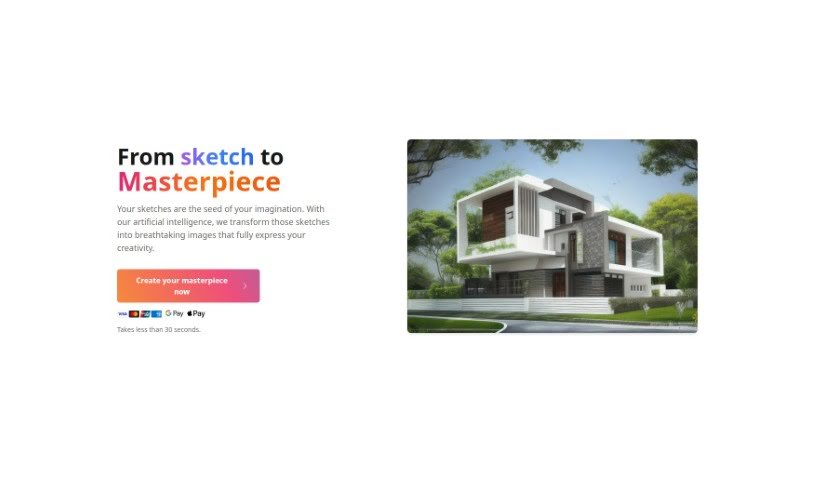
Render A House is a really neat tool that lets you take your architectural drawings or even just simple hand-drawn sketches and turn them into realistic images. It does this quickly and with a lot of precision, which is super helpful. Some of its key features include turning sketches into images, super-fast rendering, letting you preview materials, and it's designed to be really easy to use, even if you're not a tech whiz. This makes it great for architects, designers, homeowners, and property developers who want to play around with designs, get ideas down fast, or quickly set up a visual for a project.

Screenshot of Renderforest

Renderforest

Freemium

The Renderforest Free AI Business Name Generator is a handy tool designed to help entrepreneurs and business owners come up with unique and memorable names for their companies. It uses smart AI to help you brainstorm. Beyond just names, Renderforest offers a whole suite of services to get your brand off the ground. You can create logos, get branding advice, find social media templates, register a domain name, and even design website templates. Basically, by inputting keywords and information about your company, the platform can suggest thousands of name ideas. It also helps you create promotional materials like social media graphics and animated videos to support your business's growth.

Screenshot of RenderNet AI

RenderNet AI

Freemium

RenderNet AI is a really solid AI image generator built for creative folks. It lets you create high-quality images using more than 100 different Stable Diffusion text-to-image models. What's neat about RenderNet is that you can take one prompt and run it across many models and LoRAs at once, playing with different settings to get a whole variety of images. People say the interface feels smooth and easy to use, so it's pretty straightforward to get around and make the most of the platform. Some of the standout features include how quickly it generates images and that you can work on several images at the same time, each with its own models and LoRAs.

Screenshot of Reok Pro

Reok Pro

Freemium

Reok Pro is an online tool that uses powerful AI technology to help you quickly create professional headshots. Forget about traditional photo shoots; you can snap headshots in seconds! You can also customize styles and backgrounds, remove backgrounds, and boost photo quality before you post them on social media platforms like Facebook, Instagram, and TikTok. It costs 5 credits for a headshot photo, and 2 credits to remove a background or unblur an image. Plus, your designs are stored permanently in the cloud. For details on how they handle your data, it's always a good idea to check out their privacy policy. There's no subscription needed – you just buy credits as you need them for one-time use. Reok Pro really focuses on privacy and making headshot creation efficient, whether you're an individual or a business.

Screenshot of Replace Anything

Replace Anything

Freemium

Replace Anything is a really advanced system that's changing how we swap out elements in images, all while keeping things looking top-notch. It makes it super easy for anyone to change backgrounds, swap faces, update clothing, and do much more in photos of people, products, or even pets. The process is straightforward: you pick the part you want to keep, or upload a special black-and-white mask image. Then, you just type in what you want to create or upload a reference image, and hit 'Run'. Simple as that!

Screenshot of ReplicantLife

ReplicantLife

Freemium

ReplicantLife is a platform with a clear mission: to make generative modeling and image creation tools accessible to everyone. They want to put these powerful technologies into the hands of individuals and organizations all over the world, no matter their technical background. The big idea behind ReplicantLife is to empower you to explore and create using generative technology, sparking new ideas and innovation across art, design, and tech.

Screenshot of Replicate AI CodeFormer

Replicate AI CodeFormer

Freemium

CodeFormer is a really solid face restoration algorithm. It's designed to make old photos look better or to improve faces that were generated by AI. It is a tool for enhancing image quality and making sure everything looks just right. This algorithm was developed for research purposes, and it uses something called a Codebook Lookup Transformer. This fancy name basically means it's really good at finding and restoring faces reliably, especially when dealing with images created using stable-diffusion generation. It’s open source, which is great because it means you can run it on your own computer. You can even use Docker to get it set up, making it super accessible for all sorts of projects where you need to work with images and restore them.

Screenshot of Replicate AI Consistent Character

Replicate AI Consistent Character

Freemium

When we talk about a 'consistent character' in AI, we're essentially referring to a model or program designed to produce outputs that stay true to a specific prompt or subject. You give it a description and a picture, and it can generate multiple variations that all look and feel like they belong to the same character. The "fofr/consistent-character" model on Replicate is a great example of this. It lets you tweak all sorts of settings – like the output style, how good the quality is, and how many variations you want. By using this model, you can count on getting results that are not only consistent but also make sense with what you initially provided.

Screenshot of Replicate AI Face-to-Sticker

Replicate AI Face-to-Sticker

Freemium

Face-to-Sticker is a really neat model created by fofr. Its main job is to turn faces into stickers. It is a fun, creative way to give your photos a personal touch. You can take a facial image and transform it into a sticker format, making your pictures more unique and expressive. When you use the Face-to-Sticker model, you just need to provide an image and then tweak a few settings – like the width, height, a descriptive prompt, and some other options – to get the sticker just right. It’s a straightforward yet clever way to make eye-catching stickers from your own face for all sorts of uses.

Screenshot of ReRoom AI

ReRoom AI

Freemium

ReRoom AI is a really neat online tool that can instantly give your rooms impressive interior design makeovers. All you have to do is upload a photo of your room, and you can then check out more than 20 different design styles. You'll get photorealistic images of your space in just seconds! It's perfect for anyone who owns a home, works as an interior designer, or just loves decor and wants to play around with different looks without any hassle. ReRoom AI makes it super easy to virtually stage rooms, plan out renovations, and explore all sorts of creative design ideas, really bringing your imagination to life visually.

Stay Updated with AI Tools

Get weekly updates on the latest AI tools, trends, and insights delivered to your inbox

Join 25,000+ AI enthusiasts. No spam, unsubscribe anytime.