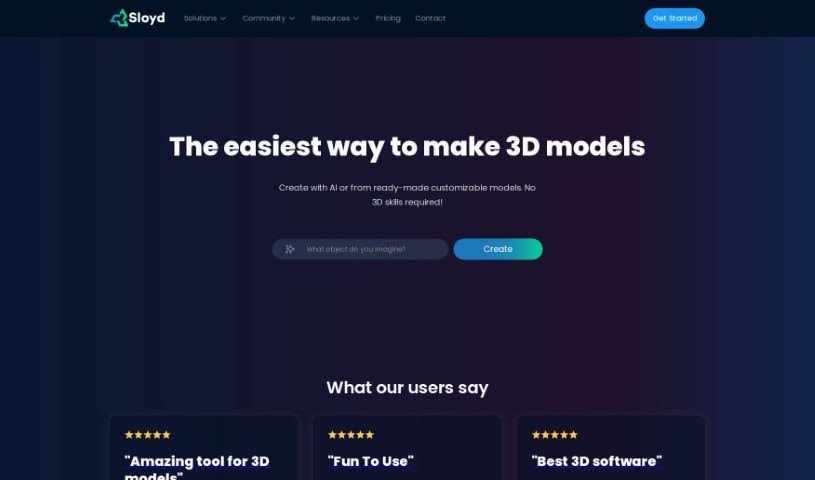
What is Sloyd?
Sloyd is a really neat web app and SDK that makes 3D modeling much simpler. It lets you generate intricate 3D models in real-time using a bunch of different generators. Whether you’re a pro designer or just starting out, Sloyd lets you create amazing 3D models with just a few clicks. What makes it stand out is its easy-to-use interface, the instant feedback you get as you generate models, and the fact that you can use it either through its web app or its SDK.
A big part of what makes Sloyd special is its AI-powered 3D model generation. It gives you access to a huge library of 3D models that you can customize. This is fantastic for game developers, designers, and anyone who loves 3D. Sloyd’s AI generators let you tweak models to fit all sorts of styles, from super realistic to more artistic. This means you can get the look you want without needing years of 3D modeling experience. Plus, Sloyd handles things like automatic UV-unwrapping, creating automatic LODs (levels of detail), and offers various export options, which makes texturing and animation much smoother.
What’s more, Sloyd has a Text to 3D Model AI Generator that’s pretty cool. You can type in a description, and it’ll turn it into a detailed 3D model. It’s great for categories like buildings, props, weapons, and vehicles. The tool uses advanced AI generators based on common object types to quickly create game-ready assets. You get a wide range of variations for each type, so you can really nail your design needs.
Basically, Sloyd wants to change 3D modeling by making it more accessible, efficient, and just plain fun for everyone, from pros to beginners. It offers a whole suite of features and capabilities to help creators bring their 3D visions to life.
Who created Sloyd?
Sloyd was actually started by Øyvind Sørøy, who’s both a co-founder and the CTO. Øyvind has a solid background in game design, programming, and 3D modeling from his time in the gaming industry. He worked on big franchises like FIFA and The Sims before diving into indie game development. Later, he teamed up with Avi Latner, who’s really into machine learning and product management, and Andreas Edesberg, who’s a gamer and management consultant. These three shared a passion for creative tech and decided to shake up 3D creation by founding Sloyd and setting off on this venture together.
What is Sloyd used for?
- Generating 3D models: You can create 3D models easily.
- Customizing 3D models: Make changes to your 3D models without any hassle.
- Creating diverse variations: Produce many different versions of a 3D model.
- Text-to-3D model creation: Turn your written ideas into 3D models.
- Architectural design: Design building structures.
- Furniture design: Create furniture models.
- Weapon design: Model weapons.
- Prop design: Design various props.
- Realistic environments: Build realistic-looking scenes.
- Stylized buildings: Create buildings with a specific artistic style.
- AI-powered 3D for creators: Game developers, designers, and 3D enthusiasts can use AI to generate models.
- Varied model creation: Produce different 3D model variations using text input, adjustable sliders, or a quick randomizer.
- Effortless AI customization: Easily customize 3D models with AI.
- Browser-based modeling: Create 3D models online with the Sloyd web app.
- Text to 3D: Transform text descriptions into 3D models.
- Templates and prompting: Use a wide range of templates and AI prompts for model creation.
- Parametric library: Access a large library of reusable 3D model parts and generators for quick and efficient model building.
- Supporting creators: Simplify the 3D creation process, helping more people make amazing games and experiences.
- Bridging generative AI gaps: Combine AI technologies with advanced parametric generators for 3D modeling.
- Real-time asset generation: Create unique assets directly within games in real-time using a powerful parametric engine.
- Clean mesh and polycount control: Generate 3D models with clean meshes and full control over the polygon count.
- Customizable library access: Find a library of customizable 3D models for game developers, designers, and 3D enthusiasts.
- Effortless customization: Customize 3D models easily with AI.
- Diverse variations: Create different 3D model variations using text, sliders, or a randomizer.
- In-browser creation: Effortlessly create 3D models directly in your browser with the Sloyd web app.
- Text-to-3D feature: Turn text descriptions into 3D models.
- Simplified 3D art: Support creators with easy tools, making 3D modeling less time-consuming.
- Enabling more creators: Help more people create amazing games and experiences by simplifying 3D art.
- Sloyd Maker tool: Use the Maker tool to create reusable parts and generators for 3D modeling.
- Get more info: Join the Discord or email to learn more about Sloyd’s vision.
Who is Sloyd for?
- Game developers
- 3D Artists
- Designers
- Professional Designers
- Hobbyists
How to use Sloyd?
Here’s a simple guide to using Sloyd effectively:
- Get Started: Log in to the Sloyd platform. If you don’t have an account yet, just sign up on the website.
- Explore the Dashboard: Take a look around the dashboard to get familiar with everything. You’ll find features like lessons, assignments, and other helpful resources.
- Pick a Lesson: Choose a subject or topic you’re interested in studying. You can browse the lesson library to find what you need.
- Dive into Lessons: Once you’ve picked a lesson, dive into the content. Read the instructions, watch the videos, or try out the interactive activities.
- Do the Assignments: After you’ve learned the material, move on to the assignments or quizzes. Just be sure to follow the instructions carefully.
- Try Interactive Activities: Participate in things like simulations or virtual experiments. They’re great for really understanding the topic.
- Work with Others: If it’s applicable, use the platform’s features to team up with classmates. You can share ideas and work on projects together.
- Get Feedback: You’ll get feedback on your assignments, and you can track how you’re doing with the evaluation tools provided.
- Use Extra Resources: Make the most of extra materials like readings, videos, or links to other sites to boost your learning.
- Keep Learning: Don’t stop! Keep exploring new lessons, topics, and assignments to continue your educational journey on Sloyd.
Following these steps will help you make the most of Sloyd for your learning and reach your educational goals.