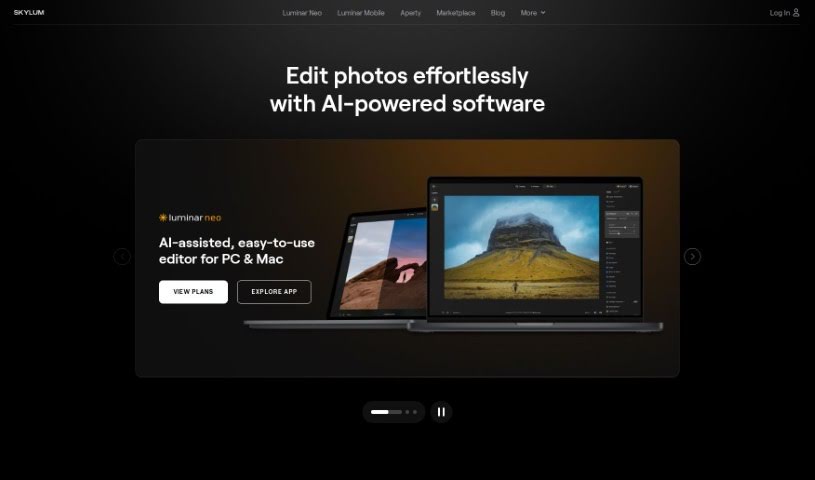
Screenshot of Skylum

Skylum

Discover Skylum in 2025! Learn what this AI-powered photo editor is, how to use its features effectively, and how it stacks up against other image generators.

Screenshot

What is Skylum?

Skylum is a really advanced photo editing tool that uses smart artificial intelligence to completely change how you edit pictures. It’s designed to help you get professional-quality results quickly and easily. It is a way to automate a lot of the tedious editing work, freeing up your time. It offers several automatic modes that can apply all sorts of cool effects and adjustments to your photos with just a few clicks. Some of its standout features include EnhanceAI, RelightAI, SkyAI, StructureAI, and Portrait Background. Whether you’re just starting out or you’re a seasoned pro, Skylum has something for you. You can get access to all its features and updates through either a subscription or a one-time lifetime purchase.

Who created Skylum?

Luminar Neo, the product from Skylum, was actually created by Paul Muzok and Dima Sytnik. These guys are serious photography fans and also happen to be developers of gaming apps. They started the company with a clear goal: to make photo editing feel intuitive, powerful, and accessible to everyone, no matter their experience level. The team behind it is pretty impressive, including folks like Yuliana Kruzhilna, Tetiana Hnatiuk, Dmytro Mykhalchuk, Kostiantyn Tymoschuk, Volodymyr Kovalchuk, Anastasia Sliusarenko, Elina Kondrashova, Marta Moskvit, and Anton Ivashchenko. They’re all really dedicated to reinventing photo editing and inspiring photographers all around the world.

What is Skylum used for?

Skylum is incredibly versatile, and here’s a breakdown of what you can do with it:

  • Boost your photos: Use AI-powered controls to make your pictures look their absolute best.
  • Automate editing: Let the AI technology handle the heavy lifting of editing processes.
  • Quick adjustments: Apply a wide range of effects and changes with just a few clicks.
  • Key Features: Take advantage of powerful tools like EnhanceAI, RelightAI, SkyAI, StructureAI, and Portrait Background.
  • Add drama: Get creative and really emphasize the dramatic elements in your photos.
  • Focus stacking: If you’re using Luminar Neo’s Focus Stacking Extension, you can achieve incredible depth of field.
  • Transform cityscapes: Make your urban shots pop.
  • Enhance forest photos: Tools like Atmosphere AI and Sunrays can add amazing atmosphere.
  • Quick color solutions: Use presets for fast, eye-catching color adjustments.
  • Create stunning landscapes: Craft mesmerizing landscape photos.

Essentially, Skylum helps you:

  • Automate the entire editing process with AI.
  • Easily apply all sorts of effects and adjustments using automatic modes.
  • Save valuable time during photo editing.
  • Consistently deliver professional-quality results.
  • Apply effects and adjustments with just a few simple clicks.
  • Edit cityscape photos effectively.
  • Improve your forest photography.
  • Use Presets for quick and interesting color solutions.
  • Streamline the editing process with AI technology.
  • Make the most of the EnhanceAI feature.
  • Adjust lighting with RelightAI.
  • Edit skies beautifully with SkyAI.
  • Sharpen image details using StructureAI.
  • Modify portrait backgrounds for a polished look.
  • Learn editing techniques through photography courses in Luminar Neo.
  • Automate the editing process using AI technology.
  • Apply a variety of effects and adjustments to photos with just a few clicks.
  • Enhance photos using features like EnhanceAI, RelightAI, SkyAI, StructureAI, and Portrait Background.
  • Make use of the automatic modes Luminar Neo provides.
  • Employ AI-powered controls for intuitive editing tasks.
  • Benefit from a tool that’s convenient for users of all skill levels.
  • Save time and achieve professional-quality results with ease.
  • Transform photos through creative editing techniques.
  • Apply presets for quick and interesting color solutions.
  • Edit cityscapes effectively.
  • Enhance forest photography.
  • Apply Presets for color solutions in photos.
  • Automate the editing process using AI technology.
  • Enhance photos with the EnhanceAI feature.
  • Adjust lighting with RelightAI.
  • Edit skies with SkyAI.
  • Enhance image structure with StructureAI.
  • Modify portrait backgrounds.

Who is Skylum for?

Skylum is a fantastic tool for a wide range of creative individuals, including:

  • Photographers
  • Artists
  • Engineers
  • Visionaries
  • Graphic designers
  • Content creators
  • Photo Editors
  • Creative professionals

How to use Skylum?

To get the most out of Luminar Neo, here’s a simple, step-by-step guide:

  1. Start with Great Photos: The first step is always about capturing high-quality images. Good raw material makes editing much easier!
  2. Get Familiar with the Basics: Take some time to explore Luminar Neo’s layout. Play around with the basic editing tools – you can get instant, noticeable results right away.
  3. Dive into Advanced Editing: Once you’re comfortable, start exploring the more advanced tools. These will really help your photos stand out from the crowd.
  4. Get Creative with Dramatic Edits: Don’t be afraid to experiment! Use the creative tools to really emphasize and enhance the dramatic aspects of your photos.
  5. Master Focus Stacking: If you’re looking for incredible depth of field, be sure to use the Focus Stacking Extension. It’s a game-changer for certain types of shots.
  6. Enhance Cityscapes and Forests: Luminar Neo has specific tools designed for these scenes. Learn how to use features like Atmosphere AI and Sunrays to really bring your cityscape and forest photos to life.
  7. Quick Color Solutions with Presets: Need a fast way to add a unique look? Presets are perfect for quickly applying interesting color solutions to your photos.
  8. Wrap Up and Review: Finally, take a moment to review what you’ve learned. Summarizing the techniques will help solidify your editing skills and boost your confidence.

Luminar Neo is a really cutting-edge photo editor, powered by advanced AI. It’s packed with features like EnhanceAI, RelightAI, SkyAI, StructureAI, and Portrait Background editing. It does a great job of automating editing processes and offers a variety of automatic modes for different effects. This tool is super user-friendly, saving you time by streamlining your editing workflow and ensuring you get professional-quality results every time.

Following these steps will guide you through using Luminar Neo effectively. You’ll be able to elevate your photo editing skills and produce stunning masterpieces with surprising ease.

Related AI Tools

Discover more tools in similar categories that might interest you

123RF AI Image Generator

Creative Image Generation
Learn More

Stay Updated with AI Tools

Get weekly updates on the latest AI tools, trends, and insights delivered to your inbox

Join 25,000+ AI enthusiasts. No spam, unsubscribe anytime.