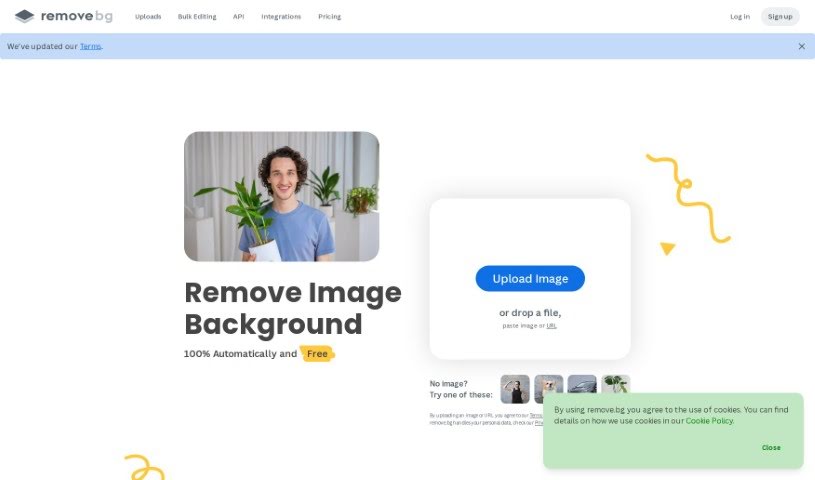
Screenshot of Remove.bg

Remove.bg

Discover what Remove.bg is and how to use it in 2025. We'll cover its features, compare it to other background removers, and show you how to get the best results.

Screenshot

What is Remove.bg?

Remove.bg is a really smart tool that uses AI to automatically remove backgrounds from your photos. It’s designed to quickly find the main subject in an image and then get rid of the background for you. What’s great is that it can handle tricky details, like wispy hair, thanks to its advanced edge detection. You can often get a background-free image in just 5 seconds, which is a huge time-saver compared to doing it manually. Plus, it plays nicely with lots of popular design tools and e-commerce sites, making it super versatile for everyone from photographers and marketers to developers and online sellers. You can even help train their AI by submitting your own images, which helps make future results even more accurate. They offer pricing that works for different needs, with pay-as-you-go options or subscription plans where the cost per image drops the more you buy.

Who created Remove.bg?

Remove.bg started back in 2018 and has quickly become a go-to solution for anyone needing to remove backgrounds. The team behind it is focused on making high-quality background removal accessible to everyone, whether you’re a big company, an app developer, running a small business, a professional photographer, or just need it for personal use. Now, Remove.bg is part of Canva, which means they’re even better positioned to offer their excellent background removal services to people all over the world.

What is Remove.bg used for?

Remove.bg is incredibly handy for a bunch of things:

  • Quickly removing backgrounds: Get a subject isolated in a snap.
  • Precise edges: It uses advanced algorithms to get those tricky edges just right.
  • Easy integration: Works seamlessly with your favorite design software.
  • E-commerce ready: Connects with online store platforms.
  • Handles tough details: Great for images with fine textures or hair.
  • Design templates: Offers pre-made designs to get you started.
  • Helpful tutorials: Guides to help you make the most of it.
  • Transparent backgrounds: Easily create PNG files with transparent backgrounds.
  • Adding white backgrounds: A simple way to give your photos a clean white backdrop.
  • Creating photo cutouts: Perfect for isolating elements for new designs.
  • Fast processing: It’s designed to work quickly.
  • One-click operation: Super simple to use.
  • Background removal: Its core function, done efficiently.
  • No manual work: Forget picking out pixels one by one.
  • Subject extraction: It’s great at pulling out the main subject.
  • Replacing backgrounds: Easily swap out the old background for a new one.
  • Custom workflows: An API is available if you need to build it into your own systems.
  • Design templates: Again, useful for quick design work.
  • Professional use: Great for those who need background removal for their work.
  • Making backgrounds transparent (PNG): Essential for many design projects.
  • Adding white backgrounds to photos: A common need for product shots.
  • Extracting or isolating subjects: Getting just the part you want.
  • Generating photo cutouts: Useful for collages or new compositions.
  • Automatically removing image backgrounds: The core AI function.
  • Image background replacement: Swap backgrounds easily.
  • Ideal for e-commerce sites: Makes product photos look professional.
  • Suitable for large projects: Can handle bulk processing.
  • Supports individual users: Great for personal projects too.
  • Adding a new background: Beyond just removing, you can add something new.
  • Subject extraction: Pulling out the main focus.
  • Isolating subjects: Getting just the person or object.
  • Making backgrounds transparent: A key feature for PNGs.
  • Supporting e-commerce professionals: Helping online sellers.
  • Ideal for large projects: Handles volume well.

Who is Remove.bg for?

Remove.bg is a fantastic tool for a wide range of people:

  • Photographers: To quickly prepare images for clients or portfolios.
  • Marketers: For creating eye-catching visuals for campaigns.
  • Developers: To integrate background removal into apps or websites.
  • E-commerce professionals: To make product photos stand out.
  • Media outlets: For quick image editing for articles and posts.
  • Individual users: For personal projects, social media, or creative fun.
  • Small Business Owners: To create professional-looking marketing materials without a big budget.
  • Professional photographers: Again, for efficiency and quality in their workflow.
  • Individuals: Anyone who needs to isolate an image subject easily.

How to use Remove.bg?

Using Remove.bg is pretty straightforward. Here’s a simple guide:

  1. Upload Your Image: Start by heading over to the Remove.bg platform and uploading the photo you want to edit.
  2. Let the AI Work: Remove.bg’s smart AI will automatically find the subject and remove the background in just a few seconds. This saves you a ton of editing time!
  3. Check the Details: The tool is really good at handling fine details, like wispy hair, so you get accurate results without much fuss.
  4. API for Custom Work: If you’re a developer or need to automate things, you can use Remove.bg’s API to build custom workflows right into your own applications or design processes.
  5. Who Uses It: Remember, Remove.bg is designed for everyone – individuals, photographers, marketers, developers, e-commerce pros, and media folks.
  6. More Than Just Removal: Besides taking backgrounds away, you can also add new backgrounds, use design templates, generate photo cutouts, and use those custom workflow APIs.
  7. Get Help When You Need It: Their website has tutorials, design templates, and API documentation to help guide you.
  8. Choose Your Plan: Pick a subscription plan that fits how often you’ll use it. They have options for different credit needs, from personal use to high-volume business needs.
  9. For Big Projects: If you have large-scale projects, Remove.bg offers enterprise solutions with flexible API access, credit options, and rate limits to handle high demands.
  10. Help Improve It: You can even contribute images to help train the AI. This makes the tool even more accurate and better for everyone in the future.

By following these steps and exploring what Remove.bg offers, you can easily edit your images, isolate subjects, and create professional-looking visuals without a lot of hassle.

Related AI Tools

Discover more tools in similar categories that might interest you

123RF AI Image Generator

Creative Image Generation
Learn More

Stay Updated with AI Tools

Get weekly updates on the latest AI tools, trends, and insights delivered to your inbox

Join 25,000+ AI enthusiasts. No spam, unsubscribe anytime.