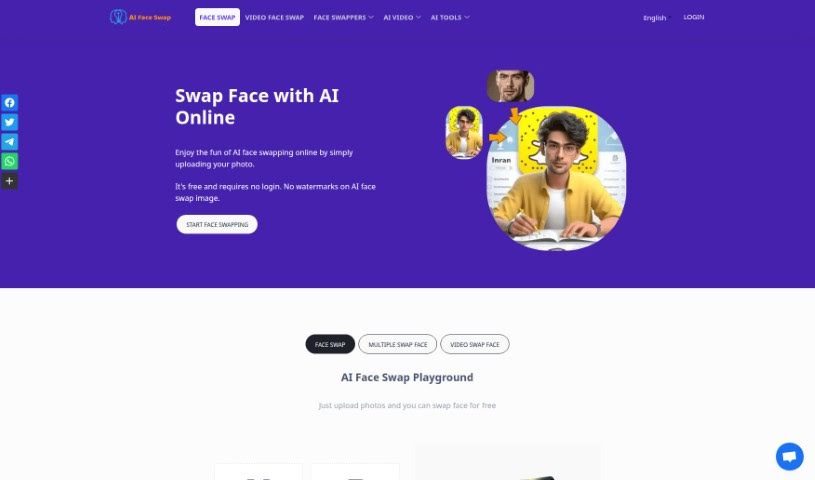
Screenshot of AI Face Swap

AI Face Swap

Curious about AI Face Swap? Learn what this technology is and how to use it effectively in 2025. We'll explore its features and how it stacks up against other Deepfake Makers.

Screenshot

What is AI Face Swap?

AI face swap is a really neat technology that uses smart artificial intelligence (AI) algorithms to digitally swap one person’s face in a photo or video with another’s. It works by carefully looking at facial features, expressions, and even how someone moves, all to blend the faces together smoothly. The goal is to make the results look super realistic and convincing.

What’s even better? This AI face swap service is free to use, and you don’t even need to log in! You can upload your images in common formats like JPG, PNG, or WebP. Just follow a few simple guidelines to get the best results: make sure the faces are clear and that there’s only one person in the image. Your privacy is a huge priority for us, so we don’t store any of your information unless you explicitly give us permission. Once you’re done, you can easily download your swapped images on your computer or phone with just a few clicks.

Beyond just swapping, this tech opens up a world of fun and creative uses, like making hilarious memes or pretending to be different characters. It really offers endless possibilities for entertainment and sharing with friends.

Who created AI Face Swap?

We don’t have details on who exactly created AI Face Swap or their company. It was launched on June 25, 2024, but the founder and company information aren’t publicly available.

What is AI Face Swap used for?

This tool is fantastic for a bunch of things:

  • Sharing on social media: Make your posts stand out!
  • Seamlessly swaps faces: It’s incredibly smooth.
  • Handles tricky lighting: Even in less-than-ideal conditions.
  • Hides editing traces: The results look natural.
  • Creates entertaining memes: Get ready for some laughs.
  • Supports any face: Swap with anyone you can think of.
  • Instant face swap: Quick and easy.
  • Amusing memes generation: Make funny content fast.
  • Transform into anyone: Ever wanted to look like a celebrity? Now you can!
  • Authentic experience: The swaps feel real.
  • Produces better results with realistic features: The AI is designed for accuracy.
  • Analyzes facial features: It understands what makes a face unique.
  • Analyzes expressions: Captures the nuances of emotion.
  • Analyzes movements: Essential for video swaps.
  • Seamlessly swapping faces: Again, it’s incredibly smooth.
  • Handling obscured lighting: It’s good even when the light isn’t perfect.
  • Hiding editing traces: You won’t see the seams.
  • Realistic face swapping: The results are genuinely convincing.
  • Creating entertaining memes: It’s a go-to for meme-makers.
  • Generating amusing memes quickly: Speed up your meme creation.
  • Transforming into anyone: The possibilities are vast.
  • Authentic face swapping experience: It feels like a real transformation.
  • Producing better results with realistic features: The AI aims for high fidelity.
  • Creating fun face swaps for social media: Boost your engagement.
  • Transforming into anyone you desire: Your imagination is the limit.
  • Swapping faces with celebrities, pets, or friends: Get creative with who you swap with.
  • Adding humorous effects to photos: Inject some fun into your images.
  • Sparkling creativity in social media posts: Make your content shine.
  • Enhancing entertainment value of images: Make your photos more engaging.
  • Creating unique and engaging content: Stand out from the crowd.
  • Generating hilarious and entertaining face swap results: Guaranteed laughs.
  • Sharing funny meme ideas with friends: Spread the fun.

Who is AI Face Swap for?

This tool is perfect for a wide range of creative individuals:

  • Photographers: Add a unique twist to portraits.
  • Video editors: Create engaging visual effects.
  • Content creators: Make viral-ready content.
  • Social media influencers: Boost engagement with fun visuals.
  • Makeup artists: Visualize different looks or create artistic concepts.
  • Digital artists: Explore new creative avenues.

How to use AI Face Swap?

Using AI Face Swap is straightforward. Here’s how you can get started:

  1. First, head over to the AI Face Swap Playground on the website.
  2. Next, upload your original photo into the ‘Source Image’ section. Then, upload the face you want to swap with into the ‘Swap Face From’ section.
  3. Simply click the ‘Swap Face’ button. The AI will then take a few moments to generate your face swap.
  4. You’ll see that the AI swaps faces seamlessly, making sure it looks natural and doesn’t show any signs of editing.
  5. Want to add more fun? You can quickly create amusing memes using the swapped faces.
  6. Feel free to transform into anyone you like – maybe a celebrity, a pet, or even a friend – by swapping faces effortlessly.
  7. Remember, for the best results, make sure your uploaded photo has clear facial features and only one face.
  8. To save your creation, just right-click on the image on your PC or long-press on your mobile device and select “Save image.”
  9. And don’t worry about your data; we really prioritize user privacy and don’t store any information without your consent.

Why not give AI Face Swap a try? It’s a fantastic way to effortlessly create entertaining and realistic face swaps!

Related AI Tools

Discover more tools in similar categories that might interest you

123RF AI Image Generator

Creative Image Generation
Learn More

Stay Updated with AI Tools

Get weekly updates on the latest AI tools, trends, and insights delivered to your inbox

Join 25,000+ AI enthusiasts. No spam, unsubscribe anytime.