AI Tools for Creative

Discover the best Creative AI tools to enhance your productivity and creativity.

Page 53 of 114 • 1360 total tools

Creativity today is changing fast, and AI is becoming a super helpful partner. Whether it’s creating amazing visuals or writing music, AI creative tools are making the art process more accessible and exciting. But with so many options out there, finding the right one for your creative needs can feel a bit overwhelming.

Things have really changed in just a few years. AI tools aren’t just for special uses anymore; they’re smoothly fitting into our everyday creative work. These new technologies can make your projects better, save you time, and even lead you to explore artistic ideas you hadn’t considered before.

I’ve spent a good amount of time exploring the world of AI creative tools, looking into everything from graphic design apps to music software. Since I love seeing how technology and creativity come together, I wanted to share what I found about the best tools available right now.

So, whether you want to make eye-catching visuals or come up with fresh concepts, there’s a tool out there just for you. Let’s dive into the best AI creative tools that can take your artistic projects to the next level and change how you create.

The best AI Creative Tools

  1. Canva for designing social media posts
  2. Character AI for brainstorming story ideas and concepts.
  3. Janitor AI for quickly crafting unique story ideas.
  4. Remove.bg for instantly removing backgrounds from design projects
  5. Leonardo AI for generating dynamic artwork for designers
  6. Photopea for designing stunning graphics and illustrations.
  7. Photoroom for improving photos for creative projects
  8. Pixelcut for designing eye-catching product ads
  9. Pixlr for designing great graphics with ease
  10. Midjourney for visual storytelling through art prompts.
  11. AI Face Swap for creating unique memes for social media.
  12. Cutout.pro for creating dynamic backgrounds for art
  13. Remaker for AI-powered image creation for unique designs.
  14. Ideogram for logo design and customization.
  15. Openart for experimenting with unique artistic styles
How do AI creative tools work?

AI creative tools work by using advanced algorithms that learn from all sorts of data. They look at patterns in creative works—like art, music, or writing—which helps them copy styles and create new, original pieces. It’s a bit like how human artists get inspired by different things they see or hear.

At their core, these tools often use neural networks. These are specially built to understand and interpret human creativity. The networks are trained on huge amounts of data, including works from many different styles and formats, so they can learn and adapt to various approaches.

When you give a prompt—like a topic for a story, a theme for a painting, or a music genre—these AI tools use the patterns they’ve learned to generate fitting responses. They essentially guess which elements should go together to make content that feels cohesive and engaging.

What’s really interesting is that AI creative tools don’t just repeat what they’ve learned; they can actually be innovative. By blending styles or drawing from less common influences, they can produce work that surprises and inspires, offering a fresh take even on familiar subjects.

As technology keeps advancing, these creative tools are getting more capable. This means we can have richer interactions, with users and AI working together more smoothly. Often, this leads to amazing artistic creations that combine human ideas with computer power.

If you’re curious about the technical side of these tools, looking into neural networks and creative AI applications can offer more insight into how they bring artistic ideas to life.

Our best AI creative tools at a glance

RankNameBest forPlans and PricingRating
1CanvaSocial media post designN/A4.73 (11 reviews)
2Character AIGBrainstorming story ideas and concepts.N/A4.64 (11 reviews)
3JanitorAICrafting unique story ideas quickly.N/A0.00 (11 reviews)
4Remove.bgInstant background removal for design projectsPaid plans start at $0.2/image.4.82 (11 reviews)
5Leonardo AIDynamic artwork generation for designersPaid plans start at $9/month.4.73 (11 reviews)
6PhotopeaDesign stunning graphics and illustrations.N/A4.67 (12 reviews)
7PhotoroomEnhancing creative project photosPaid plans start at $7.50/month.4.74 (38 reviews)
8PixelcutDesigning eye-catching product adsN/A4.64 (11 reviews)
9PixlrDesigning stunning graphics effortlesslyPaid plans start at $0.99/month.4.73 (11 reviews)
10MidjourneyVisual storytelling through art prompts.N/A4.73 (11 reviews)
11AI Face SwapCrafting unique memes for social media.N/A4.70 (10 reviews)
12Cutout.proDynamic background creation for artistryN/A4.46 (13 reviews)
13RemakerAI-powered image creation for unique designs.N/A4.69 (13 reviews)
14IdeogramLogo design and customization.N/A4.85 (26 reviews)
15OpenartExperiment with unique artistic stylesPaid plans start at $84/year.4.25 (8 reviews)
Screenshot of Imgi.in

Imgi.in

Freemium

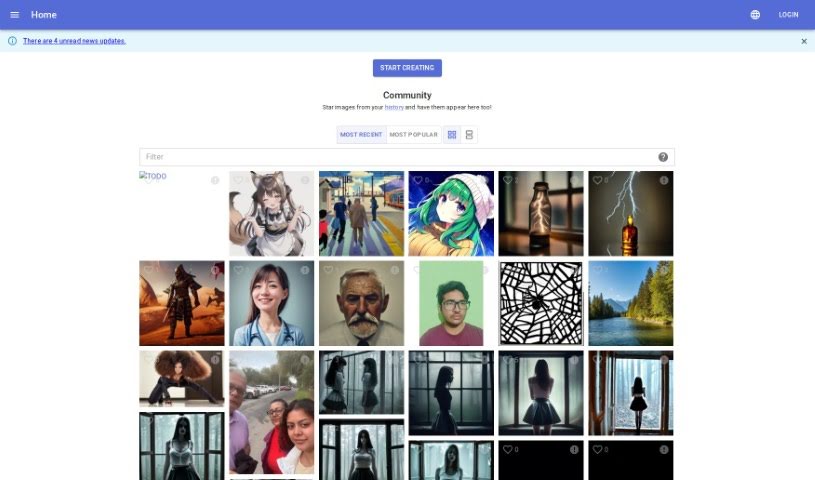
Img.in is a really versatile platform that lets you create all sorts of images. Whether you're into fantasy art, need hyper-realistic pictures of characters or scenes, or want something totally unique, Imgi.in has you covered. You can generate images in cool styles like perfect symmetry, psychedelic art, neo-mosaics, and even neo-shamanism figures. What's great is that it's super easy to use – you don't need any coding knowledge at all. It really sets itself apart from other AI tools because it combines advanced generative AI with a lot of control for the creator. Imgi.in shines when it comes to things like fine-tuning models, making sure your prompts are followed accurately, and producing photorealistic images, whether it's a wide-angle view or a super detailed close-up. It's useful for everything from making digital art to supporting all sorts of different image styles for business needs.

Screenshot of Imgkits

Imgkits

Freemium

Imgkits is a really handy AI tool for working with images. It's packed with features that make enhancing and transforming your photos super easy. Think of things like restoring old pictures, getting rid of watermarks or unwanted objects, and even turning your photos into cartoons. Whether you're a pro photographer looking to polish your portfolio or just someone wanting to make personal photos look better, Imgkits has you covered. You can do things like retouch skin, magically remove people or clutter from shots, add color to black and white photos, fix scratches on vintage pictures, turn photos into sketches, sharpen blurry images, and easily remove backgrounds. It’s designed to be straightforward, so you can get great results with just a few clicks.

Screenshot of Imgn

Imgn

Freemium

IMGN - Image Engine is an app built to bring powerful, advanced image editing tools to everyone. You don't need to know anything about AI, machine learning, or data science to use it. The goal here is to let you enjoy the benefits of state-of-the-art image editing without getting bogged down in the technical details.

Screenshot of imgtopia

imgtopia

Freemium

Imgtopia is a really neat AI tool that helps you create all sorts of unique, custom images. You just tell it what you want, and it uses some pretty advanced machine learning – think computer vision, natural language processing, and deep learning – to bring your ideas to life. You can generate all sorts of images, from abstract art and beautiful landscapes to realistic portraits and animal pictures. It's quite flexible, letting you pick image sizes like 256x256 or 512x512, and you can choose if your creations are public or private. The interface is super user-friendly and available in several languages, which is a big plus. If you sign up, you unlock even more features, like saving your images and seeing pricing details. It's great for lots of different industries and people, but it's worth noting there's no free option, the image sizes are a bit limited, and you do need to sign in for some of the cooler stuff.

Screenshot of IMI Prompt

IMI Prompt

Freemium

IMI Prompt is a really handy tool designed specifically for Midjourney v5. It is your personal prompt generator, helping you craft unique and personalized artworks. It offers a huge variety of prompts across different categories – like nature, fantasy, sci-fi, and abstract themes. What's neat is that it uses advanced AI to suggest prompts based on what you like and what you've created before. This means you can get personalized prompts quickly and efficiently. Plus, it's super user-friendly, with an intuitive interface that works great for both beginners and seasoned artists, whether you're on the web, Android, or iOS.

Screenshot of Immag.in

Immag.in

Freemium

Immagin is a smart API and Content Delivery Network (CDN) designed for images. It is a service that automatically makes your website or app images better. It handles things like optimizing them for faster loading, letting you transform them on the fly, and storing them securely. It uses serverless tech, which means image editing is super quick, and you can even manipulate images just by changing simple URL parameters. This makes it really easy to integrate with your existing code, ensuring your photos are delivered fast and safely across a worldwide network. Plus, it boasts a 99.9% uptime guarantee and offers different pricing plans, including a free tier that gives you 25,000 requests each month.

Screenshot of Impossible Images

Impossible Images

Freemium

Impossible Images is a platform dedicated to creating truly one-of-a-kind visuals. What makes them "impossible"? Well, in a couple of ways. First, they're unusual, odd, or just plain impossible to capture in reality. Second, and perhaps more importantly, they're images that simply couldn't have been made with AI technology before 2023. The platform has some specific rules for creating these images: they don't reference living artists or creatives in the AI prompts, they avoid using image-based prompts, and they steer clear of mentioning any known people or brands. The images themselves are generated at a good size, around 2560 pixels on the longest side, which means they're ready for various uses. If you have a very specific vision, you can even commission custom images or sets of images. The cost for this depends on how much time it takes to craft the perfect prompt and then create the image. Plus, there's a plan to let AI artists submit their own creations to the collection soon!

Screenshot of in3D

in3D

Freemium

In3D, also known as Avaturn, is a really cool platform that lets you create lifelike, customizable avatars. What's neat is you can do it using just your phone camera, and it only takes about a minute! This platform makes it super easy to bring your in3D avatars into your own projects. You can check out how good the scans look and then export your 3D models in different formats like FBX, GLB, or USDZ. Plus, they offer SDKs for Unreal Engine and Unity, so you can pop your avatars into whatever environment you're working with. They've really focused on making it personal and easy to use, with a stylish interface, a design that works on any device, simple navigation, and a modern feel. It’s all about creating avatars that truly reflect who you are.

Screenshot of Industrial Render AI

Industrial Render AI

Freemium

Industrial Render AI is a specialized tool for industrial design. It takes your conceptual product design sketches and turns them into high-quality renderings. It uses technology inspired by Generative Pretraining Transformer (GPT) models. The goal here is to really boost creativity, make communication smoother during the design process, and generally improve the quality and efficiency of your designs. You can upload your hand-drawn drafts, tweak some settings, and then generate all sorts of renders, perfect for your portfolio. By understanding and improving your sketches with GPT-based tech, Industrial Render AI is changing the game for industrial design, making it much faster to get great-looking renders.

Screenshot of Infografix

Infografix

Freemium

Infografix is a handy, free tool that lets you create infographics easily, even if you're not a designer. It uses AI to help you whip up infographic examples quickly. You can make all sorts of visual content, like lists, hierarchies, timelines, cycles, process maps, SWOT analyses, and mind maps. You can use it right in your web browser, or if you prefer, you can download the app from the Apple App Store or Google Play. Infografix taps into generative AI, specifically Azure AI, to help you generate infographics from simple text prompts. Plus, you can tweak colors, fonts, and export formats (PNG, JPG, SVG, PDF) to make your infographics look just right.

Screenshot of Infography

Infography

Freemium

an infographic is a visual story. As the document "infography.pdf" explains, it's all about creating and sharing information in a way that's easy to grasp and genuinely interesting. Instead of just text, infographics blend images, charts, graphs, and concise text to get complex data across clearly. You'll see them everywhere – in news articles, textbooks, marketing materials, and presentations – because they make information so much more appealing and understandable. Essentially, infographics are a fantastic way to simplify and boost how we communicate ideas using creative visuals.

Screenshot of Ink With AI

Ink With AI

Freemium

Ink With AI is a really cool tool that uses artificial intelligence to help you design tattoos. It is your personal AI tattoo artist! You can describe exactly what you want for your dream tattoo, pick from a bunch of different art styles, and the AI will whip up a unique design for you, usually in just about a minute. Because it’s based on your specific input and the style you choose, every design it creates is one-of-a-kind.

Stay Updated with AI Tools

Get weekly updates on the latest AI tools, trends, and insights delivered to your inbox

Join 25,000+ AI enthusiasts. No spam, unsubscribe anytime.