AI Tools for Photo Editors

Discover the best Photo Editors AI tools to enhance your productivity and creativity.

Page 19 of 23 • 273 total tools

In today’s world of social media and instant sharing, everyone wants stunning visuals. We take so many photos every day, so making yours stand out is really important. But, not everyone has the time or the skills to learn complicated photo editing software. That’s where AI photo editors come in—they’re your new best friends for creating beautiful pictures.

These smart tools have completely changed how we improve and work with our photos. Instead of spending hours tweaking every little detail, you can now get professional-quality results with just a few clicks. Thanks to AI advancements, many of these editors can automatically adjust colors, fix blemishes, and even add artistic effects, all customized for you.

I’ve spent time checking out and testing the best AI photo editing tools out there right now. Each platform has its own special features, from simple automatic fixes to more detailed creative options. So, whether you’re just looking to touch up family photos or you’re a photographer wanting to add that extra something, I’ve got you covered.

Come along as we explore the best AI photo editors that can make your images shine while saving you precious time. Let’s find out what makes editing easier and more enjoyable.

The best AI Photo Editors

  1. Canva for quick photo enhancements and edits online.
  2. Photopea for easy photo retouching and improvements.
  3. Photoroom for efficient batch editing for photographers.
  4. Pixlr for simple photo enhancement and retouching.
  5. Cutout.pro for smooth background removal for portraits.
  6. Pic Wish AI Photo Editor for easy background removal for photos.
  7. Freepik Pikaso for adding details to images.
  8. Adobe Firefly for advanced photo improvements.
  9. BeFunky to easily enhance and retouch portraits.
  10. SnapEdit to effortlessly improve and edit images.
  11. Recraft for consistent edits for brand visuals.
  12. Icons8 for removing tricky photo backgrounds.
  13. Dewatermark for quick watermark removal for editors.
  14. Topaz Labs to refine and improve image quality.
  15. AirBrush for simple, precise photo retouching.

How do AI photo editors work?

AI photo editors use smart algorithms powered by machine learning to improve and change images. Basically, these tools look at your photos, identifying things like colors, lighting, and textures. By comparing these elements to data they’ve learned from, they can suggest edits or create new features that make the picture look better overall.

Most AI photo editing software uses deep learning, especially something called convolutional neural networks (CNNs). These networks are trained on tons of images, which helps them spot patterns and tell different visual parts apart. This training lets the software do things like recognize objects, remove backgrounds, and retouch photos automatically, without you having to do it manually.

When you upload a picture, the AI checks its parts and makes them better based on what it’s learned. For instance, if a photo is too dark, an AI photo editor can brighten it up naturally. It does this by understanding the photo’s context, not just by applying a generic filter.

Lots of popular editing tools now include AI features so users can do complex edits easily. This includes automatically improving photos, suggesting styles, or even copying the editing choices professional photographers make. Because these tools learn and adapt, they keep getting better at their suggestions over time.

AI photo editors aren’t just for basic tweaks. They can also get creative, adding new features like textures or artistic effects. Using generative models, some AI tools can even create whole new backgrounds or elements that fit perfectly with the original photo. As technology keeps advancing, what these editors can do keeps growing.

If you’re curious about how AI works in photography, there are plenty of tutorials and resources available. They can help you learn how to use these tools well, whether for your personal projects or your professional work. AI has huge potential in photo editing, offering new solutions for both beginners and experts.

Our best AI photo editors at a glance

RankNameBest forPlans and PricingRating
1Canvaquick photo enhancements and edits online.N/A4.73 (11 reviews)
2Photopeaeasy photo retouching and improvements.N/A4.67 (12 reviews)
3Photoroomefficient batch editing for photographers.Paid plans start at $7.50/month.4.74 (38 reviews)
4Pixlrsimple photo enhancement and retouching.Paid plans start at $0.99/month.4.73 (11 reviews)
5Cutout.prosmooth background removal for portraits.N/A4.46 (13 reviews)
6PicWish AI Photo Editoreasy background removal for photos.N/A4.65 (43 reviews)
7Freepik Pikasoadding details to images.N/A4.67 (21 reviews)
8Adobe Fireflyadvanced photo improvements.N/A4.67 (6 reviews)
9BeFunkyeasily enhance and retouch portraits.Paid plans start at $83.88/year.4.69 (13 reviews)
10SnapEditeffortlessly improve and edit images.N/A4.73 (11 reviews)
11Recraftconsistent edits for brand visuals.N/A4.67 (3 reviews)
12Icons8removing tricky photo backgrounds.N/A3.64 (11 reviews)
13Dewatermarkquick watermark removal for editors.N/A4.67 (18 reviews)
14Topaz Labsrefine and improve image quality.N/A4.70 (10 reviews)
15AirBrushsimple, precise photo retouching.N/A4.78 (23 reviews)
Screenshot of Reface

Reface

Freemium

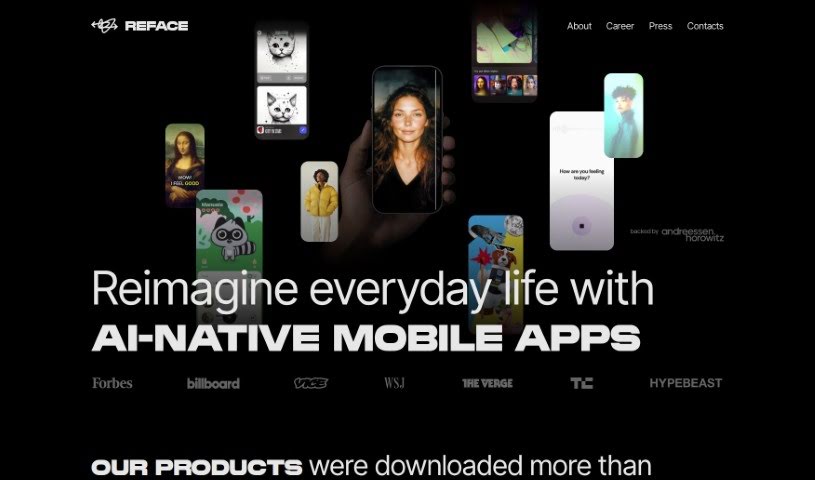
Reface is a really cool app that uses AI to let you easily swap faces in videos and GIFs. All you need is one selfie! Developed by a Ukrainian company, it lets you put your face onto someone else's, create funny content, animate photos, and even turn them into cool cartoons. The app has tons of videos and GIFs ready to go, or you can upload your own media to make your face swaps totally unique. It's super easy to use, available on both iOS and Android, and it's a fantastic way to get creative and have some fun.

Screenshot of Remix.ai

Remix.ai

Freemium

Remix.ai is your go-to AI tool for making images. It’s designed to be super easy, letting you generate visuals using artificial intelligence. You can start with your own ideas, some text, or even existing photos, and the AI acts like your creative partner, helping you bring your vision to life. It’s a really straightforward and fast way to create images – you just describe what you're looking for. People often praise Remix.ai for being user-friendly, packed with impressive features, and producing high-quality images that really hold their own against other AI image creators out there. On top of that, Remix.ai has this neat feature called "Magic Camera." It lets you transform your selfies and other photos with AI in a snap. Basically, Remix.ai aims to be a smooth, efficient platform for anyone wanting to create and edit images with AI.

Screenshot of Removebackgroundai

Removebackgroundai

Freemium

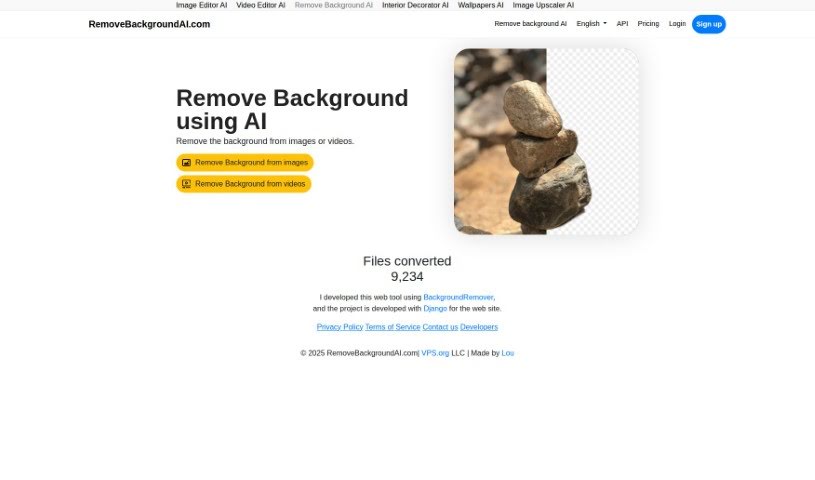
Remove Background AI is a handy tool that uses artificial intelligence and machine learning to automatically take the background out of your images and videos. It's built for everyone, whether you're using it for fun or for your business. You get free credits to start with for smaller files, and there's a paid option if you need to process larger files or more of them. The tool works in many languages, has a super simple interface, and even lets you upload files in batches. If you're a paid user, you'll also get priority in the processing queue. You can grab more credits by checking out the pricing page on their website.

Screenshot of removebg.dev

removebg.dev

Freemium

Removebg.dev is your go-to spot for easily removing backgrounds from images, completely free, all thanks to some clever AI. You just upload your picture, let the smart AI do its thing to figure out what's what, and poof! The background is gone in a few quick, simple steps. This service is super handy for all sorts of things – whether you're working on a creative project, putting together marketing stuff, or just want to clean up a personal photo. With its easy-to-use design and speedy background removal, removebg.dev makes it a breeze to make your images look better by getting rid of anything you don't want in the background.

Screenshot of Replace Anything

Replace Anything

Freemium

Replace Anything is a really advanced system that's changing how we swap out elements in images, all while keeping things looking top-notch. It makes it super easy for anyone to change backgrounds, swap faces, update clothing, and do much more in photos of people, products, or even pets. The process is straightforward: you pick the part you want to keep, or upload a special black-and-white mask image. Then, you just type in what you want to create or upload a reference image, and hit 'Run'. Simple as that!

Screenshot of Replicate AI CodeFormer

Replicate AI CodeFormer

Freemium

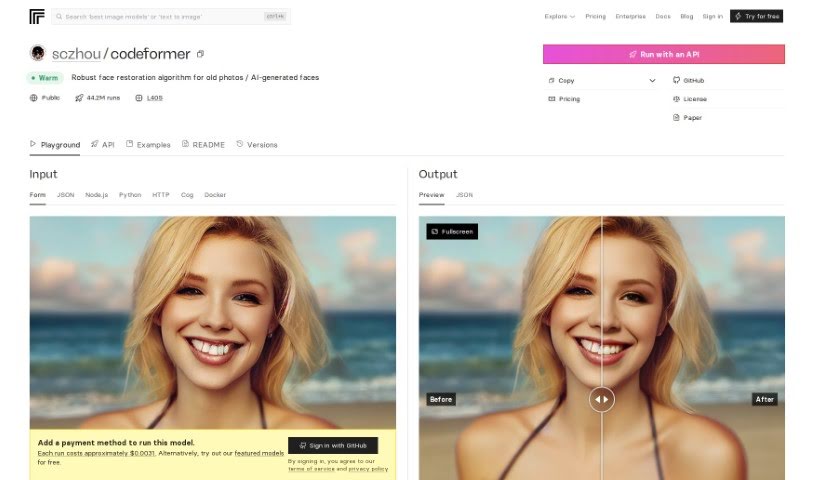
CodeFormer is a really solid face restoration algorithm. It's designed to make old photos look better or to improve faces that were generated by AI. It is a tool for enhancing image quality and making sure everything looks just right. This algorithm was developed for research purposes, and it uses something called a Codebook Lookup Transformer. This fancy name basically means it's really good at finding and restoring faces reliably, especially when dealing with images created using stable-diffusion generation. It’s open source, which is great because it means you can run it on your own computer. You can even use Docker to get it set up, making it super accessible for all sorts of projects where you need to work with images and restore them.

Screenshot of Retouch4me

Retouch4me

Freemium

Retouch4me is a really neat tool for photo retouching. It uses AI-powered plugins that work like a pro retoucher, giving you that precise, polished look without all the fuss. What's great is that it keeps your photos looking natural by preserving the real skin texture. You just upload your pictures, hit a button, and the software does the rest, delivering fantastic results without needing you to fiddle with complicated settings. It's designed for both photographers and retouchers, offering different plugins for specific jobs, like fixing skin tones or making smiles look brighter with whiter teeth. Plus, since it all runs on your computer, your images stay completely private – nothing gets uploaded anywhere else. It also saves you a ton of time with batch processing, so you can work on multiple photos at once without losing quality. It’s a super user-friendly and efficient way to get your retouching done.

Screenshot of Retoucher

Retoucher

Freemium

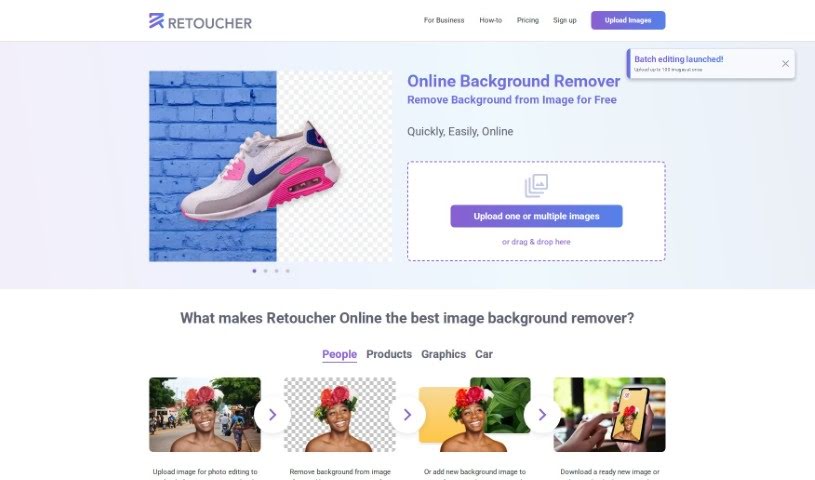
Retoucher Online is a really handy tool for editing your images, especially if you need to remove backgrounds. It lets you upload pictures and get them just right for social media platforms like Instagram, Facebook, TikTok, and YouTube, or even for passport photos. You can remove backgrounds from images for free, pop in new ones, create awesome profile pictures, and then download your finished image or tweak it further right there in the Retoucher editor. The tool automatically handles the background removal, keeping your main subject front and center. This makes it super useful for all sorts of things, like making product images for online stores look their best. Retoucher Online is designed to save you both time and money, offering an easy-to-use interface with features like automatic background removal, high-quality image generation, the ability to upload multiple images at once, and even API support.

Screenshot of Retouchme

Retouchme

Freemium

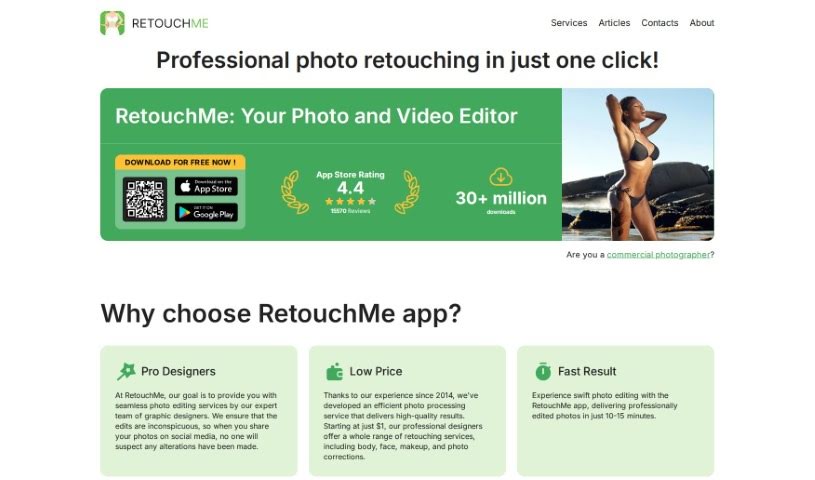
RetouchMe is a photo editing app you can get for both iOS and Android. What makes it really different is how it works: instead of just automated filters, a real team of professional editors manually works on your photos, pixel by pixel, using Adobe Photoshop. This means you get really high-quality, natural-looking results. The app has tons of services, like a Pimple Remover that lets you quickly and easily get rid of blemishes, acne, or any other skin imperfections. It’s designed for everyone, whether you’re just snapping selfies or you’re a professional photographer. The interface is super easy to use, and you can get quick edits done. You can buy editing credits one time or sign up for a monthly subscription, and if you’re a subscriber, your orders usually get processed even faster.

Screenshot of Retouchme

Retouchme

Freemium

The RetouchMe app is a photo editing tool you can get for both iOS and Android. What really makes it different is its unique approach: real, professional editors actually work on your photos, pixel by pixel, using Adobe Photoshop. This means you get high-quality, natural-looking results. The app has tons of services, like a Pimple Remover that lets you quickly and easily clear up your face from blemishes, acne, or anything else. It’s designed for everyone, whether you’re just snapping selfies or you’re a pro photographer. The interface is super easy to use, and you can get quick edits done. You can buy editing credits one time or sign up for a monthly subscription, and if you’re a subscriber, you often get faster processing.

Screenshot of Revivoto

Revivoto

Freemium

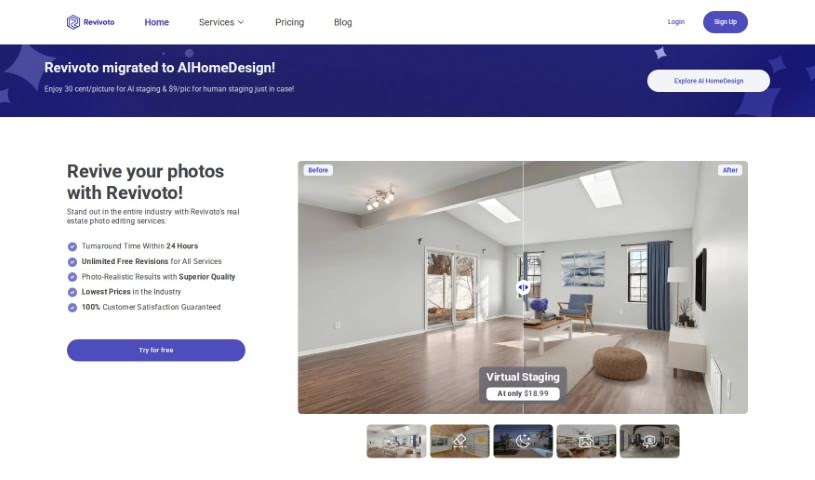
Revivoto is a specialized photo editing tool built specifically for real estate professionals. Its main goal is to help you make your property photos really pop, which can attract more potential buyers. It is your go-to service for making properties look their absolute best. Revivoto offers a range of services, including virtual staging (adding furniture to empty rooms), removing unwanted items from photos, general image enhancement, and even redrawing floor plans. They started in Vancouver, BC, back in 2021 with a mission to really shake things up in the real estate industry by using the latest technology for top-notch photo editing. What's great is they promise to get your edited photos back to you within 24 hours, and you get unlimited free revisions, all at what they claim are the lowest prices around.

Screenshot of roboMUA

roboMUA

Freemium

RoboMUA is a really neat tool for anyone in the makeup and beauty world, whether you're a pro or just love playing with makeup. It's designed to make applying makeup simpler and better. It is a smart assistant powered by advanced AI. With roboMUA, you can create professional-looking makeup styles super easily, often with just a few clicks. It's built to be user-friendly, so makeup artists of all skill levels can jump right in. Plus, it gives you personalized suggestions based on your unique features and what you like. It’s a huge time-saver, letting you generate looks quickly, and the AI applies makeup virtually with impressive accuracy. It’s also fantastic for trying out new styles and getting creative without any commitment.

Stay Updated with AI Tools

Get weekly updates on the latest AI tools, trends, and insights delivered to your inbox

Join 25,000+ AI enthusiasts. No spam, unsubscribe anytime.