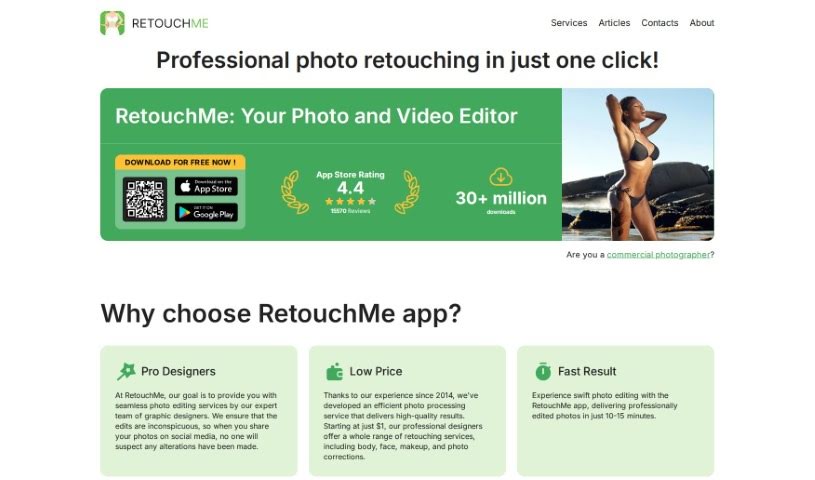
Screenshot of Retouchme

Retouchme

Discover what Retouchme is and how to use it effectively in 2025. We'll dive into its features, compare it to other photo editors, and show you exactly how to get those perfect shots.

Screenshot

What is Retouchme?

RetouchMe is a photo editing app you can get for both iOS and Android. What makes it really different is how it works: instead of just automated filters, a real team of professional editors manually works on your photos, pixel by pixel, using Adobe Photoshop. This means you get really high-quality, natural-looking results. The app has tons of services, like a Pimple Remover that lets you quickly and easily get rid of blemishes, acne, or any other skin imperfections. It’s designed for everyone, whether you’re just snapping selfies or you’re a professional photographer. The interface is super easy to use, and you can get quick edits done. You can buy editing credits one time or sign up for a monthly subscription, and if you’re a subscriber, your orders usually get processed even faster.

People seem to really like it, often mentioning how easy it is to use, how natural the edits look, and how efficiently it improves their photos.

Who created Retouchme?

Meet the Founder of the RetouchMe App:

Alexander Lozitsky, who is the CEO and Founder of RetouchMe, started the app because he’s passionate about photography. He co-founded it with Andrey Kazanovsky, who serves as the Creative Director. Both of them are based in Ukraine. They launched the app back in 2014, and it’s been offering professional photo editing by real designers for years. The best part? They can get these edits done for you in just minutes! It’s perfect for both beginners and pros who want top-notch results without breaking the bank. Plus, the app is really easy to navigate, they offer customer support 24/7, and they’re focused on making sure you’re happy with the final product. It’s a really smooth experience for getting your photos retouched.

What is Retouchme used for?

RetouchMe is incredibly versatile! You can use it to:

  • Make your portraits look even better.
  • Quickly clear up your face from any blemishes.
  • Get rid of acne.
  • Fix all sorts of other little imperfections.
  • Process multiple photos at once if you have RetouchMe Pro.
  • Give your selfies that extra polish.
  • Get professional-quality photo retouching, no matter who you are.
  • Smooth out your skin.
  • Adjust facial symmetry.
  • Do quick and easy photo retouching.
  • Remove acne and other imperfections with ease.
  • Enhance portraits with just a few clicks.
  • Remove pimples and moles, and smooth your skin.
  • Get that polished look in your photos.
  • Change your hair color.
  • See instant retouching results.
  • Enjoy convenient photo retouching for everyone.
  • Enhance photos without needing professional skills.
  • Remove acne and other imperfections.
  • Make photo retouching convenient and get immediate results.
  • Achieve a polished look in your photos without needing to be a pro.
  • Access a wide range of retouching tools, from removing pimples to changing hair color.
  • Use it as a mobile solution for editing photos wherever you are.

Who is Retouchme for?

RetouchMe is great for:

  • Anyone who loves taking selfies.
  • Professional photographers.
  • Selfie enthusiasts.
  • Professional photographers.

How to use Retouchme?

Using the RetouchMe app, especially for things like pimple removal, is really straightforward. Here’s how you do it:

  1. First, just download the RetouchMe app. You can find it in the App Store if you have an iOS device, or the Google Play Store if you’re on Android.
  2. Once it’s on your phone, open it up and find the Pimple Remover tool.
  3. Now, upload the photo you want to edit. Then, just pick the option for removing pimples.
  4. The app’s advanced editing tools will then work to target and remove any pimples or other imperfections you want gone from your photos.
  5. You’ll get professional-quality results right away, and you don’t need any special editing skills to make it happen!
  6. Don’t stop there! You can also explore other editing options, like smoothing your skin or fixing facial symmetry.
  7. The interface is really user-friendly, making quick and easy retouching a breeze.
  8. If you’re a professional photographer and need to edit a lot of photos, check out RetouchMe Pro. It lets you do batch processing, which saves a ton of time.
  9. Ultimately, it saves you time and effort. You get quick fixes that deliver high-quality results, so your photos always look their absolute best.

All in all, RetouchMe offers a super convenient and accessible way to retouch your photos right on your phone. It makes it simple for both everyday users and professional photographers to make their images look better, effortlessly and efficiently.

Related AI Tools

Discover more tools in similar categories that might interest you

123RF AI Image Generator

Creative Image Generation
Learn More

Stay Updated with AI Tools

Get weekly updates on the latest AI tools, trends, and insights delivered to your inbox

Join 25,000+ AI enthusiasts. No spam, unsubscribe anytime.