In today’s world, where visuals are everything, making sure your images look their absolute best is more important than ever. Whether you’re a pro photographer, run a small business, or just love sharing memories, how good your photos look can really make a difference. But let’s be honest, not every shot is perfect right out of the camera.
That’s where AI-powered image enhancers and upscalers come in. These tools use smart algorithms to refine and improve your images without a fuss. They can restore detail in low-res photos, boost colors, and tweak contrasts, basically transforming your visuals in ways that used to need fancy professional software.
Over the last year, image enhancement tech has gotten so much better. What used to take ages of manual editing can now be done in seconds with just a few clicks. I’ve spent time trying out some of the best options out there, focusing on ones that give great results without needing you to be a digital art whiz.
If you’re ready to give your images a new lease on life, this guide will show you the top AI image enhancers and upscalers available right now. Let’s jump in and see how to make your photos go from good to amazing.
The best AI Image Enhancer & Upscalers
- Pixelcut: Great for improving image clarity and resolution.
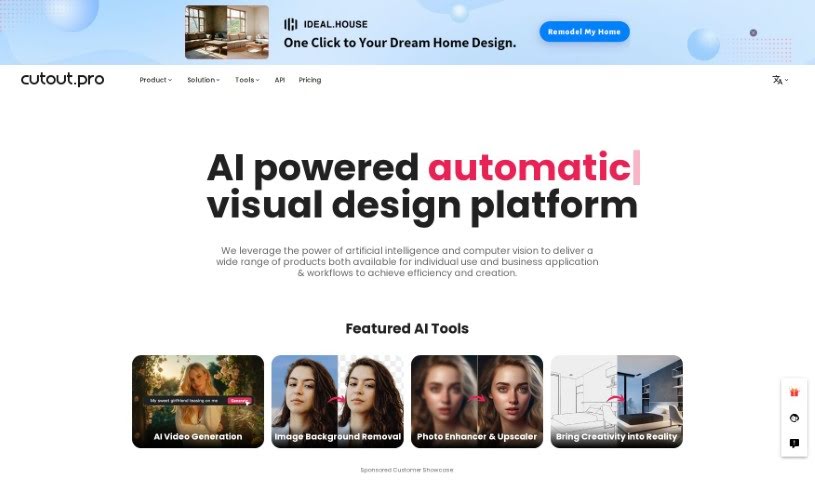
- Cutout.pro: Helps boost photo clarity and resolution.
- Pica AI: Smoothly enhances and upscales anime images.
- Image Upscaler: Perfect for turning low-res images into print-ready files.
- Upscale.media: Quickly boosts visuals for e-commerce.
- Remini AI: Transforms low-res images into stunning visuals.
- Vectorizer.ai: Improves image quality for large prints.
- Let’s Enhance: Enhances images for vibrant large prints.
- Clip Drop: Boosts the quality of low-res images.
- Bigjpg: Enlarges anime art while keeping details sharp.
- Adobe Photoshop AI: Upscales low-res photos for better clarity.
- Vance AI: Improves photo quality for prints.
- Passport Photo Online: Enhances photo quality for official documents.
- Reface: Improves image quality for clearer details.
- Magnific AI: Transforms low-res images into high-definition.
How do AI image enhancers & upscalers work?
AI image enhancers and upscalers use advanced algorithms, especially deep learning models like convolutional neural networks (CNNs). These models analyze images to understand what they’re seeing and how they’re structured. The main goal is to make images look better, adding detail and clarity while reducing any oddities that can pop up when you enlarge a picture.
Basically, AI image upscaling looks at a low-resolution image and figures out what a high-resolution version would likely look like. By learning from tons of image data, these models can fill in details that aren’t actually there.
When training, the AI gets shown countless pairs of low and high-resolution images. This teaches it how to effectively reconstruct missing information. So, when you enlarge a smaller image, the model can create realistic textures, subtle lighting, and smooth color transitions.
Some common methods include super-resolution, where the AI creates new pixel data based on what’s already there, ensuring a smooth enlargement. This helps keep the image looking natural while making it sharper and generally better looking.
AI tools also fine-tune images by adjusting colors, contrast, and brightness. This isn’t just about resizing; it genuinely improves the look and feel of the photo. It makes distracting elements less obvious and really makes the main subject pop.
So, to sum it up, AI image enhancers and upscalers use deep learning and massive training datasets to create great-looking images from lower-quality sources. Their knack for recreating details and improving overall image quality really shows off how powerful artificial intelligence is for creating and enhancing visual content.
Our best AI image enhancer & upscalers at a glance
| Rank | Name | Best for | Plans and Pricing | Rating |
|---|
| 1 | Pixelcut | Improving image clarity and resolution. | N/A | 4.64 (11 reviews) |
| 2 | Cutout.pro | Boosting photo clarity and resolution. | N/A | 4.46 (13 reviews) |
| 3 | Pica AI | Enhancing and upscaling anime images smoothly. | N/A | 4.58 (12 reviews) |
| 4 | Image Upscaler | Turning low-res images into print-ready files. | Paid plans start at $3.9/year. | 4.54 (13 reviews) |
| 5 | Upscale.media | Quickly boosting visuals for e-commerce. | N/A | 4.17 (6 reviews) |
| 6 | Remini AI | Transforming low-res images into stunning visuals. | N/A | 4.67 (6 reviews) |
| 7 | Vectorizer.ai | Improving image quality for large prints. | N/A | 4.17 (6 reviews) |
| 8 | Let’s Enhance | Enhancing images for vibrant large prints. | Paid plans start at $12/month. | 4.72 (25 reviews) |
| 9 | ClipDrop | Boosting the quality of low-res images. | Paid plans start at N/A—/month. | 4.75 (12 reviews) |
| 10 | Bigjpg | Enlarging anime art while keeping details sharp. | N/A | 4.77 (13 reviews) |
| 11 | Adobe Photoshop AI | Upscaling low-res photos for better clarity. | N/A | 4.70 (27 reviews) |
| 12 | VanceAI | Improving photo quality for prints. | N/A | 4.73 (11 reviews) |
| 13 | Passport Photo Online | Enhancing photo quality for official documents. | Paid plans start at $16.95/N/A. | 4.67 (6 reviews) |
| 14 | Reface | Improving image quality for clearer details. | N/A | 4.35 (20 reviews) |
| 15 | Magnific AI | Transforming low-res images into high-definition. | Paid plans start at $39/month. | 4.67 (6 reviews) |