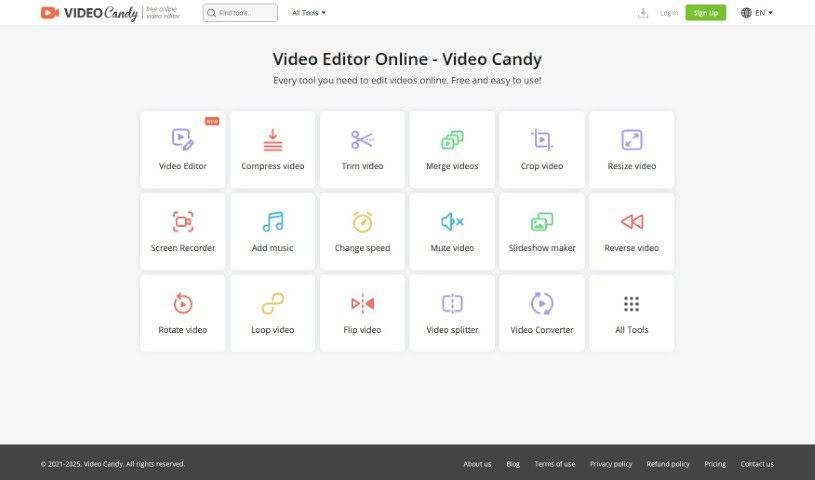
Screenshot of Video Candy

Video Candy

Discover Video Candy in 2025! Learn what this free online video editor does, explore its features, and see how it stacks up against other video creation tools.

Screenshot

What is Video Candy?

Video Candy is a really handy online platform packed with all sorts of video editing tools. Whether you’re just starting out or you’ve been editing for years, you’ll find something useful here. It’s got this super easy-to-use interface, and it offers tools for trimming, merging clips, compressing videos, cropping, resizing, recording your screen, adding music, changing video speed, removing audio, making slideshows, and a whole lot more. Plus, you can convert video and audio files without any fuss. The whole idea behind Video Candy is to help you make your video content shine, whether it’s for social media, your blog, or even professional presentations. The best part? Every single tool is completely free and straightforward to use.

Who created Video Candy?

We don’t have specific details about who founded Video Candy, as that information wasn’t provided. What we do know is that it’s a platform offering a wide range of video editing tools, perfect for both beginners and seasoned professionals. It really helps users polish their video content. You can do things like trim clips, merge them together, compress files, crop, resize, record your screen, edit audio, and convert files between different formats. All these tools are available for free on their easy-to-navigate website, making video editing much more accessible and convenient for everyone.

What is Video Candy used for?

Video Candy is your go-to for a bunch of video and audio tasks:

  • Screen Recording: Capture exactly what’s happening on your screen, great for tutorials or presentations.
  • Trim and Merge Videos: Easily cut out unwanted parts or combine different clips to tell your story.
  • Video Compression: Make your video files smaller without losing quality.
  • Audio and Video Conversion: Switch between different media formats to suit your needs.
  • Edit and Enhance Audio: Add background music, mute existing audio, or adjust the playback speed of your videos.
  • Add Music or Adjust Video Speed: Give your videos the right soundtrack or change their pace.
  • Create Slideshows: Turn your photos into engaging video presentations.
  • Reverse Video Clips: Play your videos backward for a cool effect.
  • Rotate, Loop, Flip Videos: Easily adjust the orientation or create repeating segments.
  • Stop Motion Creation: Experiment with creating stop-motion animations.

Who is Video Candy for?

  • Amateurs: If you’re new to video editing, you’ll find it incredibly easy to get started.
  • Professionals: Even experienced editors can appreciate the convenience and range of free tools.

How to use Video Candy?

Using Video Candy for your video editing projects is pretty straightforward. Just follow these simple steps:

  1. Head over to Video Candy: Start by visiting their website. You can begin editing your videos right away, and there’s no watermark added to your finished projects, which is a nice bonus.
  2. Upload Your Video: The first step is to upload the video file you want to work with. They accept files up to 4 GB in size.
  3. Pick Your Editing Tools: Video Candy has a great selection of tools available. You can choose from trimming, merging, compressing, cropping, resizing, or even screen recording. Just select the ones that fit what you need to do.
  4. Make Your Video Better: Now’s the fun part! You can add music, change the video’s speed, remove the original audio, put together a slideshow, or try out stop motion effects to really enhance your content.
  5. Work on the Audio: It’s not just about video; Video Candy also lets you edit and improve your audio. You can add music, mute the existing sound, or adjust the video’s speed.
  6. Convert Files Easily: Need to change your video or audio file to a different format? Video Candy makes it simple to convert files to meet all your multimedia needs.
  7. Download Your Masterpiece: Once you’re happy with all your edits, you can download the final video. There are no limits on what you can download.
  8. Check Out More Features: Don’t forget to explore other tools like video compression and screen recording. They also offer various multimedia tools that cover a wide range of editing requirements.

Following these easy steps should help you use Video Candy to create really engaging and professional-looking videos without much hassle.

Related AI Tools

Discover more tools in similar categories that might interest you

Stay Updated with AI Tools

Get weekly updates on the latest AI tools, trends, and insights delivered to your inbox

Join 25,000+ AI enthusiasts. No spam, unsubscribe anytime.