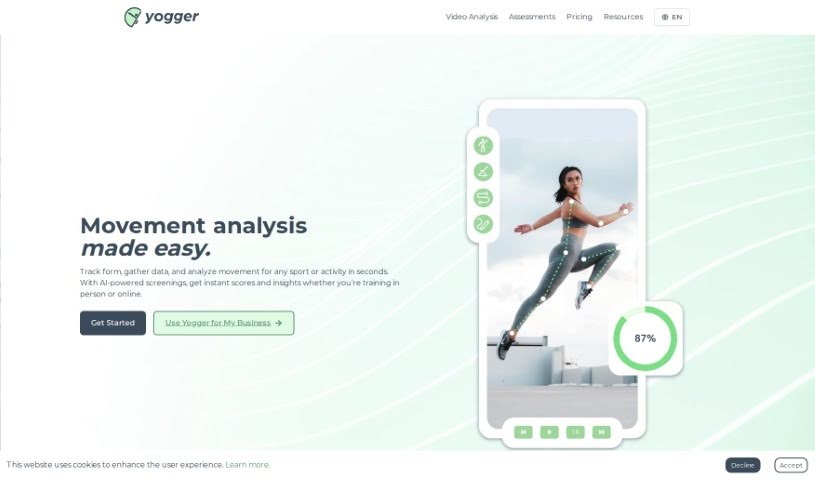
Screenshot of Yogger

Yogger

Discover what Yogger is and how to use it effectively in 2025. We'll explore its features and see how it stacks up against other video editing tools.

Screenshot

What is Yogger?

Yogger is a sophisticated video analysis tool that uses artificial intelligence to help athletes improve their performance. It works by capturing and analyzing your movements, essentially acting like a digital coach. It is a way to get detailed insights into how you move, which is super helpful for boosting your physical condition, avoiding injuries, and keeping tabs on your progress.

This AI-powered system analyzes your performance by looking closely at how you move. It uses motion capture to break down your movements, focusing on specific joints. This detailed feedback helps you become more effective in whatever sport you’re playing.

One of the best things about Yogger is how easy it is to use. You can capture motion for analysis using just your phone or a webcam. This means you can do movement screenings pretty much anytime, anywhere – no special equipment needed.

Yogger is a great asset for all sorts of athletes, whether you’re training solo or as part of a team. It helps you analyze your movements, keep an eye on how your joints are developing, track your progress over time, and importantly, prevent injuries. Coaches and physical therapists will also find it incredibly useful for assessing their clients across many different sports.

When it comes to preventing injuries, Yogger really shines. Its AI-powered movement screenings can spot potentially harmful movement patterns. It then gives you feedback on how to correct them, zeroes in on specific joints for a closer look, and can even help predict and prevent injuries before they happen.

Using Yogger’s motion capture video analysis is pretty straightforward. You record your movements with your phone or webcam. Then, the AI takes over, assessing your athletic performance, focusing on the joints you want to examine, and giving you the tools you need to improve your physical capabilities and make sure you’re moving safely.

This app is also fantastic for self-coaching. As an individual athlete, you can conduct your own movement screenings, get detailed performance data, understand exactly where you need to improve, and receive personalized advice to make your training more efficient.

Yogger also features virtual assessments. This lets you run AI-powered movement screenings on yourself or your clients. You’ll get performance scores and detailed reports, making it easy to evaluate progress flexibly, no matter where you are.

Who created Yogger?

Yogger was brought to life by Ken Krebs and Adrian Heneveld. They launched it in 2022 with a clear goal: to make movement data accessible to physical therapists and coaches. Their idea was to use everyday devices like smartphones, tablets, or webcams to collect precise data, cutting out the need for expensive sensors. Yogger’s mission is to highlight how crucial movement data is in healthcare and to empower coaches, healthcare professionals, and athletes to make a bigger difference. Ken Krebs serves as the CEO & Co-founder, and Adrian Heneveld is the COO & Co-founder.

What is Yogger used for?

Here’s a look at what Yogger is great for:

  • Sports trainers use it to analyze movements, helping athletes improve their physical condition, avoid injuries, and track their progress.
  • Physical therapists can conduct AI-powered movement screenings on patients, focusing on specific joints for analysis, monitoring progress, and generating detailed reports.
  • Individual athletes and teams benefit from analyzing movements, tracking joint development, monitoring progress, and preventing injuries.
  • It’s ideal for self-coaching, allowing athletes to use AI analysis to understand areas needing improvement and get personalized advice.
  • You can conduct virtual assessments that provide detailed reports based on analyzed movements.
  • It helps in monitoring and tracking joint advancements by isolating specific joints during movement screenings.
  • Personal trainers can save valuable time during client assessments by quickly analyzing multiple movements.
  • Injury prevention is a key use, as Yogger’s AI movement screenings detect harmful patterns and offer corrective feedback.
  • It improves client communication by providing tools to maximize effectiveness.
  • Specialized motion capture tools are used for in-depth movement screenings, allowing you to isolate target joints.
  • Yogger helps prevent training-related injuries through its AI-powered movement screenings.
  • Its motion capture video analysis focuses on isolating target joints, evaluating movement patterns, and offering tools to boost physical capability.
  • Users can monitor and track joint advancements by performing movement screenings with Yogger.
  • After a screening, Yogger delivers detailed, scored reports with analysis, insights on isolated joints, performance scores, and suggestions for improvement.
  • Yogger is particularly useful for physical therapists who can perform AI-powered movement screenings, track patient progress, and generate comprehensive reports.
  • Personal trainers can significantly cut down assessment time by using Yogger’s AI analysis of multiple movements, reducing the need for manual evaluations.
  • Yogger allows you to track progress over time by capturing and storing performance data from each session.
  • There’s a community and support group for Yogger users, which makes it easy to connect, share experiences, and get extra help.
  • Yogger offers a virtual assessments feature for detailed, AI-powered screenings, enabling performance evaluations anytime, anywhere.
  • It’s beneficial for self-coaching, letting you conduct movement screenings independently and get tailored advice to improve training efficiency.
  • It’s great for athletic performance evaluation.
  • It aids in injury prevention during training.
  • It supports self-coaching for athletes.
  • It’s useful for virtual assessments.
  • It helps in tracking joint advancements.
  • You get comprehensive reports after screenings.
  • It’s a valuable tool for physical therapists.
  • It saves time for personal trainers.
  • It allows for progress tracking over time.
  • There’s a community and support group for users.

Who is Yogger for?

Yogger is designed for:

  • Sports trainers
  • Physical Therapists
  • Performance coaches
  • Individual athletes
  • Athletes (as part of teams or individually)

How to use Yogger?

Getting started with Yogger is pretty straightforward. Just follow these simple steps:

  1. First, download the Yogger app from the Apple App Store.
  2. Then, conduct your motion screenings. You can do this using your mobile device or a webcam to capture the movements you want to analyze.
  3. Next, let the AI-powered technology do its work. It will analyze your athletic performance, including isolating specific joints and evaluating your movement patterns.
  4. After each screening, you’ll receive detailed, scored reports. These reports highlight exactly where you can improve and offer suggestions for performing better.
  5. Keep an eye on your joint advancements over time. You can do this by isolating specific joints and tracking your progress through various movements.
  6. Try out the virtual assessments for a thorough evaluation of your performance. These generate performance scores and detailed reports.
  7. Yogger is also great for preventing injuries during training. It helps by detecting harmful movement patterns and giving you corrective feedback.
  8. Use Yogger for self-coaching. This means you can conduct your own movement screenings and get personalized advice to train more effectively.
  9. For extra help, check out the resources and tutorials available on Yogger’s website. They’ll guide you on how to get the most out of the software.
  10. Finally, consider joining the Yogger community. You can connect with users from all over the world, share your experiences, and get additional support.

Related AI Tools

Discover more tools in similar categories that might interest you

Stay Updated with AI Tools

Get weekly updates on the latest AI tools, trends, and insights delivered to your inbox

Join 25,000+ AI enthusiasts. No spam, unsubscribe anytime.