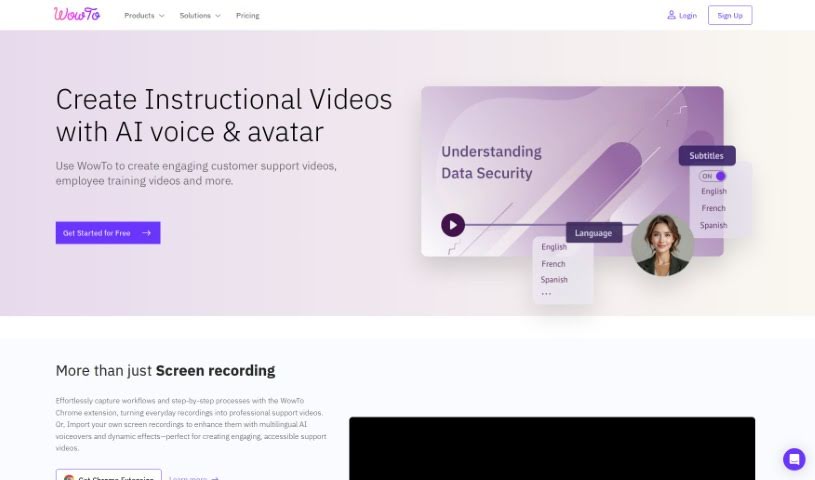
Screenshot of Wowto

Wowto

Discover what Wowto is and how to use it effectively in 2025. We'll explore its features and see how it stacks up against other video creation tools.

Screenshot

What is Wowto?

Wowto is a platform powered by AI that really helps you create how-to videos fast and easily. It offers some great benefits, like making customers happier, letting you create and host videos without a fuss, and even giving you AI-generated voice-overs. You can also get videos in different languages and even have them right inside apps you already use, like Intercom and Slack. Wowto’s goal is to make how-to videos more interesting than just reading text articles. They have different plans with various features and limits, including a free option that puts a WowTo watermark on your videos. Basically, it’s built so you can easily make support and instructional videos using a user-friendly editor, even if you’ve never designed anything before. Wowto uses AI for voice-overs and video editing, and it also offers integrations with a Chrome extension, Atlassian Jira, Confluence, Zapier Automation, and plans to add interactive videos down the line.

Who created Wowto?

Wowto was started by a team of folks who really know their stuff when it comes to new video technologies and AI. They’re all about making how-to videos and building a video knowledge base that makes customers happier and acts as an all-in-one video support solution. Wowto provides features like simple video creation, custom branded layouts, natural-sounding AI voice-overs, the ability to use multiple languages, and easy access to videos within customer support apps.

What is Wowto used for?

  • You can create how-to videos and build an engaging video knowledge base.
  • Embed the WowTo widget to show users the resources they need.
  • Integrate the WowTo knowledge base directly into your Intercom chat.
  • Use the in-app video widget on your website or within your app.
  • Set up videos to appear based on what users do.
  • Create support videos using the AI screen recorder.
  • Host video tutorials or how-to guides for your product on your website.
  • Bring your video knowledge base into apps like Intercom and Slack so it’s easier to access.
  • Make videos with AI-generated voice-overs.
  • Easily create videos using the Chrome extension, images, or even PDF/PPT files.
  • Whip up support videos quickly with the AI video editor.
  • Build a professional video help center for your company or product.
  • Launch a video knowledge base for your website, complete with your own brand colors and themes.
  • Let customers help themselves within your app using the WowTo video widget.
  • Share videos easily through a knowledge base link, a URL, or by embedding them.
  • Improve how you communicate in apps like Intercom, Slack, Zendesk, Jira, and Confluence by adding engaging videos.
  • Bring WowTo directly into your customer support apps for better video access.
  • Create step-by-step videos, instructional guides, help videos, and customer service videos.
  • You can upgrade your account by clicking the ‘Upgrade’ button in the app’s top toolbar.
  • Make how-to videos.
  • Host a video knowledge base that really grabs attention.
  • Build a video help center for your company, product, or service.
  • Create help videos, instructional videos, customer service videos, and step-by-step guides.
  • Launch a video knowledge base with your own custom brand colors.
  • Offer self-serve help to customers right within your app.
  • Share videos easily using links, URLs, or by embedding them.
  • Integrate WowTo with popular services like Intercom, Slack, Zendesk, Jira, and Confluence.
  • Embed the WowTo widget on your website to display relevant resources.
  • Integrate the WowTo knowledge base directly into the Intercom chat.
  • Use the WowTo in-app video widget to show relevant content.
  • Create support videos with AI and update them easily.
  • Connect WowTo with services like Atlassian Jira, Confluence, and Zapier.
  • Make step-by-step videos using the AI screen recorder.
  • Bring video tutorials into your app using the WowTo widget programmatically.
  • Create video tutorials for help, instruction, and customer service.
  • Host a video knowledge base that’s engaging.
  • Provide support videos for your products.
  • Embed the WowTo widget to display resources.
  • Create support videos using the AI screen recorder.
  • Produce step-by-step videos.
  • Offer video tutorials for customer service.
  • Build a video help center.
  • Share videos easily with links or embedding options.
  • Integrate WowTo into apps like Intercom, Slack, Zendesk, Jira, and Confluence.
  • Build a professional video help center.
  • Create video tutorials.
  • Launch a video knowledge base for your website.
  • Make communication within existing apps more engaging.
  • Create instructional videos.
  • Provide customer service videos.

Who is Wowto for?

  • Support Staff
  • Customer service representatives
  • Technical Support Specialists
  • Customer support staff
  • Technical Support Staff
  • Instructional designers
  • Customer Success Managers
  • Technical Writers
  • Product Managers
  • Tech Teams
  • Customer service professionals
  • Product Explainers
  • Training specialists

How to use Wowto?

Here’s how you can get started with WowTo:

  1. Sign Up and Log In: First, create your account on WowTo and then log in to access everything the platform offers.
  2. Create How-To Videos: You can use the Chrome extension to record your screen, or try other methods like converting PDFs into videos.
  3. Customize Videos: Add voice-overs in different languages and personalize your videos with your brand’s logo and colors.
  4. Build a Video Knowledge Base: Gather your video tutorials or how-to guides for your product and put them on your website to serve as a go-to support resource.
  5. Embed WowTo Widgets: Place WowTo widgets on your website or app so users can easily find and watch relevant video content.
  6. Integrate with Apps: Connect WowTo with apps like Intercom, Slack, Zendesk, Jira, and Confluence to make user interactions more engaging.
  7. Video Sharing and Updates: Sharing your videos is simple, whether through links or embedding them. Plus, you can easily keep your videos current as your products change.
  8. Upgrade or Cancel Subscription: If you need more features, you can upgrade your plan. And if you decide it’s not for you, just cancel your subscription before the renewal date.
  9. Download and Use: You can download your videos whenever you like; there are no restrictions on how or where you use them.

Just a reminder, the free plan lets you create up to 15 videos, each lasting a maximum of 2 minutes, and they will include the WowTo watermark. If you have any questions or need help with anything technical, don’t hesitate to reach out to support. Dive into WowTo’s features to create great video content for your users!

Related AI Tools

Discover more tools in similar categories that might interest you

Stay Updated with AI Tools

Get weekly updates on the latest AI tools, trends, and insights delivered to your inbox

Join 25,000+ AI enthusiasts. No spam, unsubscribe anytime.