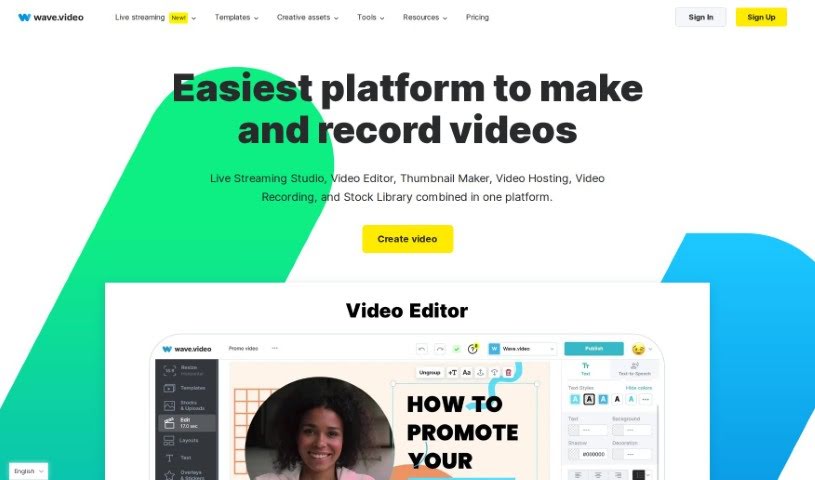
Screenshot of Wave.video

Wave.video

Discover what Wave.video is and how to use it effectively in 2025. We'll explore its features and see how it stacks up against other video creation tools.

Screenshot

What is Wave.video?

Wave.video is an online platform that lets you create, edit, record, and even live stream professional-looking videos. It is your all-in-one video toolkit. It comes with a robust video editor, a live streaming studio you can customize, a free tool to make thumbnails, secure video hosting, a screen recorder, and a library packed with stock media like images and video clips. The editor makes it super easy to add visual effects and graphics, so even if you’re new to video editing, you can make your videos pop. Wave.video is built for creators of all skill levels, helping you produce and adapt videos for all your marketing needs without a hitch.

This platform is especially great for businesses wanting to boost their video marketing. It helps you get more out of your video efforts and see a better return on investment across your entire marketing funnel. Wave.video brings together video hosting, an online editor, and a video landing page builder all in one place, which really simplifies things for marketers. The team behind Wave.video is passionate about video’s power in marketing and is committed to helping you create high-quality videos that get results. They’re always working to improve their tools and offer top-notch customer support.

Who created Wave.video?

Wave.video was started by a global team of designers, developers, testers, and marketers. They’re all really focused on making the platform better and easier to use. Their main goal is to give video creators, no matter their experience level, the tools they need to make engaging videos that actually achieve results. Wave.video offers a video editor, a live streaming studio you can customize, a free thumbnail maker, secure video hosting, and a stock media library to help you create and market your videos more effectively.

What is Wave.video used for?

  • Video Editing: You can resize, trim, combine clips, add animations, transitions, and more.
  • Thumbnail Creation: Make eye-catching thumbnails for your videos.
  • Live Streaming Studio: Set up custom live streams, invite guests, and create branded broadcasts.
  • Video Hosting: Upload and store your videos securely, create shareable landing pages, and customize the player.
  • Video Recording: Record videos directly from your laptop, manage scenes, and share easily.
  • Stock Library: Access a wide range of images, videos, and audio tracks.
  • AI Video Creation: Generate videos from text, templates, blog posts, or stock assets.
  • Video Conversion: Convert videos from platforms like YouTube and Instagram.
  • Multistreaming: Broadcast to multiple channels at once.
  • Video Captioning: Add captions and subtitles to your videos.
  • Marketing Videos: Create videos specifically for marketing campaigns.
  • Social Media Videos: Edit videos tailored for social media platforms.
  • Video Landing Pages: Build dedicated pages for your videos.
  • Photo Background Removal: Easily remove backgrounds from your photos.
  • Team Collaboration: Work together with your team on video projects.

Who is Wave.video for?

  • Marketers
  • Agencies
  • Video creators
  • Teams

How to use Wave.video?

Getting started with Wave.video is pretty straightforward. Here’s a quick rundown:

  1. Start a Project: You can kick things off by creating a blank video, uploading your own footage, or letting the AI help you generate a video. The AI can work from text, templates, or even stock assets, giving you lots of options.
  2. Editing: Dive into the online video editor. Here, you can resize your video, trim clips, stitch them together, and add all sorts of cool stuff like animations, text, and stickers. Adding captions and subtitles is also a breeze.
  3. Live Streaming: Want to go live? You can customize your streams without needing any coding skills. Invite guests to join you and create authentic, branded broadcasts that really connect with your audience.
  4. Thumbnail Creation: Make sure your videos get noticed with the free thumbnail maker. You can create really attention-grabbing thumbnails that encourage more people to click and watch.
  5. Video Hosting: Upload and keep your videos safe on the platform. You can even create custom landing pages for your videos, tweak the video player’s look, and keep an eye on how your videos are performing with analytics.
  6. Video Recording: Need to record something? You can easily record videos online, adjust your layouts, manage different scenes, and share your content straight from your laptop. It’s perfect for podcasts, live shows, or just creating engaging video content.

Remember, Wave.video has tools for everyone, aiming to make video creation simpler and more effective for all. With this guide, you’ll be well on your way to creating fantastic videos for all your marketing needs.

Related AI Tools

Discover more tools in similar categories that might interest you

Stay Updated with AI Tools

Get weekly updates on the latest AI tools, trends, and insights delivered to your inbox

Join 25,000+ AI enthusiasts. No spam, unsubscribe anytime.