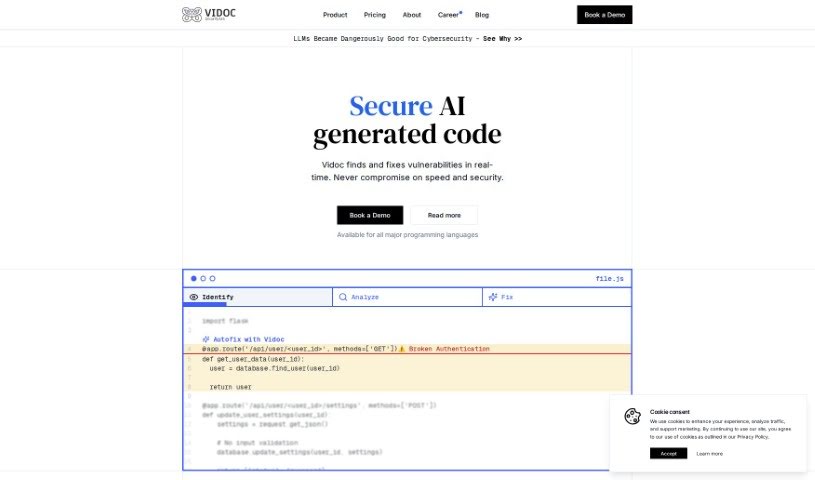
Screenshot of Vidoc Security

Vidoc Security

Discover what Vidoc Security is and how to use it effectively in 2025. We'll explore its features and see how it stacks up against other Software Development Tools.

Screenshot

What is Vidoc Security?

Vidoc is essentially an AI Security Engineer. Its main job is to boost security throughout your development process. It does this by scanning and reviewing all your code – whether it’s written by people or by AI – to find and fix any security issues. Vidoc combines AI technology with a handy library of modules to give you a complete picture of your attack surface. You’ll find features like ‘Fix with a Click’ for quick solutions, ongoing security reviews, and easy integration right into your development workflow. Getting started is simple: just provide your domain name, and you can even try it out for free to see what it can do before you commit.

If you’re curious about Vidoc’s specific features, like how it spots web app misconfigurations, its continuous security review capabilities, or how it fits into your dev pipeline, just ask away!

Who created Vidoc Security?

About Vidoc:

Vidoc officially launched on April 9, 2024. The company was started by Dawid Moczadlo and Klaudia Kloc, two visionary Polish ethical hackers who are really passionate about changing the game in digital security. They noticed some shortcomings in the security tools that were already out there, so they founded Vidoc with a strong focus on research and coming up with new ideas. Vidoc’s core mission is to provide automated security solutions for code during development, using AI to scan and review code efficiently. Key features include continuous security review, identifying misconfigurations, and a ‘Fix with a Click’ option for immediate problem-solving.

What is Vidoc Security used for?

  • Exporting your data
  • Accessing the API
  • Getting notifications when new subdomains are found
  • Keeping your data indefinitely
  • An AI Fix and Security Assistant
  • Running the Vidoc AI Model on your own servers
  • Scanning your internal network
  • Automated scanning processes
  • Creating your own custom modules
  • Using a library of pre-built modules
  • Scanning code for security flaws, whether it’s human-written or AI-generated
  • Spotting misconfigurations in web applications and infrastructure
  • Performing continuous security reviews
  • Integrating seamlessly into your development pipeline
  • Fixing security issues quickly with the ‘Fix with a Click’ feature
  • Monitoring your security from an outside perspective
  • Finding and confirming vulnerabilities
  • Blending the precision of a human security engineer with the speed of AI
  • Automating and simplifying security tasks
  • Providing custom code solutions for specific problems

Who is Vidoc Security for?

  • Individual security professionals
  • Development teams

How to use Vidoc Security?

Here’s how you can get started with Vidoc:

  1. Create Your Account: First, sign up for an account on Vidoc’s platform. You’ll need to enter your domain name when you set things up.
  2. Get Set Up: The setup is pretty straightforward and doesn’t require any verification. Once your account is ready, you can dive in and start exploring all the features.
  3. Explore the Features: Vidoc offers a variety of tools, including AI-powered solutions, the ability to create custom modules, continuous security review, and that handy ‘Fix with a Click’ functionality.
  4. Integrate with Your Workflow: To bring Vidoc into your development pipeline, just add two extra lines of code to your GitHub Actions Workflow. This simple step lets Vidoc automatically handle security tasks.
  5. Monitor Your Security: Vidoc keeps an eye on your security from an external viewpoint, using its AI to quickly find any misconfigurations in your web apps or infrastructure.
  6. Find Vulnerabilities: You can use Vidoc to detect misconfigurations, confirm vulnerabilities, and even get custom code solutions through its ‘Fix with a Click’ feature.
  7. Continuous Security Review: Vidoc can continuously review your security, much like a human security engineer would, helping to efficiently identify and fix potential risks.
  8. Book a Demo: If you want to explore Vidoc in more detail, you can book a demo directly through the ‘Book a demo’ link on their website.

By following these steps, you’ll be able to effectively use Vidoc’s AI-powered solutions to strengthen security throughout your development pipelines.

Related AI Tools

Discover more tools in similar categories that might interest you

Stay Updated with AI Tools

Get weekly updates on the latest AI tools, trends, and insights delivered to your inbox

Join 25,000+ AI enthusiasts. No spam, unsubscribe anytime.