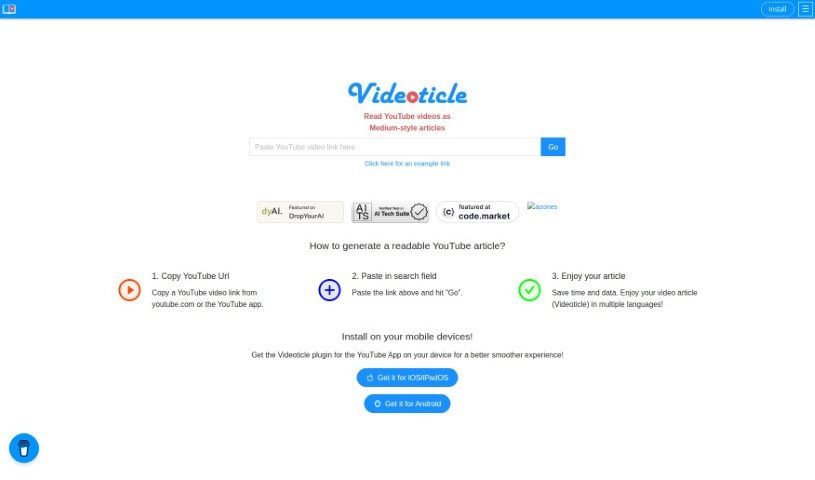
Screenshot of Videoticle

Videoticle

Discover what Videoticle is and how to use it effectively in 2025. We'll explore its features and see how it stacks up against other YouTube video tools.

Screenshot

What is Videoticle?

Videoticle is a neat little helper for YouTube users. It’s designed to take your YouTube videos and turn them into articles, kind of like those you’d find on Medium. How does it do this? Well, it grabs the subtitles from your video and transforms all that spoken content into text. This is especially handy for vlogs or any video where dialogue is key. It’s a great way to save time, use less data, and connect with more people around the world, even if they speak different languages. You just give it a YouTube video link, and Videoticle does the heavy lifting – pulling out the subtitles and creating a readable article complete with text and even snapshots from the video. Plus, you can use it on pretty much any device, as it’s mobile-friendly and supports multiple languages. For content creators, this means you can easily share your video material in a new, readable format, reaching a wider audience.

Who created Videoticle?

Videoticle was brought to life by a team of innovators focused on making YouTube content more accessible. They launched this unique service, which turns videos into Medium-style articles, on December 25, 2023. While the founder’s name isn’t specifically mentioned, the company’s core mission is clear: they aim to make content easier to access, encourage different ways of presenting information, and support content in many languages. Videoticle is built to work smoothly on mobile devices, and they even offer a YouTube app plugin to make the whole experience even better.

What is Videoticle used for?

Videoticle is a versatile tool that helps you get more out of your YouTube videos. Here’s a breakdown of what it’s great for:

  • Easy to Use: It features a user-friendly interface that makes converting videos a breeze.
  • Multilingual Support: It works with multiple languages, helping you reach a global audience.
  • SEO Boost: Generate SEO-friendly content by turning your videos into text articles.
  • Video to Text: Directly converts YouTube videos into written text.
  • Subtitle Power: It excels at extracting subtitles from your videos.
  • Multimedia Extraction: It can pull out various elements from your video content.
  • Content Repurposing: It’s a fantastic tool for repurposing your existing video material.
  • Better Consumption: It makes content easier to consume by offering a text alternative.
  • Diverse Formats: It encourages you to present your content in different ways.
  • Quick Conversion: The process is a simple one-click conversion.
  • Medium-Style Articles: It specifically transforms YouTube videos into articles similar to those on Medium.
  • Save Time & Data: By providing a text version, it lets people read instead of watching, saving them time and data.
  • Boost Readability: It makes video content more accessible and easier to read.
  • Wider Audience Reach: Multilingual support helps you connect with more people.
  • Engage Readers: It appeals to those who prefer reading over watching.
  • Creator Support: It helps content creators expand their reach.
  • Simple Interface: The user-friendly design makes content conversion straightforward.
  • SEO Benefits: It supports SEO efforts by creating text-based articles.
  • Format Diversity: It promotes using different content formats for repurposing.
  • Accessibility: It increases content accessibility and consumption through text.

Who is Videoticle for?

Videoticle is a valuable tool for several groups:

  • Content Creators: Anyone making videos who wants to reach more people.
  • Transcribers: Professionals who need to convert spoken word to text.
  • Language Professionals: Those working with different languages and content formats.
  • SEO Specialists: People looking to improve search engine rankings with text content.
  • Vloggers: Especially useful for those whose videos rely heavily on dialogue.

How to use Videoticle?

Want to turn your YouTube videos into easy-to-read articles with Videoticle? It’s pretty straightforward. Just follow these simple steps:

  1. First, grab the YouTube video URL. You can copy it right from youtube.com or the YouTube app itself.
  2. Next, head over to the Videoticle website and paste that link into the search field.
  3. Then, just hit the “Go” button to kick off the conversion.
  4. Now, give Videoticle a moment to work its magic. It’ll process the video, pull out the subtitles, and create a nice, Medium-style article for you.
  5. Finally, enjoy reading your new article! You can even access it in different languages, saving you time and data compared to watching the whole video.

Videoticle is especially helpful for vlogs where the spoken words are the main event. It’s a fantastic way to save time, cut down on data usage, and connect with a wider audience thanks to its multilingual features and content repurposing capabilities. The tool is designed to be user-friendly, works great on mobile devices, and integrates smoothly with YouTube. Just a quick reminder: Videoticle works best when the YouTube videos you use already have subtitles.

Related AI Tools

Discover more tools in similar categories that might interest you

Stay Updated with AI Tools

Get weekly updates on the latest AI tools, trends, and insights delivered to your inbox

Join 25,000+ AI enthusiasts. No spam, unsubscribe anytime.