What is Symphony.run?
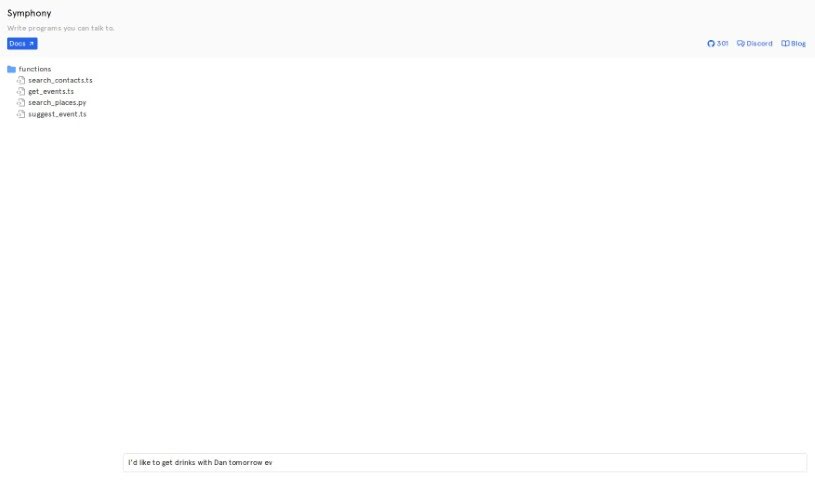
Symphony.run is a handy tool built to help you create programs that you can talk to. It is a way to build applications that understand and respond to spoken language. It’s all about making natural language processing and understanding easier for developers. With Symphony, you can build apps that can process and reply to your verbal commands and requests. If you’re using Symphony, you’ll find really thorough documentation to guide you on how to make the most of its features. Plus, Symphony plays nicely with Discord, a super popular communication platform. This means your conversational programs can connect with the Discord community without a hitch. And if you’re into sharing your work or collaborating, Symphony has you covered with its GitHub repository. You can jump in to help with its development, check out existing resources, and keep up with all the new improvements. To give you an idea of what’s possible, Symphony lets you create programs like search_contacts.ts, get_events.ts, search_places.py, and suggest_event.ts. These examples really show off the variety of applications you can build with Symphony’s conversational programming tools.
Who created Symphony.run?
Symphony.run was developed with the goal of making it easier for people to create conversational programs that respond to spoken language. It officially launched on September 19, 2023. The main idea behind it was to give developers the power to build applications that can understand and react to verbal commands and requests. Symphony also integrates with Discord, which is great for connecting your conversational programs to the wider Discord community. You can also find its code and collaborate on its development through its GitHub repository.
What is Symphony.run used for?
- Building conversational programs that understand natural language.
- Interacting with programs using your voice.
- Getting clear guidance and instructions from comprehensive documentation.
- Connecting with communities on the Discord platform.
- Sharing code and working together on projects via GitHub.
- Creating handy applications for tasks like finding contacts (
search_contacts), getting event details (get_events), locating places (search_places), and suggesting events (suggest_event).
- Giving developers the tools they need to build conversational programs.
- Making applications that can process and respond to spoken commands and requests.
- Providing resources to help you use conversational programming effectively.
- Allowing your programs to interact with users on Discord channels.
- Creating conversational programs in general.
- Handling verbal commands and requests.
- Connecting with the Discord community.
- Sharing code and collaborating on GitHub.
- Developing applications that use natural language processing.
- Building programs specifically for Discord channels.
- Contributing to the Symphony project on GitHub.
- Finding and exploring useful resources and program examples.
- Keeping up-to-date with the latest enhancements.
- Ensuring conversational programs are implemented effectively.
- Supporting Natural Language Processing (NLP).
- Building conversational programs through voice interaction.
- Enabling applications to process and respond to verbal commands and requests.
- Accessing detailed documentation for guidance.
- Integrating with Discord for communication.
- Facilitating code sharing and collaboration via GitHub.
- Creating programs like
search_contacts, get_events, search_places, and suggest_event.
- Improving how you implement and integrate with platforms like Discord.
- Building conversational programs by supporting natural language processing.
- Interacting with users through spoken language.
- Connecting conversational programs with the Discord community.
- Creating programs that can process and respond to verbal commands and requests.
- Developing applications using Symphony’s conversational programming capabilities.
- Using existing program examples like
search_contacts.ts, get_events.ts, search_places.py, and suggest_event.ts.
- Empowering developers to create conversational programs by offering resources for implementation.
- Supporting effective integration with platforms like Discord.
- The creation of conversational programs.
- Integration with Discord for interacting with its community.
- Code sharing and collaboration through its GitHub repository.
- Support for natural language processing.
- Building applications that can process and respond to verbal commands and requests.
- Access to comprehensive documentation for guidance.
- Creating programs that are interactive through spoken language.
- Developing a range of applications like
search_contacts, get_events, search_places, and suggest_event.
- Ensuring effective implementation and integration with platforms like Discord.
- Interacting with users through spoken language commands and requests.
- Accessing comprehensive documentation for guidance and instructions on using the tool.
- Integrating with Discord to connect conversational programs with the Discord community.
- Facilitating code sharing and collaboration through the GitHub repository.
- Creating programs like
search_contacts, get_events, search_places, and suggest_event using Symphony.
- Empowering developers to build applications with conversational programming capabilities.
- Enabling users to write programs that are interactive through spoken language.
- Broadening application reach by interacting with users on Discord channels.
- Supporting the implementation and integration of conversational programs.
Who is Symphony.run for?
- Developers
- Programmers
- Coders
- Software engineers
How to use Symphony.run?
Symphony is a tool designed to help you create conversational programs that you can interact with using your voice. To get the most out of Symphony, here’s a simple guide:
- Check Out the Documentation: Your first step should be to dive into the comprehensive documentation Symphony provides. It’s packed with detailed guidance on how to best use the tool’s features for building your conversational programs.
- Understand How It Works: Get familiar with Symphony’s core functions, especially its natural language processing and understanding abilities. Knowing this is key to building programs that can actually process and respond to what you say.
- Connect with Discord: Symphony integrates smoothly with Discord, a really popular communication platform. By linking your conversational programs to Discord, you can easily connect with users on their channels, which really helps your Symphony-powered applications reach more people.
- Collaborate on GitHub: You can access Symphony’s GitHub repository to collaborate, contribute to its development, explore helpful resources, and stay in the loop with the latest updates and improvements. This collaborative space is perfect for sharing code and working together to make Symphony even better.
- Explore Example Programs: Take a look at the pre-existing functions Symphony offers, like
search_contacts.ts, get_events.ts, search_places.py, and suggest_event.ts. These examples give you a great idea of the different kinds of applications you can build with Symphony’s conversational programming tools.
By following these steps, you can effectively use Symphony to build your conversational programs, connect them with platforms like Discord, collaborate on GitHub, and explore all the possibilities Symphony’s features offer.