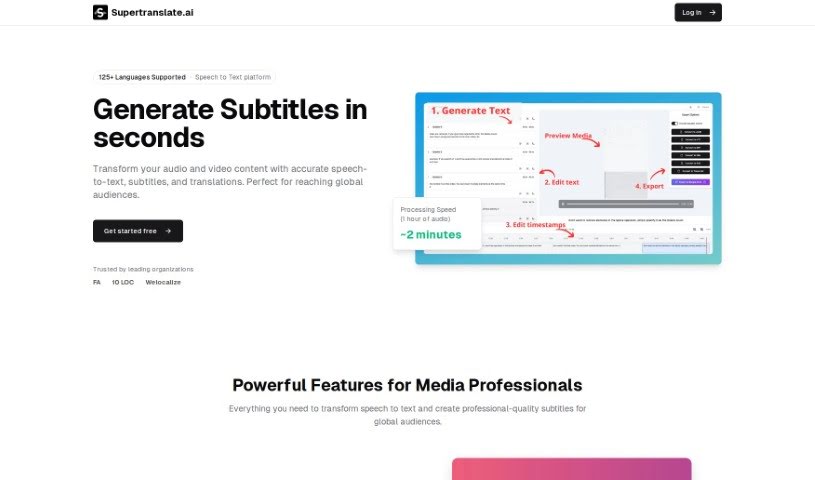
Screenshot of Supertranslate

Supertranslate

Discover what Supertranslate is and how to use it effectively in 2025. We'll explore its features and see how it stacks up against other video editing tools.

Screenshot

What is Supertranslate?

Supertranslate is a platform designed to make adding English subtitles to your videos incredibly simple. You can upload videos in any language, and the system automatically generates high-quality English subtitles for you. It uses OpenAI’s Whisper technology, which is known for its accuracy. Plus, you get a really user-friendly subtitle editor that lets you easily split, merge, and adjust the timing of those subtitles.

They offer a free plan that’s perfect for hobby projects. You only pay if you need to scale up, and there’s no credit card required upfront, so you can cancel anytime. If you’re a creator or a brand needing more, they have paid plans with different monthly credit allowances for processing videos. And if you’re an agency or an enterprise looking for something custom, you can always reach out to them directly. Essentially, Supertranslate’s goal is to take the hassle out of creating English subtitles for videos in any language, all thanks to AI.

Who created Supertranslate?

Supertranslate was actually created by two talented individuals: Bhargav and Ben Dobson. You can find Bhargav on Twitter at @codewithbhargav, and Ben Dobson goes by @bendobson84. The company behind Supertranslate focuses on text generation and subtitle editing, always aiming for features that are both easy to use and deliver professional-quality results. If you want to learn more, their website is supertranslate.ai.

What is Supertranslate used for?

Supertranslate is a versatile tool that helps you with a variety of tasks related to video subtitles:

  • It automatically generates English subtitles for videos, no matter the original language.
  • You can easily split, merge, and adjust the timing of these subtitles with an intuitive editor.
  • It uses OpenAI-Whisper, ensuring you get top-notch quality for your subtitles.
  • It’s a fantastic way to make your videos accessible to a wider audience by adding subtitles.
  • It saves you a lot of time compared to manually creating subtitles.
  • The platform is great for hobby projects, thanks to its free plan.
  • Creators will find the Starter Plan very useful.
  • Brands can benefit from the Pro Plan.
  • Custom solutions are available if you’re an agency or enterprise.
  • You can expect high accuracy in the subtitles it generates.
  • It’s a real time-saver for anyone needing subtitles.
  • It makes your videos more accessible by providing subtitles.
  • The subtitle editor lets you split, merge, and adjust timings easily.
  • It automatically generates English subtitles from any language video using OpenAI-Whisper for quality.
  • It’s perfect for creating subtitles for videos in different languages.
  • It helps improve the accessibility of your video content.
  • It enhances the user experience by offering translated subtitles.
  • The service supports multiple languages for video subtitles.
  • It provides professional video content translation services.
  • It’s an efficient way to translate video content into English.
  • It’s an AI-powered solution for generating subtitles for video content.
  • It helps increase your reach and engagement by offering multilingual subtitles.
  • It generates subtitles for videos in any language.
  • It automatically generates English subtitles.
  • It uses OpenAI-Whisper for high-quality subtitle generation.

Who is Supertranslate for?

Supertranslate is a great tool for a variety of people who work with video content:

  • Subtitle editors
  • Creators
  • Brands
  • Translators
  • Linguists
  • Language Teachers
  • Content creators

How to use Supertranslate?

Using Supertranslate to get automatic English subtitles for your videos is pretty straightforward. Here’s how you can do it:

  1. First, head over to the Supertranslate website at supertranslate.ai.
  2. Upload your video – it can be in any language, and the tool will automatically generate English subtitles for you.
  3. Remember, the system uses OpenAI-Whisper, which is known for generating really high-quality subtitles.
  4. Once you have the subtitles, you can use the intuitive subtitle editor. It lets you split, merge, and adjust the timecodes whenever you need to.
  5. You’ve got a few pricing options depending on what you need:
    • Forever Free: This plan is great for starting out. You only pay for extra features as you grow, and there’s no credit card needed. You can cancel anytime.
    • Starter Plan: If you’re a creator, this plan costs $10 per month and gives you 150 credits for video processing.
    • Pro Plan: For brands, this plan is $25 per month and includes 400 credits for video processing.
  6. If you’re an agency or an enterprise and need something more tailored, just get in touch with their contacts for custom solutions.
  7. Don’t forget to check out the FAQ section on their website if you have any questions or need a hand with anything.
  8. Finally, just enjoy the benefits of having automatic subtitles. Supertranslate makes the whole process seamless and efficient.

By following these simple steps, you can easily use Supertranslate to generate accurate and high-quality English subtitles for your videos, regardless of the original language.

Related AI Tools

Discover more tools in similar categories that might interest you

Stay Updated with AI Tools

Get weekly updates on the latest AI tools, trends, and insights delivered to your inbox

Join 25,000+ AI enthusiasts. No spam, unsubscribe anytime.