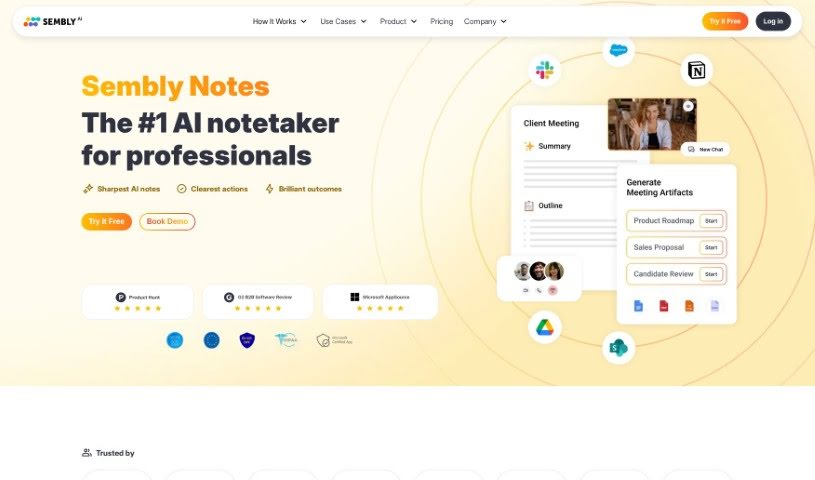
Screenshot of Sembly AI

Sembly AI

Discover Sembly AI, your AI meeting assistant for 2025. Learn how to use its features for better meeting notes, summaries, and follow-ups, and see how it stacks up against other AI note-takers.

Screenshot

What is Sembly AI?

Sembly AI is a smart platform built to make your meetings more productive and efficient. It is your AI assistant that handles the tedious task of note-taking. It automatically picks out all the important stuff from your meetings – like decisions made, requirements agreed upon, and key events that happened. It’s really good at spotting risk items, notable facts, and even important financial figures, making sure nothing crucial gets missed.

Sembly AI uses AI to create meeting notes, giving you clear summaries with detailed bullet points. This makes it super easy to remember what was discussed and decided. Plus, it supports many languages, lets you share notes securely, export transcripts, and even customize how your meeting minutes look.

And there’s Semblian™, Sembly AI’s virtual assistant. Semblian™ can offer helpful insights, take care of follow-ups automatically, and generally boost your meeting efficiency with personalized messages and suggested prompts. It plays nicely with all the major video conferencing tools you probably already use, like Zoom, Google Meet, Microsoft Teams, and Webex, making it a really complete package for getting more out of your meetings.

Who created Sembly AI?

Sembly AI got its start in early 2019, thanks to its founders, Gil Makleff and Artem Koren. Gil Makleff, who leads the company as CEO and Co-Founder, brings a wealth of experience in managing projects and driving transformations. Artem Koren, the Chief Product Officer and Co-Founder, has a solid background in IT and management consulting. Based in New York, the company is dedicated to offering AI-driven meeting technology that really helps teams communicate better and get more done.

What is Sembly AI used for?

Sembly AI is incredibly versatile and can help with a wide range of meeting-related tasks:

  • Seamless Integrations: Connects with Slack, Trello, ToDo Apps, and other CRM and productivity tools.
  • Meeting Recording & Transcription: Records and transcribes your meetings accurately.
  • Automated Follow-ups: Takes care of sending reminders and next steps.
  • Virtual Attendance: Automatically attends meetings for you when you’re double-booked.
  • Smart Summaries: Generates concise summaries of your discussions.
  • Key Item Detection: Identifies action items, decisions, important topics, and risk items.
  • Filler Word Removal: Cleans up transcripts by removing unnecessary filler words.
  • Meeting Import: Supports importing pre-recorded meetings.
  • Ad-hoc Meeting Support: Works for spontaneous meetings too.
  • Voice Identification: Recognizes different speakers.
  • Automatic Task Assignment: Assigns tasks to the right people.
  • Workspace Analytics: Provides a dashboard for insights into meeting effectiveness.
  • Meeting Minutes Generation: Automatically creates, edits, and shares meeting minutes.
  • Task Management Integration: Streams meeting insights directly into your task management tools.
  • Sembly Tasks: Helps maximize the impact of your team meetings.
  • Semblian Chatbot: Revolutionizes meeting productivity with personalized insights and follow-ups.
  • Client/Team Sharing: Allows you to share structured meeting results easily.
  • Data-Driven Facts: Tracks impactful data and facts discussed.
  • Multi-Platform Compatibility: Works with Zoom, Google Meet, Microsoft Teams, and Webex.
  • Transcript Export & Customization: Lets you export and tailor your meeting transcripts.

Who is Sembly AI for?

Sembly AI is designed to benefit a wide range of users:

  • Individual professionals looking to boost their personal productivity.
  • Teams aiming for better collaboration and clearer communication.
  • Organizations seeking to optimize overall meeting efficiency and outcomes.

How to use Sembly AI?

To get the most out of Sembly AI, here’s a straightforward guide:

  1. Add Your Team: Invite everyone on your team to Sembly. This helps everyone benefit from shared insights and makes collaboration smoother.
  2. Connect Calendars: Link your team members’ calendars to Sembly. This allows the platform to automatically capture and analyze all relevant meetings.
  3. Review Key Items: Make it a habit to check the commitments and key items that Sembly identifies. This ensures no important discussion points slip through the cracks.
  4. Use Proxy Attendance: If you find yourself in back-to-back meetings, use the Proxy Attendance feature. Sembly can attend on your behalf, so you don’t miss out on anything.
  5. Get the Mobile App: Download the Sembly mobile app. It gives you easy access to all your meeting content, no matter where you are.
  6. Install the Chrome Extension: For quick meeting invitations without leaving your current app, install the Sembly Chrome Extension.
  7. Enable Integrations: Set up integrations to automate tasks. For example, you can have Meeting Notes posted directly to Slack or have your commitments added to your to-do lists.

When it comes to security and privacy, Sembly is fully compliant with SOC 2 Type II and GDPR standards. It also supports multiple languages and currencies. It works seamlessly with popular conferencing apps like Google Meet, Zoom, Microsoft Teams, and Cisco Webex. With features like highly accurate transcription, automated task management, and intelligent meeting summaries, Sembly is built to significantly improve meeting efficiency and productivity for everyone – individuals, teams, and entire organizations. Make sure to explore Sembly’s features to simplify your meeting processes and get the best possible results.

Related AI Tools

Discover more tools in similar categories that might interest you

Stay Updated with AI Tools

Get weekly updates on the latest AI tools, trends, and insights delivered to your inbox

Join 25,000+ AI enthusiasts. No spam, unsubscribe anytime.