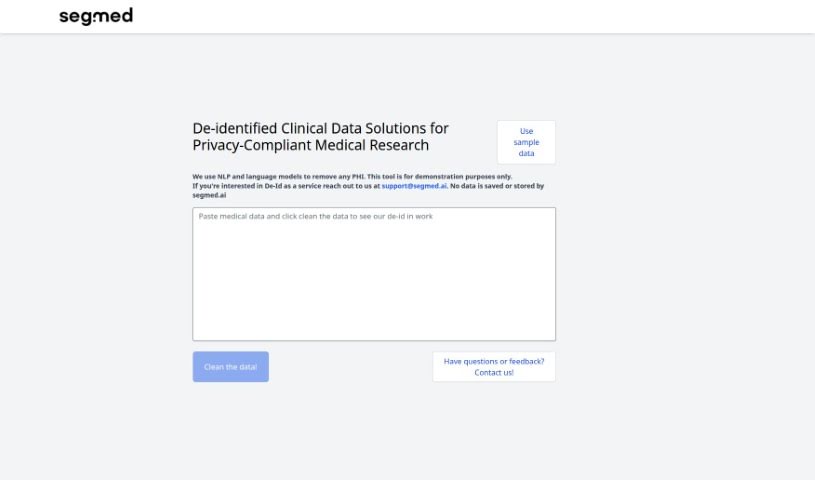
Screenshot of Segmed

Segmed

Discover what Segmed is and how to use its De-Id Playground effectively in 2025. We'll explore its features, compare it to other software development tools, and guide you through its capabilities.

Screenshot

What is Segmed?

Segmed offers a web-based demonstration tool called the De-Id Playground. It is a showcase for Segmed’s de-identification service. It uses language models to help remove personally identifiable information from sample data. It’s really important to remember that this tool is just for showing off what Segmed can do; you shouldn’t use it to remove PHI in a real production environment. If you want to try it out, you can input your own sample data to see how well the de-identification works. Segmed assures users that they don’t save or store any data after you’re done testing. To make sure the De-Id Playground runs smoothly, you’ll need to have JavaScript enabled in your browser. There’s also a handy feature that lets you clean your data even further. If you’re curious for more details about Segmed’s de-identification services, you can always check out their website or send them an email directly at [email protected]. The tool itself is quite interactive and easy to use – no installation is needed, and you can access it right from your web browser. Segmed built this website using Create-react-app, a popular JavaScript library, which helps create that interactive user interface. Segmed also really welcomes feedback or any questions you might have about the De-Id Playground.

Who created Segmed?

Segmed was brought to life by a founder whose name isn’t publicly shared. The company officially launched on June 15, 2023. They provide de-identification services, and their main way of showing this off is through their web-based De-Id Playground. This tool uses language models to strip personally identifiable information from data samples. Just a friendly reminder, though: the De-Id Playground is strictly a demonstration tool, not meant for actual production use.

What is Segmed used for?

Segmed’s De-Id Playground is designed to be incredibly user-friendly, acting as a web-based platform that highlights the de-identification process. It allows you to experiment with removing personally identifiable information from your own sample data, effectively demonstrating how Segmed’s technology works. You can even use a ‘clean the data’ feature for further sanitization, enhancing the de-identification. It provides all the necessary contact information and detailed service details on their website, making it easy to learn more. Since it only requires JavaScript, it’s accessible without any installation downloads. Segmed also makes sure that no data is saved or stored after your testing session, and they encourage you to reach out with feedback or questions about the De-Id Playground.

Who is Segmed for?

Segmed’s De-Id Playground is a valuable tool for a variety of professionals and students who work with data and need to understand de-identification. This includes:

  • Healthcare professionals
  • Data scientists
  • Researchers
  • Data analysts
  • Students
  • Medical researchers
  • Healthcare IT professionals

Essentially, anyone involved in handling sensitive data who needs to explore methods for protecting privacy will find Segmed’s offerings relevant.

How to use Segmed?

Here’s a straightforward guide to using Segmed’s De-Id Playground effectively:

  1. Access the De-Id Playground: Start by heading over to Segmed’s website. You’ll find the De-Id Playground there, which is their web-based tool designed to showcase their de-identification service.
  2. Understand the Tool: Keep in mind that this Playground uses language models (LLMs) specifically to remove personally identifiable information from sample data.
  3. Experiment Safely: It’s crucial to remember that the De-Id Playground is purely for demonstration. Please don’t use it for removing actual PHI in any production settings.
  4. Input Your Data: You’re welcome to input your own sample data. This lets you test the tool’s de-identification capabilities firsthand.
  5. Utilize Features: Don’t hesitate to explore the features available, like the ‘clean the data’ option, which can further enhance the de-identification process.
  6. Ensure JavaScript is Enabled: For the De-Id Playground to work correctly, you’ll need to make sure JavaScript is enabled in your browser.
  7. Contact Segmed: If you need more information or have any questions, feel free to reach out to Segmed directly. You can contact them via email at [email protected].
  8. No Data Storage: Segmed guarantees that no data is saved or stored once your testing sequence in the De-Id Playground is complete.

By following these steps, you can really get the most out of Segmed’s De-Id Playground, understanding its de-identification process and capabilities. For even more detailed instructions, you can always check Segmed’s website or get in touch with them directly for comprehensive information and support.

Related AI Tools

Discover more tools in similar categories that might interest you

Stay Updated with AI Tools

Get weekly updates on the latest AI tools, trends, and insights delivered to your inbox

Join 25,000+ AI enthusiasts. No spam, unsubscribe anytime.