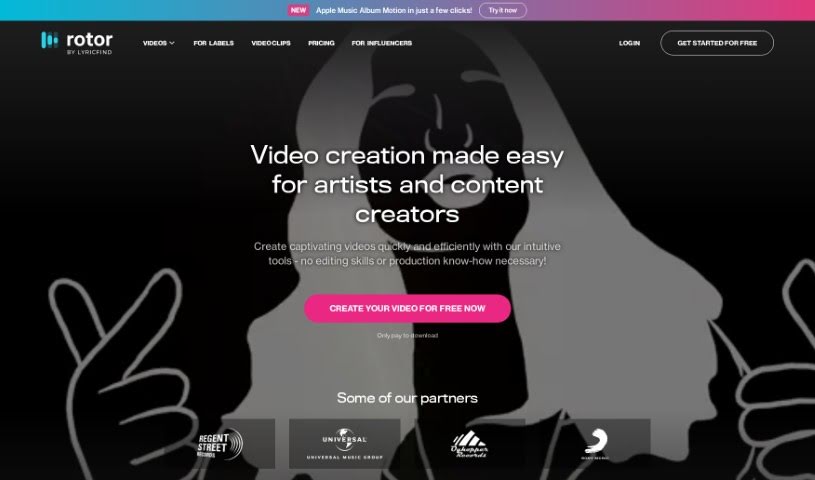
Screenshot of Rotor Videos

Rotor Videos

Discover Rotor Videos in 2025! Learn what it is, how to use its features effectively, and how it stacks up against other video creation tools.

Screenshot

What is Rotor Videos?

Rotor Videos is a really handy tool designed specifically for musicians who want to create professional-looking music videos, promo clips, Spotify canvas videos, and lyric videos. The best part? You don’t need any video editing experience to use it. It uses smart, AI-powered editing that actually listens to your music and looks at the video clips you choose. Then, it automatically puts together a video that fits your track perfectly. You get access to a huge library with over a million high-quality stock video clips, and you can easily add text, cool visual effects, different styles, and filters to make it your own. It’s a great option for independent artists and labels looking for an affordable way to make eye-catching video content without a lot of fuss. You can even start for free and only pay when you’re ready to download your finished video, which makes it a pretty risk-free choice for any musician, no matter where they are in their career. Some of the standout features include an AI-powered lyric video maker, a smart editing engine, that massive library of over 1 million stock video clips, over 150 styles and filters for custom effects, and a flexible pay-per-download pricing model.

Who created Rotor Videos?

Rotor Videos was actually started by Darryl Ballantyne, who’s the CEO, along with Mohamed Moutadayne as CTO, and Chris Book on the Board of Directors. Their goal was to build a platform that makes it super easy for musicians to create professional-quality music videos, promo videos, Spotify canvas videos, and lyric videos, even if they’ve never edited a video before. Rotor Videos uses AI to help with the editing, gives you access to over a million stock video clips, lets you customize visual effects, and offers flexible pricing. It’s designed to help everyone from independent artists to larger labels.

What is Rotor Videos used for?

Rotor Videos is incredibly versatile. You can use it for:

  • Flexible Pricing: Pay only for what you download.
  • AI-Powered Editing: Let the smart engine do the heavy lifting.
  • Music Videos: Create stunning visuals for your songs.
  • Promo Videos: Get the word out about your releases.
  • Spotify Canvas Videos: Make your tracks pop on Spotify.
  • Lyric Videos: Showcase your lyrics with dynamic visuals.
  • Visualizer Videos: Add animated graphics that react to your music.
  • Artwork Videos: Bring your album art to life.
  • Social Media Promotion: Create engaging content for platforms like Instagram, TikTok, and Facebook.
  • High-Quality Stock Video Access: Tap into a library of over 1 million clips.
  • Customization: Add text and promotional messages easily.
  • Audio-Reactive Effects: Apply visual effects and filters that respond to your music.
  • New Releases: Create videos for your latest tracks.
  • Back Catalogue Promotion: Revitalize older material with new visuals.
  • Cross-Platform Videos: Adapt your content for different social media sites.
  • Dynamic Lyric Videos: Make your lyric videos more engaging.
  • Album Artwork Videos: Create animated visuals for your album art.
  • Apple Music Motion Videos: Produce visuals for Apple Music.
  • Spotify Loop Videos: Create short, looping visuals for Spotify.

Who is Rotor Videos for?

This tool is perfect for a range of creative individuals and groups in the music industry:

  • Musicians: Whether you’re just starting out or have been around for a while, it’s a great way to get professional videos.
  • Content Creators: Anyone making visual content for music.
  • Music Video Directors: A quick way to generate ideas or create content.
  • Visual Artists: Those who want to add motion to their artistic vision.
  • Music Labels: A cost-effective solution for promoting their artists.
  • Music Artists: Anyone looking to promote their music visually.

How to use Rotor Videos?

Using Rotor Videos is pretty straightforward. Here’s a simple step-by-step guide:

  1. Sign Up: First, you’ll need to create an account on the Rotor Videos website. It’s quick and easy.
  2. Choose Your Video Type: Decide what kind of video you want to make. Are you going for a full music video, a short promo, a Spotify canvas, or a lyric video? Just pick the option that fits.
  3. Add Your Music: Upload the music track you want to use. This is the core of your video!
  4. Select or Upload Clips: You can either pick clips from Rotor’s massive library of over a million videos, or you can upload your own footage.
  5. Let the AI Work: Rotor’s smart AI will then analyze your music and the clips you’ve chosen. It figures out the best way to sync them up.
  6. Customize It: Now’s your chance to make it unique! Add text, adjust the size for different platforms (like Instagram or TikTok), and play around with visual effects, styles, and filters.
  7. Preview Your Creation: Take a look at your video before you commit. Make sure it looks and feels the way you imagined.
  8. Download: Once you’re happy with it, hit the download button.
  9. Payment: Rotor uses a pay-per-download model, so you’ll pay based on the video you download. It’s a simple way to manage costs.

Rotor Videos really simplifies making videos for musicians. It gives you access to all sorts of helpful features, like that AI lyric video maker, a smart editing engine, a huge library of clips, and effects you can customize. Plus, it’s affordable, and you can start for free. This tool is a cost-effective way for artists to create professional-quality videos without needing any prior editing skills or experience. You can try out different video styles, apply filters, and easily resize your videos for whatever platform you’re using. It’s a really versatile and user-friendly platform for creating engaging visual content.

Related AI Tools

Discover more tools in similar categories that might interest you

Stay Updated with AI Tools

Get weekly updates on the latest AI tools, trends, and insights delivered to your inbox

Join 25,000+ AI enthusiasts. No spam, unsubscribe anytime.