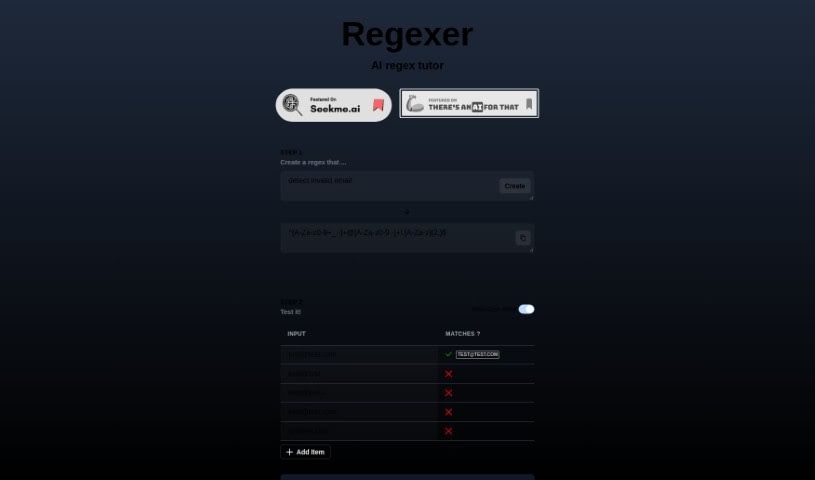
What is Regexer?
Regexer is a really helpful AI tutor designed specifically to help you get better at creating and testing regular expressions, or regex for short. It makes the whole process feel pretty straightforward. You can actually build your regex patterns right there in a Code Editor, which is super convenient for matching specific patterns within any text you’re working with. What’s great is that you get instant feedback – it’ll tell you right away if your regex is valid and what matches you can expect when you test it against different inputs. You’re totally free to tweak and play around with your regex patterns in the Code Editor, and you’ll see the results, like any replacements or matched parts of the text, right there in the console. One of the things that makes Regexer stand out is that it uses a simpler way of writing regex operations, which really helps make things more accessible for everyone. Plus, if you ever get stuck or need a bit of a hand, you can even chat with tutor support in Step 3. It’s a genuinely practical and supportive tool for anyone looking to sharpen their regex skills.
Who created Regexer?
Regexer was actually created by Jacopo Marrone. He launched it on January 19, 2023. Essentially, it’s an AI regex tutor that really simplifies how you create and test regular expressions. It comes with features like a handy Code Editor where you can build your regex patterns, and you get immediate feedback on any matches you find. Jacopo Marrone is the founder of the company behind Regexer, and they’ve really focused on making sure the experience is user-friendly for anyone who wants to get better at using regex.
What is Regexer used for?
- You can use it to craft and test your regular expressions.
- It’s great for matching specific patterns within any text you input.
- You can test your regex against all sorts of different inputs to see how it performs.
- It lets you modify and experiment with your regex patterns freely.
- You get immediate feedback on whether your regex is valid and what matches you should expect.
- It helps you clearly distinguish between matches that are valid and those that aren’t.
- You can see the results of any replacements you make and the specific substrings that were matched.
- If you run into challenges or need some clarification, you can interact with tutor support.
- It creates a really user-friendly experience, partly thanks to its simplified syntax.
- It serves as a practical and accessible resource for anyone wanting to hone their regex skills.
- You can check the validity of your regular expressions quickly.
- It provides immediate feedback on the validity of your regex.
- It’s a fantastic way to learn and practice regex, with tutorial support available.
- You can interact with tutor support if you need clarification on anything.
- It really helps streamline the entire process of creating and testing regex.
- It’s designed to enhance your skills in crafting and testing regex effectively.
Who is Regexer for?
Regexer is a great tool for a variety of professionals and individuals who work with text and data, including:
- Software developers
- Data scientists
- Web Developers
- Digital marketers
- Cybersecurity Analysts
- Data Analysts
- Researchers
- Data engineers
How to use Regexer?
To really get the most out of Regexer, here’s a breakdown of how to use it effectively:
- Launch Regexer: The first step is simply to open the tool. You can do this right in your favorite web browser. When you open it up, you’ll see a clean, uncluttered interface that’s all set and ready for you to start working with your regular expressions.
- Enter Text: Next, you’ll need to input the text that you want to analyze or manipulate using regular expressions. Just type it into the designated text field provided in the tool.
- Craft Your Regular Expression: Now comes the creative part! You’ll construct your regular expression pattern. Think carefully about the specific text patterns you’re trying to match or extract. You can use all the standard regex symbols you might need, like
^, $, (), [], or \, to help you build your pattern.
- Adjust Options: Most of the time, you’ll find there are options available that let you fine-tune your regex search even further. Common settings you might want to adjust include enabling case-insensitivity (so it doesn’t matter if letters are uppercase or lowercase), turning on multiline mode (which affects how
^ and $ work), or activating the global flag if you want to find all possible matches, not just the first one.
- Test Your Regex: Once you’ve crafted your pattern, use the “Test” or “Match” button. This is where you see how your regular expression actually performs on the text you entered. It’s a crucial step for identifying if it’s capturing exactly what you want, accurately.
- Refine and Iterate: If your regex isn’t quite working the way you expected, don’t worry! The key is to refine it iteratively. Try testing it on different parts of the text to make sure it’s robust and can handle all the variations you might encounter.
- Apply and Execute: When you’re happy with how your regex pattern is performing, go ahead and execute it on the text. You’ll then see the results, which will typically be your matches highlighted or extracted, depending on how you set up your expression.
- Further Processing: Depending on the specific features of the tool, you might have even more options. You could potentially replace text based on your regex, extract specific groups of captured data, or even save your regex patterns for later use.
- Practice and Learn: Regular expressions can be a bit intricate, so the best way to get good at them is through practice. Try working with all sorts of different texts. You can also explore online resources and tutorials to really deepen your understanding and learn how to tackle more complex patterns.
By following these steps and making sure you practice regularly, you’ll definitely become much more adept at using regular expressions effectively with Regexer.