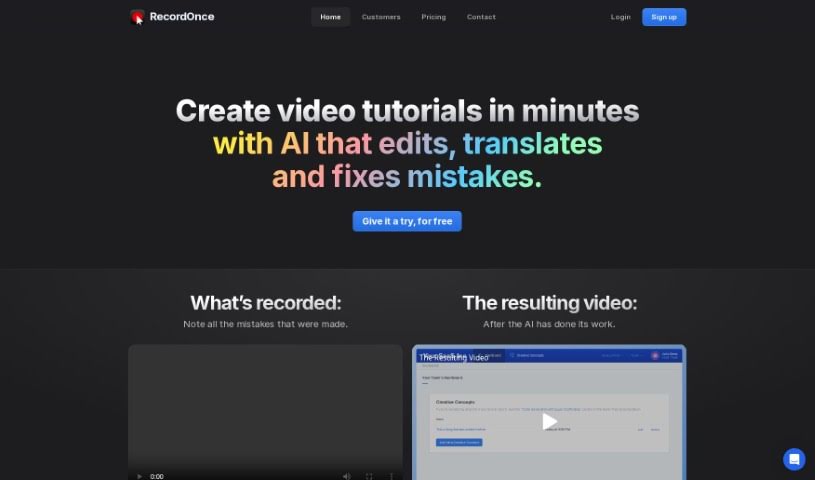
Screenshot of Record Once

Record Once

Discover what Record Once is and how to use it effectively in 2025. We'll explore its features and see how it stacks up against other video creation tools.

Screenshot

What is Record Once?

Record Once is a really neat tool that’s changing how we make video tutorials. It uses AI to make editing and improving your recordings super easy and fast. You can quickly record product demos, and the AI takes care of the editing for you, which really speeds things up. It even has a built-in browser recorder that can capture how web apps work at the HTML/CSS level. Plus, it adds automatic enhancements like voice-overs and text guides, and you get instant updates with hosting included, so your content is always current. It also helps keep your brand looking consistent across your whole team, even if nobody has advanced video editing skills.

With Record Once, you’ll find the whole process, from recording to getting your video out there, is really smooth. This is thanks to features like automatic editing, voice-overs, text guides, and the ability to publish quickly without needing to be a video editing whiz. The AI can even translate and fix mistakes, offering some pretty amazing editing capabilities that let you create high-quality videos really fast. It’s great for teams too, as it provides a consistent format, making it easy to share the workload on video creation.

Record Once is designed to overcome the limitations of older screen recording tools that just capture frames and pixels. Instead, it focuses on clearly showing and explaining concepts. This tool captures all the details of web apps, including how they interact, along with their HTML and CSS, to create attractive videos that the AI controls. By making video tutorial creation simpler and ensuring great results, Record Once empowers more people to create professional-looking tutorials quickly and without much effort.

Who created Record Once?

Joris Machielse, the Co-Founder of the company, created Record Once. The tool’s main goal is to transform how video tutorials are made by offering an AI-powered solution that quickly edits and enhances recordings. This means you can create professional-looking videos without needing advanced video editing skills. Record Once includes a built-in browser that captures web app interactions at the HTML/CSS level, allowing the AI to make adjustments on the fly for a smooth playback experience. The platform also provides automatic text guides, voice-overs, and allows for quick updates to published content. Plus, you get a visually stunning experience with 4K resolution and playback at over 120 FPS.

What is Record Once used for?

  • Using AI to edit and improve video recordings.
  • Quickly creating video tutorials.
  • Adding automatic text guides and voice-overs.
  • Updating existing content instantly.
  • Providing a format that’s great for teams and keeps brand consistency.
  • Capturing interactive web app sessions at the HTML/CSS level.
  • Instantly translating videos into many different languages.
  • Customizing AI training for translated content.
  • Publishing videos in 4K resolution and at over 120 FPS.
  • Including hosting for video tutorials.
  • Revolutionizing video tutorial creation with a user-friendly, AI-powered tool that quickly edits and improves recordings, removing the need for complex video editing skills.
  • Capturing interactive web app sessions at the HTML/CSS level to ensure high-quality video results.
  • Offering automatic enhancements like voice-overs, text guides, and automatic error correction for polished tutorials.
  • Enabling real-time updates to published videos, with hosting included, to keep content current.
  • Ensuring brand consistency across different team members without requiring video editing skills.
  • Recording one video and getting identical versions in multiple languages instantly, supporting all languages worldwide.
  • Translating voice-overs using AI to maintain a consistent voice across all videos in different languages.
  • Updating existing videos instantly to keep them in sync with product changes.
  • Allowing partial updates and replacing parts in existing videos, no matter when the first version was made.
  • Providing automatic text guides with screenshots, making it easy for anyone to create professional videos without needing video skills.
  • Recording product demos quickly, with AI handling the editing and mistake removal for a streamlined video creation process.
  • Utilizing AI for automated editing features to correct typos, add voice-overs, text guides, and improve the video’s appearance.
  • Capturing web app interactions at the HTML/CSS level for high-quality video output.
  • Ensuring fast app loading times during recording to improve the viewing experience.
  • Delivering high-quality videos at 4K resolution and over 120 FPS with small file sizes.
  • Allowing instant updates to published videos and including hosting for current content.
  • Facilitating team collaboration for brand consistency without needing video editing skills.
  • Generating professional tutorials quickly with automatic text guides, screenshots, and SEO-friendly content.
  • Supporting easy updates, even years later, by letting you replace parts of existing videos and maintain a consistent format across the team.
  • Providing smooth, 4K video playback at high frame rates without large file sizes.
  • Recording product demos quickly with automatic editing and mistake removal.
  • Capturing web app sessions in high quality by recording at the HTML/CSS level.
  • Offering automatic enhancements like voice-overs, text guides, and error correction for polished tutorials.
  • Enabling real-time updates to published videos with included hosting for current content.
  • Ensuring brand consistency with no need for video editing skills across team members.
  • Translating recorded apps into various languages for consistent voiceovers.
  • Updating existing videos instantly with features like partial updates and consistent format across teams.
  • Providing 4K resolution videos at over 120 FPS with small file sizes.
  • An easy-to-learn tool suitable for cross-platform use with automatic text guides and hosting included.
  • Revolutionizing screen recording by focusing on concepts rather than just frames and pixels.

Who is Record Once for?

  • Product Managers
  • Designers
  • Software developers
  • Engineers
  • Customer Support Specialists
  • Technical Writers
  • Developers
  • Startup Founders
  • Digital marketers

How to use Record Once?

Here’s how to get started with Record Once:

  1. Record: Start by recording your product demos quickly. The built-in browser captures web app interactions right at the HTML/CSS level.
  2. Edit Automatically: The AI then takes over, automatically editing and polishing your recording. It fixes mistakes, corrects typos, adds voice-overs, and generates text guides to give it a professional look.
  3. Enhance & Host: You can instantly update and host your videos. Hosting is included, so your content always stays current.
  4. Team Collaboration: Keep your brand looking consistent across all team members, even without needing video editing skills.
  5. Publish: You can go from recording to publishing in just minutes. Features like automatic voice-overs, text guides with screenshots, and even background music help make your videos look really professional.
  6. Translate: Record your video in one language, and get identical videos in multiple languages instantly. The AI translations can even be customized for accuracy.
  7. Update Easily: Need to update an existing video? You can do it instantly, replace specific parts, and keep the format consistent across your team.
  8. High-Quality Output: Enjoy videos in 4K resolution with high frame rates, all delivered in small file sizes for a great visual experience.

Record Once offers a really user-friendly experience with AI-powered features that make video creation and editing efficient. It’s a great fit for both new startups and bigger companies. Just start by recording your demos, let the AI handle the editing, and publish professional videos with total ease.

Related AI Tools

Discover more tools in similar categories that might interest you

Stay Updated with AI Tools

Get weekly updates on the latest AI tools, trends, and insights delivered to your inbox

Join 25,000+ AI enthusiasts. No spam, unsubscribe anytime.