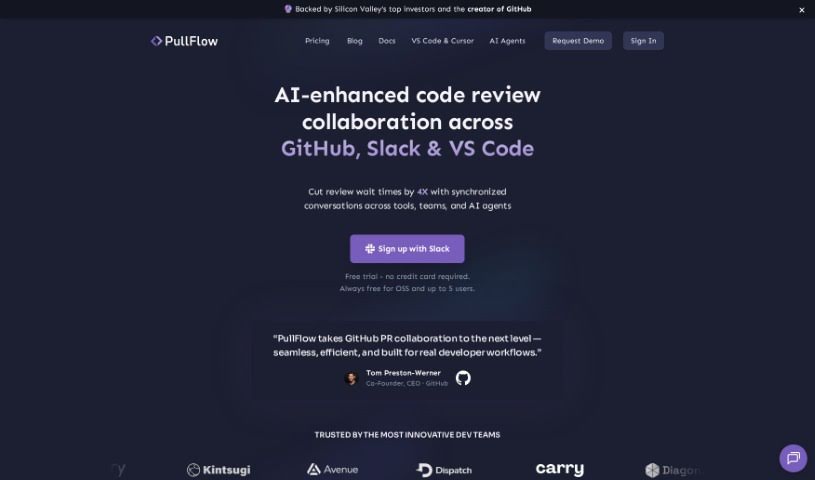
What is Pullflow?
Pullflow is a smart tool that uses AI to make code review collaboration smoother. It’s like a central hub where developers, systems, and AI can all chat together in sync. This handy tool works with popular platforms like GitHub, Slack, and Visual Studio Code, making teamwork and communication much easier. What makes Pullflow stand out is its ability to keep conversations flowing naturally across different platforms. Plus, it uses AI to offer helpful, context-aware answers right when you’re discussing code. It also gives you a clear, all-in-one view of your pull requests, from the very first draft all the way to deployment.
By keeping your user identities and code review activities in sync, Pullflow lets you take action quickly from wherever you are, without breaking your stride. You can even speed things up with simple chat mentions or keyboard shortcuts, meaning you don’t have to jump back to GitHub as often. Ultimately, Pullflow is designed to help teams work better together, speed up how quickly they review code, improve the quality of that code, and generally boost everyone’s productivity, all in a way that’s easy to use.
Who created Pullflow?
Pullflow, the AI-powered tool for making code reviews easier, first launched on May 31, 2023. The team behind it created it to bring developers, systems, and AI into a synchronized conversation, aiming to keep workflows running smoothly and cut down on switching between different apps. Pullflow was founded by a group of people who are really passionate about changing how teams collaborate on code. Their main focus is on improving teamwork, making code reviews happen faster, and ensuring better code quality by connecting seamlessly with platforms like GitHub, Slack, and Visual Studio Code.
What is Pullflow used for?
- It helps teams conduct code reviews more efficiently.
- It makes collaboration and communication better across platforms like GitHub, Slack, and Visual Studio Code.
- It uses AI to provide relevant answers during code review chats.
- It helps teams give feedback and answer questions directly within Slack conversations.
- It keeps conversations flowing smoothly between developers, systems, and AI.
- You can get a quick look at your pending Pull Requests right in Slack and Visual Studio Code.
- It lets you join PR conversations, take action, set reminders, and do more.
- It connects with GitHub Actions, external CI/CD pipelines, GitHub Apps, and more, giving you a single place to see all your pull requests.
- It offers features like ChatOps, which allow for quick actions using chat mentions or keyboard shortcuts in your IDE.
- This means you won’t need to go back to GitHub as often.
- It synchronizes conversations among developers, systems, and AI.
- It integrates with GitHub, Slack, and Visual Studio Code.
- It keeps conversations in sync across different platforms.
- It uses AI to provide answers based on the context of code review discussions.
- You can see pending Pull Requests in Slack and Visual Studio Code.
- It integrates with GitHub Actions, external CI/CD, GitHub Apps, and so on.
- ChatOps allows for quick actions via chat mentions or keyboard shortcuts in your IDE.
- It helps with giving feedback and answering questions within Slack conversations.
Who is Pullflow for?
- Developers
- Systems administrators
- AI specialists
- Anyone on a team working together
How to use Pullflow?
If you want to use Pullflow to make your code reviews much more efficient, here’s how to get started:
- Connect Your Accounts: First, you’ll need to link your GitHub and Slack accounts in Pullflow. This sets up automatic syncing so everything stays up-to-date.
- See the Benefits: Once set up, you’ll notice better teamwork, quicker code reviews, higher code quality, and a general boost in productivity.
- How Access Works: Pullflow only looks at messages in channels where you’ve invited the Pullflow bot. It specifically processes messages within threads that are related to pull requests.
- Your Code is Safe: Pullflow doesn’t actually look at your source code itself. It only asks for permission to see pull request details and comments.
- Choose Your Repositories: You get to decide which GitHub repositories Pullflow can access. You do this by authorizing them through your GitHub account settings.
- Who Can Join: Any member of your Slack workspace can sign up for Pullflow. However, to get it set up, you’ll need admin access to your GitHub organization.
- What You Get: You can start with essential features for code review and team coordination at no cost. As your team grows and needs more, there are options for advanced collaboration tools and enterprise-level features.
By following these simple steps, you can really make the most of Pullflow’s AI features to smooth out your code review process and help your team be more productive.