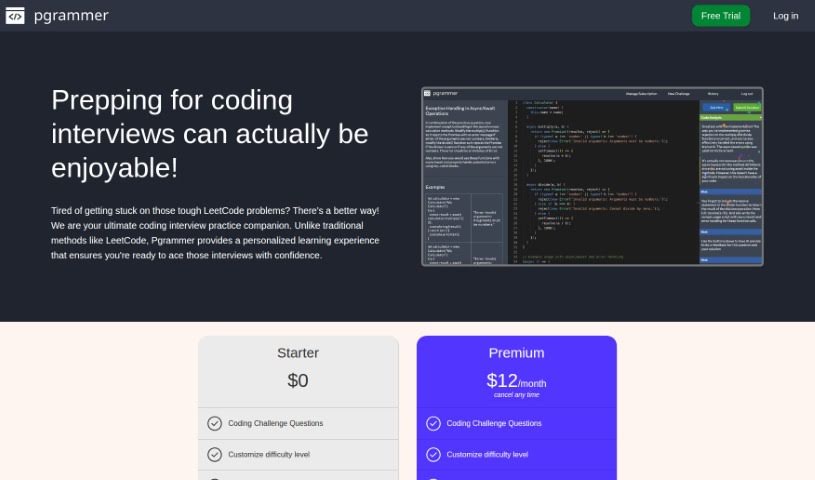
What is Pgrammer?
Pgrammer is a really smart tool designed to make your coding interview preparation feel more personal and effective. It creates a learning path just for you, no matter your current skill level or what kind of interviews you’re facing. What’s cool is that it supports over 20 different programming languages. Plus, it uses the latest AI technology, specifically GPT-4, to give you a practice interview that feels incredibly real and interactive. You’ll get helpful hints right when you need them, detailed feedback on your code solutions, and you can even adjust the settings to match your experience and how confident you feel. Pgrammer also covers frontend UI questions, so you can practice with HTML, CSS, JavaScript, and popular frameworks like React and Svelt.
Who created Pgrammer?
Pgrammer was actually started by a group of engineers who know a thing or two about succeeding at big tech companies like FAANG. They noticed that preparing for coding interviews often felt a bit generic, not quite matching the real-world experience you gain on the job. That’s why they built Pgrammer to offer a truly personalized way to get ready. It covers more than 20 programming languages and uses advanced AI, like GPT-4, to create a practice environment that’s both interactive and feels like a genuine interview. What really sets Pgrammer apart is how it tailors the learning experience and provides those timely hints that help guide you through tough problems.
What is Pgrammer used for?
Pgrammer is a fantastic resource for several key things:
- Getting Ready for Coding Interviews: It’s your go-to for practicing and feeling confident.
- Coding Challenges: You’ll find questions across more than 20 programming languages.
- Customized Difficulty: You can easily adjust how hard the coding challenges are to fit your level.
- Real-Time Hints: If you get stuck, Pgrammer offers hints to help you move forward.
- Solution Analysis: It breaks down your code, helping you understand how to improve your skills and knowledge.
- Saving Your Progress: You can keep a history of your coding challenges to review and see how you’ve improved.
- Detailed Feedback: Pgrammer gives you thorough feedback on the solutions you submit.
- Frontend UI Practice: It also supports frontend UI questions, covering languages like HTML, CSS, JavaScript, and TypeScript.
- Code Interpretation & Deep Analysis: The system can interpret your code, offer hints, and really dig into analyzing your solutions.
- Reshaping Your Learning: It transforms the whole interview prep process into a personalized journey.
- Boosting Confidence: Ultimately, it helps candidates feel more prepared and confident when facing interview questions.
Who is Pgrammer for?
Pgrammer is a great tool for anyone involved in the software development world, including:
- Software Engineers
- Developers
- Programmers
- Technical Interviewers (who might use it to practice or understand the candidate experience)
How to use Pgrammer?
Ready to dive in? Here’s how to get the most out of Pgrammer:
- Get Started: First, sign up for Pgrammer. You can choose their free Starter plan or opt for the Premium plan at $12 per month.
- Pick a Challenge: Once you’re in, select a coding challenge that interests you. You can also customize the difficulty level to match your current experience.
- Code Away: Practice your coding skills using any of the over 20 programming languages Pgrammer supports. The platform’s tools are there to help.
- Use the Hints: Don’t hesitate to use the real-time hints if you get stuck. They’re designed to guide you and help you learn.
- Review Your Solutions: After you’ve submitted your code, you’ll get comprehensive feedback. This is super helpful for spotting what you’re doing well and where you can improve.
- Ask Follow-Up Questions: If you want to really understand a concept, you can ask for follow-up questions to dive deeper.
- Experience the AI: Take full advantage of Pgrammer’s AI system, powered by GPT-4. It creates an interactive and realistic interview experience that’s hard to beat.
- Explore Frontend UI: If you’re interested in frontend, be sure to check out the UI questions available in languages like HTML, CSS, JavaScript, and TypeScript.
- Reach Out: Have questions about other languages or what’s coming next? Feel free to contact Pgrammer’s team.
- Enjoy Personalized Learning: Embrace the personalized learning experience. Pgrammer is all about making sure you feel completely ready for your coding interviews.
By following these steps, you’ll be well on your way to making the most of Pgrammer’s innovative platform for your coding interview preparation.