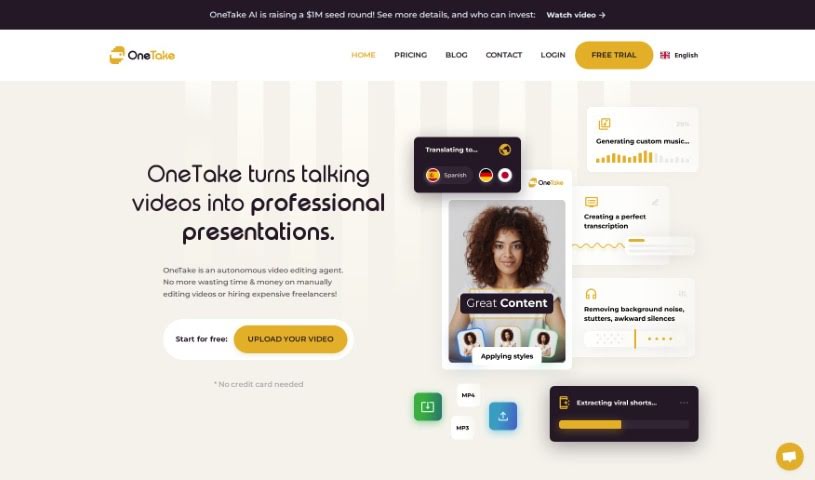
What is OneTake AI?
OneTake AI is a smart tool designed to make video editing much simpler for entrepreneurs. It uses artificial intelligence to help you out. You can get transcriptions, translate your videos into different languages, dub them, sync lips, write scripts, and even add animations, transitions, and improve your audio. Basically, itâs built to help content creators make their videos look and sound great without a lot of hassle.
Who created OneTake AI?
John Carter, the Co-founder and CEO, created OneTake AI. His company, which used to be called Nuro.video, is all about helping entrepreneurs by automating video editing with AI. The platform offers features like one-click editing, it can handle multiple languages, it helps with content and scripts, offers lots of customization, and makes it easy to share your videos everywhere. The team is guided by values like making things accessible, working together, aiming for excellence, embracing innovation, empowering users, and being responsible. OneTake AI wants to help businesses of all sizes create high-quality videos efficiently.
What is OneTake AI used for?
- Simplify video editing: Use one-click editing to speed things up.
- Go global: Translate and dub your videos into six languages.
- Get content ideas: AI helps suggest content and write scripts.
- Make videos shine: Customize with animations, transitions, and better audio.
- Share easily: Export your videos with one click to various platforms.
- Work with multiple languages: It supports transcribing and editing from different languages.
- Create shareable content: Get links with your video, searchable transcripts, and key moments.
- Reach more viewers: It automatically detects and switches to the viewerâs language.
- Get help with content and scripts: AI offers suggestions to guide you.
- Improve audio quality: It automatically removes background noise and adjusts volume for clear sound.
- Easy editing with the âMagic Buttonâ: Streamline your video editing process.
- Translate and dub videos: Reach a global audience with multilingual capabilities.
- Add visual flair: Customize videos with animations and transitions.
- Distribute effortlessly: Export videos with a single click to many platforms.
- Translate and localize: Adapt your content into six different languages.
- Optimize audio: Automatically remove background noise and fine-tune sound.
- Create marketing materials: Generate copy for ads and sales videos.
- Get MP3 audio: Create downloadable MP3 versions of your content.
- Host your videos: Use an easy-to-integrate player.
- Podcast-ready audio: Achieve perfect, world-standard podcast loudness.
- Keep your voice: It preserves your voice and applies the same enhancements to translated versions.
- Choose your style: Pick from many video styles and color palettes.
- Control text display: Decide how much text (titles, subtitles) appears.
- White label your content: Host videos on your own domain.
- Embeddable player: Host videos with an easy-to-integrate player.
- Player customization: Adjust the playerâs colors and overall look.
- Shareable links: Generate links with video and searchable transcripts.
- Auto-detect language: Switches to the viewerâs language automatically.
- Easy content distribution: Share content with easily shareable links.
- One-click exports: Send your videos to various platforms quickly.
- Podcast conversions: Convert your content into podcast formats.
Who is OneTake AI for?
- Entrepreneurs
- Content creators
- Online Marketers
- Course Creators
- Authors
- Coaches
- Consultants
How to use OneTake AI?
Hereâs how you can get started with OneTake AI:
- Import Your Video: First, upload your raw video footage into the OneTake AI platform.
- Hit the âMagic Buttonâ: Click the âMagic Buttonâ to start the AIâs automated editing. This one click handles transcriptions, language translation, dubbing, lip-syncing, script suggestions, animations, transitions, and audio improvements all at once.
- Customize It: Make your videos your own using the advanced customization options. You can add animations, transitions, and tweak the audio to match your brand.
- Translate and Localize: OneTake AI lets you translate and adapt your content into six languages, helping you connect with a global audience authentically.
- Distribute Your Content: The platform makes sharing easy. You can get shareable links, export with one click to different platforms, or convert your content for podcasts.
- Share Your Videos: Share your edited videos using special URLs, embed them on your website, or send them directly to social media and video sites.
- Check FAQs and Get Support: If you have questions about editing, translation accuracy, video limits, controls, sharing, or mobile use, check out the FAQs.
- Give Feedback: OneTake AI learns from your content to offer more accurate and personalized editing, ensuring your videos always look professional and keep your audience engaged.
By following these steps, you can easily use OneTake AIâs features to make your video content better.