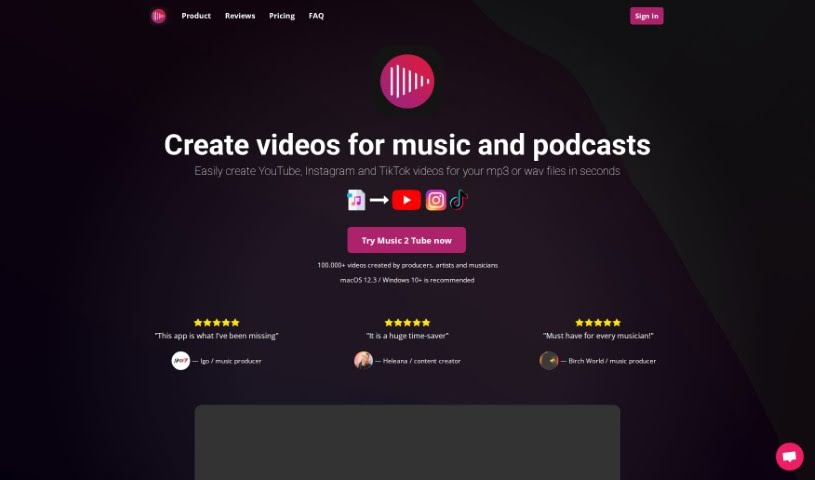
Screenshot of Music 2 Tube

Music 2 Tube

Discover what Music 2 Tube is and learn how to use it effectively in 2025. We'll explore its features and see how it stacks up against other video creation tools.

Screenshot

What is Music 2 Tube?

Music 2 Tube is a handy platform designed to help you create and upload videos for your music, beats, and podcasts. It’s packed with features to make video creation a breeze. You can whip up beat videos in bulk, upload an unlimited number of videos to YouTube, and even schedule your uploads. Plus, you can really make your videos your own by customizing elements, adding cool effects like background blur, and applying watermarks. It also plays nicely with cloud storage, including your Google Drive files, making it super easy to create videos for YouTube, Instagram, and TikTok. You can even add your branding to the videos. What’s great is that it supports MP3 and WAV audio formats and doesn’t re-render your audio, so the quality stays top-notch.

Who created Music 2 Tube?

Brit G. and his team are behind Music 2 Tube. They launched the platform on January 17, 2024. It’s built to help musicians and content creators easily make and upload videos for their beats, songs, and podcasts. The platform lets you create unlimited videos, supports various video formats, and offers lots of customization options. They also ensure secure logins through Google. If you need help, customer support is available, and they offer different subscription plans along with a money-back guarantee.

What is Music 2 Tube used for?

Here’s a look at what you can do with Music 2 Tube:

  • Create multiple beat videos from your audio files all at once.
  • Upload as many videos as you want to YouTube.
  • Set up automatic uploads to YouTube right after your video is ready.
  • Schedule when your videos go live.
  • Keep your beat audio sounding its best.
  • Export videos perfectly formatted for YouTube and Instagram.
  • Create videos that work for YouTube, Instagram, Reels, Shorts, and TikTok.
  • Make beat videos that include GIF animations.
  • Customize different parts of your videos.
  • Add effects, like blurring the background image.
  • Schedule your video uploads to go out at a specific time.
  • Tailor video elements to match your style.
  • Add overlays, such as a VHS look or film grain.
  • Blur the background images in your videos.
  • Add watermarks to show your ownership.
  • Add watermarks to your videos.
  • Use GIF animations in your videos.
  • Connect with cloud storage for your files.
  • Render videos even when you’re not online.
  • Apply various overlays and effects.
  • Use GIF animations.
  • Access files directly from your Google Drive.
  • Add watermarks to your videos.
  • Apply overlays like VHS effects, grain, and more.
  • Use files from Google Drive and other cloud services.
  • Generate beat videos that feature GIF animations.
  • Supports cloud storage for your files.
  • Render videos offline.

Who is Music 2 Tube for?

  • Musicians
  • Podcasters

How to use Music 2 Tube?

Want to get the most out of Music 2 Tube? Just follow these simple steps:

  1. Create Videos in Bulk:
    • Simply drag and drop your audio files. This lets you create lots of beat videos all at the same time, saving you a ton of time.
  2. Make It Your Own:
    • You can change up all sorts of video parts. Think about customizing your image covers, adding cool effects, using overlays, and putting on watermarks to really make your brand stand out.
  3. Upload Your Videos:
    • You can upload your finished videos straight to YouTube, Instagram, and TikTok without any hassle.
  4. Set Up Defaults:
    • To save time on future uploads, you can set default video details. This means you won’t have to type in the same information over and over.
  5. Keep Audio Quality High:
    • Music 2 Tube is designed to keep your original audio quality intact. It doesn’t re-render the audio, so it sounds just as good as the original file.
  6. Automate Uploads:
    • Once your video is rendered, it can be automatically uploaded to YouTube for you.
  7. Use GIFs:
    • You can add GIF animations to your videos to make them more dynamic and engaging.
  8. Connect to the Cloud:
    • Need to use files stored online? Music 2 Tube lets you access files from Google Drive, making your video creation process smoother.
  9. Work Offline:
    • You can render your videos even if you don’t have an internet connection.
  10. Get Help When You Need It:
    • If you have any questions or run into issues, you can always reach out to their technical support team via email.

Following these steps should help you create and upload great videos with Music 2 Tube really easily, whether you’re posting to YouTube, Instagram, or TikTok. It’s a straightforward way to get your content out there.

Just a heads-up, make sure your computer meets the recommended specs to ensure everything runs as smoothly as possible.

Related AI Tools

Discover more tools in similar categories that might interest you

Stay Updated with AI Tools

Get weekly updates on the latest AI tools, trends, and insights delivered to your inbox

Join 25,000+ AI enthusiasts. No spam, unsubscribe anytime.