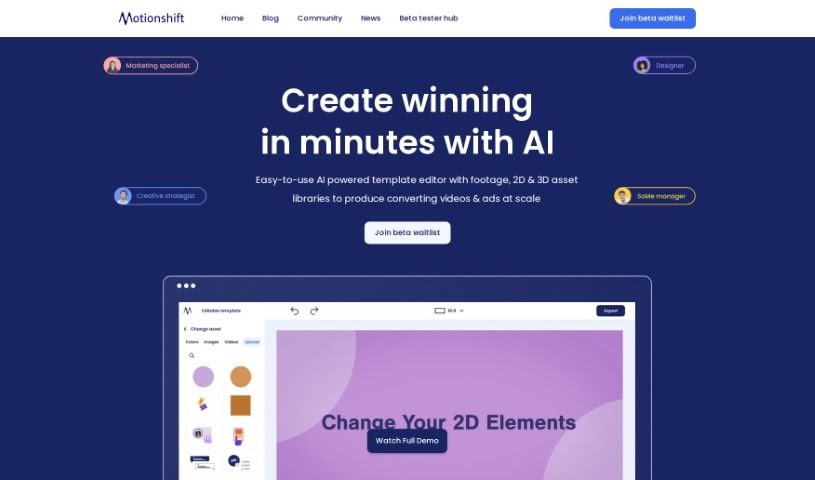
Screenshot of Motionshift

Motionshift

Discover what Motionshift is and how to use it effectively in 2025. We'll explore its features and see how it stacks up against other Video Creation Tools.

Screenshot

What is Motionshift?

Motionshift is a platform that’s really changing how we create digital content. It offers a super user-friendly space where you can quickly produce impactful 2D and 3D videos. You can craft compelling videos that make a lasting impression, even if you don’t have a ton of design experience. How? By using an AI-powered template editor along with a huge library of footage and 2D & 3D assets. This means you can generate high-converting videos and ads efficiently. The platform also provides customizable templates, all tailored for different industries and backed by research-driven insights, giving you a real edge. So, whether you’re a digital marketing pro, a brand manager, a creative director, or running a small business, Motionshift is built to boost your video marketing game. Want to be one of the first to try it? Joining the beta waitlist means you’ll get early access to this innovative tool and can start elevating your digital marketing strategies right away.

Key Features of Motionshift:

  1. AI-Powered Template Editor: This makes creating videos and ads a breeze, giving you access to extensive libraries.
  2. 2D & 3D Videos: You can create both 2D and 3D videos, which is great for meeting all sorts of marketing needs.
  3. Customizable Templates: They offer free templates that are already optimized for success across different industries.
  4. Beta Testing Access: You can get early access by joining the beta waitlist.
  5. Engaging Video Interaction: Videos automatically play when you hover over them, keeping users captivated with built-in play and pause functionality.

FAQs About Motionshift:

  1. What is Motionshift? – It’s a platform that lets you create 2D and 3D videos without needing any design skills.
  2. Who can benefit from Motionshift? – Lots of people! Think digital marketers, small business owners, and many other professionals.
  3. Do I need design skills for Motionshift? – Nope, the platform is really user-friendly for making powerful videos.
  4. How do I join the Motionshift beta waitlist? – Just sign up on their website for early access.
  5. What types of videos can I create? – You can make both 2D and 3D videos using the AI-powered template editor.

Categories: Video Editing, AI-Powered, 3D Videos, 2D Videos, Template Editor, Digital Marketing, Social Media, Brand Management, Creative Direction

This overview gives you a good look at what Motionshift can do and why it’s beneficial for a wide range of professionals who want to improve their video marketing.

Who created Motionshift?

Motionshift was actually created to really shake up digital content creation. It’s designed to be an easy-to-use platform for making impactful 2D and 3D videos in just minutes. While the document doesn’t mention the founder by name, the platform itself is built to help various professionals like digital marketing specialists, brand managers, and small business owners. It does this by offering AI-powered template editing, a bunch of customizable templates, and the chance to get early access through a beta waitlist.

What is Motionshift used for?

  • You can create really powerful 2D and 3D videos.
  • It helps you attract, engage, and convert audiences with ads that really catch the eye.
  • You’re able to produce high-converting videos and ads at scale, meaning you can make a lot of them efficiently.
  • You get access to video and ad templates that are already optimized for different industries.
  • It’s a great way to elevate your video marketing game, whether you’re a digital marketing specialist, brand manager, art director, or small business owner.
  • You can create winning 2D and 3D videos in just minutes.
  • Design powerful videos without needing any design skills at all.
  • Make videos that engage users by playing automatically on hover, with simple play and pause functionality.
  • Generate conversion-focused video ad creatives directly from URLs in seconds using AI.
  • Edit videos and animations easily because it uses pre-animated and pre-composed templates.
  • Create unique video experiences that are sure to intrigue your audience.
  • You can create both 2D and 3D videos to meet all sorts of diverse marketing needs.
  • Design powerful videos even if you don’t have any design experience.
  • Access free and customizable templates that are optimized for success across various industries.
  • Drive more traffic to your content with video experiences that you can scale.
  • Engage your audience on a deeper level by creating unique video experiences.
  • Convert your website URLs into video ads using AI technology.
  • Streamline your video production process with an easy-to-use template editor.
  • Enhance your video marketing efforts, especially if you’re a digital marketing specialist, brand manager, art director, or small business owner.
  • It’s great for creating 2D and 3D videos for all sorts of marketing needs.
  • Design powerful and engaging videos specifically for digital marketing.
  • Produce high-converting videos and ads at scale.
  • Attract, engage, and convert audiences with eye-catching ads.
  • Get video and ad templates that are optimized for various industries.
  • Boost your video marketing efforts as a digital marketing specialist, brand manager, art director, or small business owner.
  • Easily create videos without needing any design skills.
  • Customize templates to ensure success across different industries.
  • Generate video ad creatives from URLs using AI capabilities.
  • Create engaging video experiences that drive more traffic and really connect with audiences.
  • Design powerful videos and ads no matter your level of design experience.
  • Access free and customizable templates that are optimized for success across various industries.
  • Elevate your video marketing game as a digital marketing specialist, brand manager, art director, or small business owner.
  • Import designs from various 2D and 3D file formats with just one click.
  • Create video campaigns easily and quickly.
  • Drive more traffic with engaging video experiences at scale.
  • Create new and unique video experiences that are sure to intrigue audiences.
  • Create winning 2D and 3D videos in minutes, no design skills needed.
  • Produce high-converting videos and ads at scale using the AI-powered template editor.
  • Enhance video marketing strategies for digital marketing specialists, brand managers, art directors, and small business owners.
  • Benefit digital marketing agencies, social media managers, small businesses, motion designers, advertising agencies, and more.
  • Create both 2D and 3D videos.
  • Utilize customizable templates for various industries.
  • Join the beta waitlist to get early access to Motionshift.
  • Enhance user engagement with videos that play on hover and have automatic play and pause functionality.

Who is Motionshift for?

  • Digital marketing agencies
  • Social media managers
  • Small businesses
  • Art Directors
  • Motion designers
  • Brand managers
  • Advertising Agencies
  • Creative Directors

How to use Motionshift?

Motionshift is a really user-friendly platform, making it effortless to create impactful 2D and 3D videos. To get the most out of this tool, here’s a simple breakdown of how to get started:

  1. Sign up: First, register for the beta waitlist on the Motionshift website. This will give you early access to the platform.
  2. Explore Templates: Dive into the AI-powered template editor. It’s packed with a wide range of footage and asset libraries, making video and ad creation super easy.
  3. Customize Videos: You can access customizable templates that are already optimized for success in various industries. This lets you tailor your content perfectly to your specific needs.
  4. Create 2D & 3D Videos: Take advantage of the feature that lets you create both 2D and 3D videos, which is fantastic for meeting all sorts of diverse marketing requirements.
  5. Engage Users: Make your videos more interactive. You can add elements like videos that play on hover, automatically grabbing users’ attention with their play and pause functionality.
  6. No Design Skills Required: Remember, Motionshift is designed for everyone, even if you don’t have design skills. This makes it accessible to a broad range of professionals, including digital marketing agencies, small businesses, art directors, and many others.
  7. Frequently Asked Questions: If you have questions, the FAQs section on the platform is a great place to find quick answers to common queries about Motionshift.

By following these steps, you’ll be able to use Motionshift to create compelling videos and really boost your digital marketing strategies effectively.

Related AI Tools

Discover more tools in similar categories that might interest you

Stay Updated with AI Tools

Get weekly updates on the latest AI tools, trends, and insights delivered to your inbox

Join 25,000+ AI enthusiasts. No spam, unsubscribe anytime.