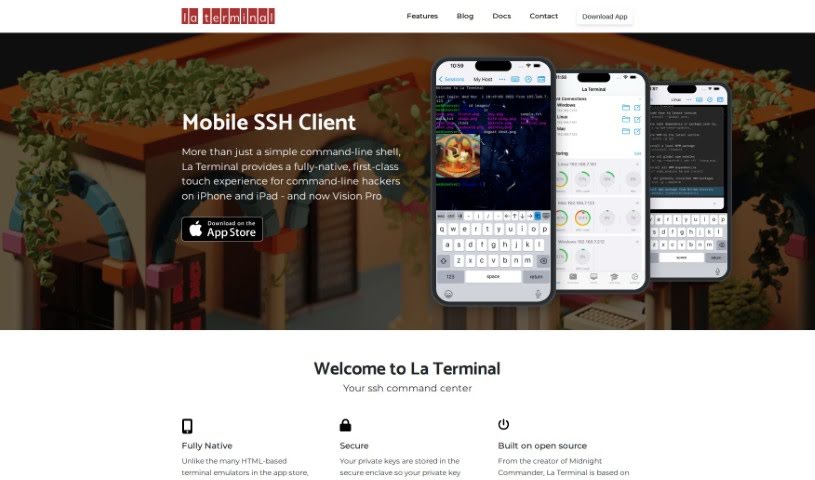
Screenshot of La Terminal

La Terminal

Discover La Terminal, a powerful native SSH client for iOS in 2025. Learn its features, how it stacks up against other development tools, and how to use it effectively.

Screenshot

What is La Terminal?

La Terminal is a really advanced SSH client app built specifically for iOS. It’s designed to give you a much better touch experience when you’re working with the command line on your iPhone or iPad. Unlike terminal emulators that are built on web technology, La Terminal uses a completely native interface. This means it feels super smooth and responsive, which is a big deal when you’re typing commands.

A standout feature is how it keeps your private keys super safe by storing them in the secure enclave. This really boosts your data protection. The app also uses open-source technology, specifically the SwiftTerm library, which packs in a lot of powerful features for anyone who’s serious about the command line. Plus, it syncs your settings and keys across your devices using iCloud, offers themes you can customize, shows you resource monitors, lets you manage files, and supports keyboards from all over the world. It was actually developed by the person who created Midnight Commander, and their goal is to offer the absolute best mobile command-line experience out there.

Who created La Terminal?

La Terminal was brought to life by the founder of Midnight Commander. The team behind La Terminal is all about creating a top-notch SSH client app for iOS. They’ve focused on a fully native interface, making sure it’s secure with features like storing private keys safely, and adding cool innovations like AI that helps guide you with commands. Beyond just useful tools like resource monitors and file management, the app really shines with its smooth iCloud integration, letting you sync everything across your devices effortlessly. Their aim is to provide the best possible mobile command-line experience for people who need it on the go.

What is La Terminal used for?

  • It offers a much better touch experience for anyone using the command line on an iPhone or iPad.
  • It keeps your data secure by storing private keys in the secure enclave, so they aren’t just sitting there in plain text.
  • You get helpful features like Command Search and AI assistance to make running commands more intuitive.
  • It syncs your settings and keys across all your devices seamlessly using iCloud.
  • You can personalize it with custom themes and even live-effect backgrounds for a bit of flair.
  • It includes practical tools like resource monitors to keep an eye on things and robust file management capabilities.
  • It supports international keyboards, so you can type in different languages.
  • It’s built using the SwiftTerm library, which means it’s packed with features for experienced command-line users.
  • It works across different platforms, including Linux, Mac, and Windows.
  • It was developed by the creator of Midnight Commander, aiming to provide the best mobile command-line experience possible.
  • It’s an SSH client app specifically designed for iOS.
  • Its fully-native interface ensures interactions are smooth and responsive.
  • It prioritizes security by storing private keys safely within the enclave.
  • It leverages open-source technology and offers many features for command-line experts.
  • It includes Command Search and AI assistance to help you find and run commands easily.
  • You can customize themes, use live-effect backgrounds, and monitor resources.
  • File management is versatile, with a built-in SFTP client and support for the Apple Files app.
  • It offers international keyboard support and aims to provide the best mobile command-line experience.
  • It’s an SSH client app for iOS.
  • It features a fully-native interface.
  • Its security-first approach means private keys are stored securely in the enclave.
  • It provides AI-powered command guidance.
  • It offers versatile file management through an integrated SFTP client.
  • It syncs settings and keys across devices via iCloud.
  • You can customize themes and use live-effect backgrounds.
  • It includes resource monitors to help you keep track of resource usage.

Who is La Terminal for?

  • Anyone who uses the command line.
  • People who use SSH clients.

How to use La Terminal?

Here’s how you can get started with La Terminal:

  1. Interface:
    • La Terminal boasts a fully native interface, which really makes for a superior touch experience on iOS devices.
    • Because it’s native, it feels incredibly smooth and responsive, unlike terminal emulators that are based on web tech.
  2. Security:
    • Your private keys are kept safe and sound in the secure enclave. This is a big plus for data protection, as it greatly reduces the risk of your keys being exposed in plain text.
  3. Command Assistance:
    • You can use El Copiloto, which is an AI assistant, to help you run commands more intuitively. It really simplifies the process, especially if you’re not sure about a specific command.
  4. File Management:
    • It comes with a built-in SFTP client, making file management really flexible.
    • You can easily navigate through local and remote files, either using Apple’s Files app or other apps that work with Apple’s File Provider system.
  5. Cross-Device Sync:
    • La Terminal lets you sync your settings and keys across all your devices using iCloud. This means you can switch between your iPhone and iPad without missing a beat.
  6. Customization and Practical Tools:
    • You can personalize your experience by customizing themes and backgrounds, making it look just how you like it.
    • It also includes handy tools like resource monitors to keep an eye on performance, plus international keyboard support.
  7. Compatibility and Features:
    • La Terminal is compatible with Linux, Mac, and Windows, offering a complete solution no matter what platform you’re on.
    • Features like Command Search are really useful for finding, running, and even writing terminal commands just by describing what you want in plain English.

By following these steps, you’ll be able to get the most out of La Terminal’s advanced SSH client features and enjoy a top-tier command-line experience right on your iPhone and iPad.

Related AI Tools

Discover more tools in similar categories that might interest you

Stay Updated with AI Tools

Get weekly updates on the latest AI tools, trends, and insights delivered to your inbox

Join 25,000+ AI enthusiasts. No spam, unsubscribe anytime.