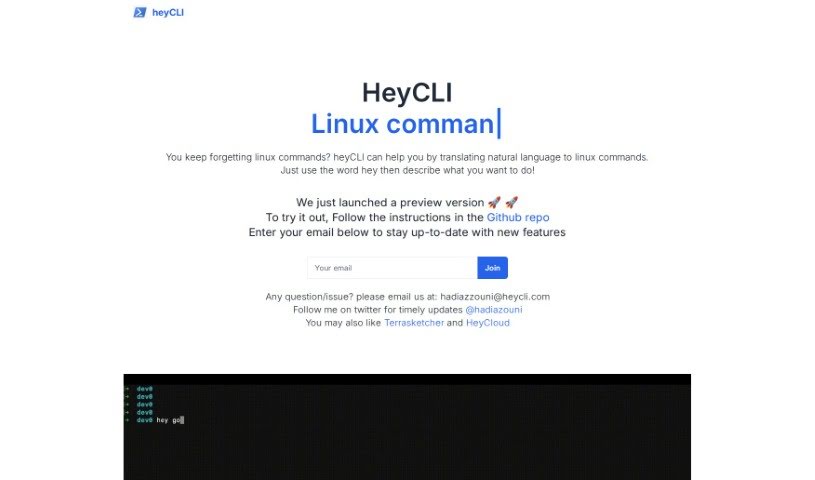
What is heyCLI?
HeyCLI is a really handy tool that lets you run Linux commands just by speaking or typing in plain English. It makes working with Linux much simpler because you don’t have to remember all those tricky command lines or coding syntax anymore. Just type what you want to do in English, and HeyCLI figures out the right Linux commands. This means you can easily move between folders, create or delete files, install or remove software, change permissions, and a whole lot more. It’s pretty smart, offering suggestions as you type and explaining exactly what each command does, complete with examples. This makes it a great asset for anyone using Linux, whether you’re just starting out or you’re a seasoned pro.
Who created heyCLI?
Hadia Z is the creator behind HeyCLI, as you can see from the provided email address ([email protected]). This tool is designed to let users run Linux commands using natural language, so you don’t need to memorize complicated command lines. HeyCLI really simplifies how you interact with the Linux operating system by turning your plain English requests into the correct Linux commands. It’s got a user-friendly interface, helpful autocomplete suggestions, and clear explanations for each command, which can really boost productivity for developers, system administrators, and anyone who uses Linux.
What is heyCLI used for?
HeyCLI is fantastic for a variety of tasks:
- Running Linux commands: You can simply tell it what you need in English.
- Navigating your system: Easily move through different directories.
- File management: Create and delete files without complex commands.
- Software management: Install and uninstall packages smoothly.
- Permission control: Manage file and directory permissions.
- Helpful assistance: Get suggestions and autocomplete as you type.
- Learning and understanding: Access detailed explanations and examples for every command.
- Boosting productivity: It’s a real time-saver for developers and system administrators.
- Simplifying the terminal: Makes interacting with Linux much more straightforward.
- Efficient task completion: Empowers you to get things done faster.
- Easy navigation: Move around your file system with ease.
- Command clarity: Understand exactly what each command does with clear examples.
- User-friendly experience: Great for both developers and system administrators.
- Saving time: Converts your natural language into Linux commands quickly.
- Natural interaction: Talk to your Linux system using everyday language.
- Basic operations: Handle tasks like navigating directories and managing files.
- Terminal ease: Simplifies working in the terminal using plain English.
- Productivity boost: Helps developers and system administrators work more efficiently.
- Smart suggestions: Offers autocomplete and helpful command prompts.
- Command insights: Provides detailed explanations and examples.
- No memorization needed: Forget about memorizing complex command structures.
- Accessibility: Makes the terminal accessible for everyone, from beginners to experts.
- Smart suggestions: Get autocomplete and command prompts to help you out.
- Command insights: Access detailed explanations and examples for each command.
- Productivity boost: Helps developers, system administrators, and Linux users work more efficiently.
- No memorization needed: You don’t have to memorize complex command structures anymore.
- Time-saving: Converts natural language input into Linux commands, saving you effort.
Who is heyCLI for?
HeyCLI is a great tool for:
- Developers
- System Administrators
- Anyone who uses Linux
- Developers
- System Administrators
How to use heyCLI?
HeyCLI is designed to be super user-friendly, making it easy to run Linux commands just by using natural language. This really simplifies how you interact with the Linux operating system. Here’s a straightforward guide on how to get started with HeyCLI:
- Get it installed: First, head over to the HeyCLI GitHub repository at https://github.com/HeyCLI/heyCLI_client to find and download the tool.
- Start using it: Once it’s installed, just open up the HeyCLI interface. You can begin by typing “hey” followed by a description of what you want to do, all in plain English.
- Try out some commands: You can do things like move between directories, create or delete files, install new software, or manage permissions – just by typing your request in English.
- Get help with suggestions: HeyCLI offers helpful autocomplete suggestions, which can speed up your commands and ensure you’re typing them correctly.
- Learn as you go: This tool also provides detailed explanations and examples for each command. It’s a fantastic way to learn more about Linux, whether you’re a beginner or have been using it for years.
- Boost your productivity: HeyCLI is a big help for developers, system administrators, and any Linux user. It makes your work more efficient by smoothly converting your natural language requests into the necessary Linux commands.
- More info: If you want to stay updated or have questions, you can reach out to the HeyCLI team via email at [email protected] or follow them on Twitter @hadiazouni.
With HeyCLI, you can finally stop worrying about remembering and typing out long, complicated command lines. It puts the power of the terminal right at your fingertips, using language you already understand. Give HeyCLI a try today and enjoy a much simpler and more efficient Linux command experience!