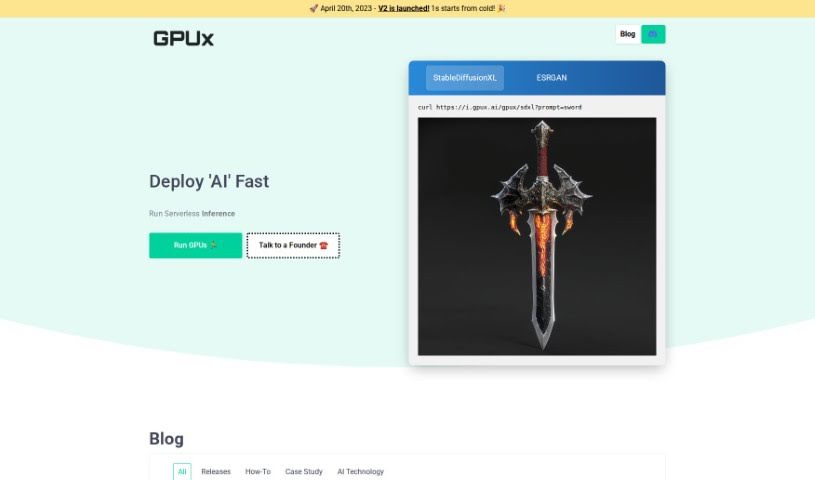
Screenshot of GPUX AI

GPUX AI

Discover what GPUX AI is and learn how to use it effectively in 2025. We'll explore its features and see how it stacks up against other Software Development Tools.

Screenshot

What is GPUX AI?

GPUX AI is a cutting-edge artificial intelligence (AI) technology built to boost GPU performance. It is a smart system that fine-tunes how your GPU is used. It does this by constantly looking at real-time data and how you’re interacting with it, then adjusting settings on the fly. This means you get the most out of your GPU, whether you’re gaming or tackling heavy computational jobs. Because it keeps learning and adapting to what your workload needs, GPUX AI ensures you’re always getting top performance, faster processing, and a much better overall experience. Its proactive approach to managing your GPU really sets a new benchmark for getting the most out of computing environments powered by AI.

Who created GPUX AI?

Ivan is the founder and leads the technical side of GPUX AI. Henry handles the company’s day-to-day operations. GPUX Inc. is based in Toronto, Canada, at 18 King Street East, Suite 1400. The company’s main focus is on providing smart solutions for machine learning workloads, aiming to find the perfect AI setup for all sorts of tasks.

How to use GPUX AI?

Ready to dive in? Here’s how you can start using GPUX AI:

  1. First, head over to the GPUX AI website at app.gpux.ai.
  2. Look for the “Run GPUs” button and click it to kick off the serverless inference process.
  3. Next, you’ll need to pick the AI model that fits your needs. You’ve got great options like StableDiffusionXL, ESRGAN, and several others.
  4. To get the AI working, you’ll enter a specific command. For example, if you’re using StableDiffusionXL, you’d type in something like: curl <https://i.gpux.ai/gpux/sdxl?prompt=sword>.
  5. Keep an eye on how things are progressing and feel free to tweak the parameters to better suit your specific AI task.
  6. Once the AI has done its work, you can use the generated output in your projects or applications.
  7. If you need more help or have questions, you can schedule a chat with the founders directly through the link they provide.

By following these simple steps, you’ll be able to effectively tap into the power of GPUX AI for all your AI-related projects and tasks.

Related AI Tools

Discover more tools in similar categories that might interest you

Stay Updated with AI Tools

Get weekly updates on the latest AI tools, trends, and insights delivered to your inbox

Join 25,000+ AI enthusiasts. No spam, unsubscribe anytime.