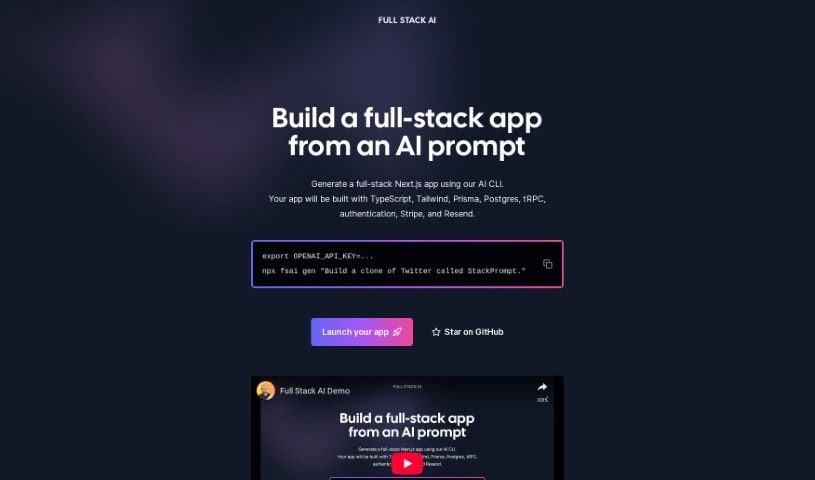
Screenshot of Full Stack Ai

Full Stack Ai

Discover what Full Stack AI is and how to use it effectively in 2025. We'll explore its features and compare it to other software development tools.

Screenshot

What is Full Stack AI?

Full Stack AI is a really cool new technology that gives developers a command-line interface (CLI) tool. It makes it super easy to build full-stack Next.js applications just by using an AI prompt. This tool really simplifies the whole development process. You can generate applications that already have a complete tech stack built-in. This includes things like TypeScript, Tailwind CSS for styling, Prisma for managing your database, Postgres as the database system itself, tRPC for end-to-end APIs, solid authentication, Stripe for handling payments, and Resend for sending emails efficiently. When you use Full Stack AI, you can get your projects launched much faster and cut down on all those tricky configuration tasks. Getting started is as simple as setting your OpenAI API key, running one command, and letting the AI do the heavy lifting to create complex apps – think of building something like a “clone of Twitter called StackPrompt.” Plus, you can get involved directly! You can contribute to the project and keep an eye on its progress over on GitHub.

Who created Full Stack Ai?

Elie is the creator behind Full Stack AI. His company offers this powerful command-line interface (CLI) tool that really empowers developers. It lets them effortlessly generate full-stack Next.js applications simply by using an AI prompt. The tech stack it uses is pretty comprehensive, including TypeScript, Tailwind, Prisma, Postgres, tRPC, authentication features, Stripe, and Resend, all of which help simplify the complexities of app development. Elie is also working on another project called Inbox Zero. It’s an open-source email app designed to automate email management and help you reach that coveted inbox zero status efficiently.

What is Full Stack Ai used for?

  • You can build a complete full-stack app just from an AI prompt.
  • It helps you automate emails and reach inbox zero really fast.
  • You can generate a full-stack Next.js app using our AI CLI tool.
  • It’s all simplified with an AI-powered CLI, making it super easy to create full-stack apps.
  • You can launch apps easily with a simple command, like npx fsai gen 'Build a clone of Twitter called StackPrompt'.
  • Get involved with the community: You can star the project and contribute to it on GitHub.

Who is Full Stack Ai for?

  • Developers
  • Programmers
  • Software engineers
  • App developers
  • Tech Innovators

How to use Full Stack Ai?

To really get the most out of Full Stack AI, here’s a simple step-by-step guide:

  1. Get the Basics Down: First, take some time to understand what Full Stack AI is all about – its main features and what it can do. This includes learning about how it handles data processing, analysis, and visualization.
  2. Input Your Data: Start by getting your data into the platform. Make sure your data is organized and formatted correctly; this really helps the analysis work accurately.
  3. Pick the Right Algorithms: Choose the machine learning algorithms or models that best fit the kind of analysis or prediction you want to do. Full Stack AI has a good variety of models you can pick from.
  4. Train Your Model: Now, train the model you’ve chosen using your own dataset. This means feeding the algorithm the data it needs and tweaking the settings to make it perform as well as possible.
  5. Check and Validate: After training, it’s important to check how well the model is doing. Test it with a different set of data to see how accurate its predictions are and if it works well overall.
  6. Fine-Tune if Needed: If the results aren’t quite there yet, you can fine-tune the model. This might mean adjusting settings again or retraining it with more data to get better results.
  7. Deploy It: Once you’re happy with how the model performs, it’s time to put it to work in your chosen environment. You might integrate it into systems you already use or into new applications.
  8. Keep an Eye on It: Continuously monitor how the model is performing in the real world. Make any necessary updates or adjustments to keep it running smoothly.
  9. Use Feedback: Set up a way to get feedback from users and use that information to improve the model over time. This ongoing process really helps the AI system get better and stay relevant.

If you follow these steps carefully, you can really use Full Stack AI effectively and tap into the power of artificial intelligence for all sorts of applications.

Related AI Tools

Discover more tools in similar categories that might interest you

Stay Updated with AI Tools

Get weekly updates on the latest AI tools, trends, and insights delivered to your inbox

Join 25,000+ AI enthusiasts. No spam, unsubscribe anytime.