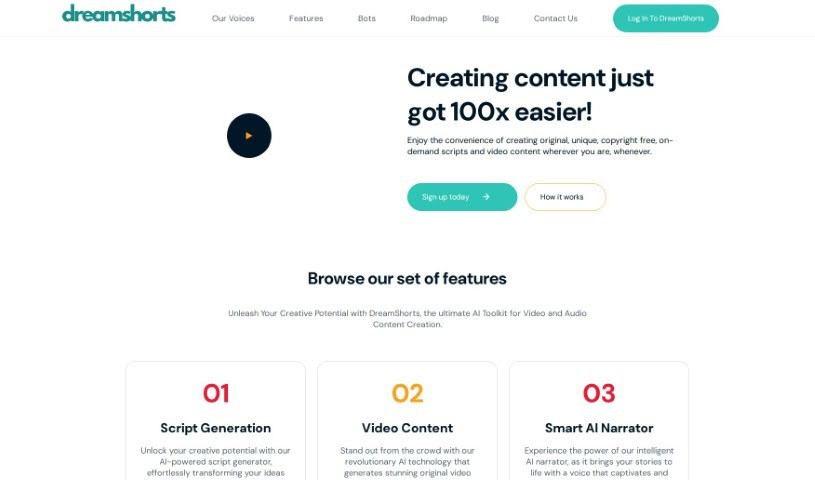
Screenshot of DreamShorts

DreamShorts

Discover what DreamShorts is and how to use its powerful AI features for video and audio content creation in 2025. Compare its tools with other video creation options.

Screenshot

What is DreamShorts?

DreamShorts is a really handy AI toolkit designed for making video and audio content. It is your all-in-one creative assistant. It’s packed with features like a smart script generator that can help you brainstorm ideas, tools to create original video content that matches your personal style or brand, and even an AI narrator that brings your scripts to life with a natural voice. Plus, it makes sharing super easy with built-in social media integrations, automatically adds captions to your videos, and provides copyright-free content for all your creative projects. You can even interact with DreamShorts through WhatsApp and Telegram bots to quickly create engaging videos and scripts for social media.

This tool is perfect for anyone who creates content – whether you’re a social media influencer, a marketing pro, an educator looking to spice up lessons, or a small business owner wanting to boost your online presence. DreamShorts helps you produce high-quality videos and audio without a huge hassle, making it easier to connect with your audience.

Who created DreamShorts?

DreamShorts was developed by Zote Labs. They launched it on March 21, 2023, as a comprehensive AI toolkit for video and audio content creation. The platform offers a range of features, including script generation, video content creation, a smart AI narrator, social media integrations, auto-captioning, and the ability to generate copyright-free content. Essentially, DreamShorts is built to help content creators, marketing professionals, educators, and small businesses improve their online presence and connect more effectively with their audiences.

What is DreamShorts used for?

DreamShorts is incredibly versatile and can help you achieve a lot:

  • Boost Engagement: Significantly increase interaction on social media platforms.
  • Video Content Generation: Easily create original videos.
  • Script Ideas: Quickly generate compelling script ideas.
  • Eye-Catching Content: Produce visually appealing videos and audio content that grabs attention on social media.
  • Stand Out: Differentiate yourself in the busy social media world.
  • Streamline Marketing: Make the content creation process much smoother for marketing professionals.
  • Promote Products: Create persuasive videos and audio ads to showcase your products.
  • Enhance Education: Improve teaching materials with engaging videos and immersive audio content for lessons.
  • Professional Quality on a Budget: Small businesses can produce professional-grade content without breaking the bank.
  • Attract Customers: Boost your online presence to draw in and engage potential customers.
  • Maximize Reach: Increase the impact and reach of your content on social media.
  • Creative Projects: Generate high-quality, copyright-free content for any creative endeavor.
  • Key Features: Leverage script generation, a smart AI narrator, social media integrations, auto-captioning, and copyright-free content generation.
  • Targeted Content Creation: Create content specifically for content creators, marketing professionals, educators, and small businesses.
  • Engage Followers: Produce eye-catching videos and audio content tailored for your audience.
  • Promote Effectively: Make compelling videos and audio ads to promote products or services across all your digital platforms.
  • Improve Learning: Make lessons more engaging and help students retain information better.

Who is DreamShorts for?

DreamShorts is designed for a variety of users who need to create engaging video and audio content:

  • Content creators looking to streamline their workflow and produce more polished content.
  • Marketing professionals aiming to create impactful campaigns and enhance brand messaging.
  • Educators who want to make their teaching materials more dynamic and engaging.
  • Small businesses needing to produce professional-quality content affordably to boost their online presence.

How to use DreamShorts?

DreamShorts is an AI-powered toolkit that makes creating video and audio content both efficient and effective. Here’s a simple, step-by-step guide to get you started:

  1. Explore the Features: Take a moment to look through everything DreamShorts offers. You’ll find tools for script generation, creating original videos, a smart AI narrator, easy social media sharing, automatic captioning, and a library of copyright-free content.
  2. Understand Who It’s For: Keep in mind that DreamShorts is built for content creators, marketing professionals, educators, and small businesses, so its features are tailored to their needs.
  3. Dive into Usage Instructions:
    • Script Generation: Use the AI script generator to turn your initial ideas into well-crafted, engaging narratives.
    • Video Content Creation: Generate unique videos that perfectly match your personal style and brand identity.
    • Smart AI Narrator: Bring your scripts to life with captivating voiceovers that sound natural.
    • Social Media Sharing: Share your finished videos directly to major social media platforms with ease.
    • Auto-Captioning: Make your videos more accessible by using the automatic captioning feature.
    • Copyright-Free Content: Access a great selection of high-quality, copyright-free content for any of your projects.
  4. Getting Started with Bots:
    • Message the Bots: Simply send your ideas or articles to the DreamShorts WhatsApp or Telegram bots.
    • Follow Prompts: The bots will guide you through the process, helping you generate unique and engaging videos and scripts for all your social media and content needs.
  5. Consider Pricing Plans:
    • Explore Options: DreamShorts offers flexible pricing plans to suit different needs and budgets.
    • Free Trial: You can start with a free trial, which allows you to generate up to 15 videos and scripts.
    • Tiered Options: Choose from various tiers based on how much you plan to use the service and your specific content creation goals.
  6. Check the FAQs: If you have questions, the comprehensive FAQ section is a great place to find quick answers. It covers trial periods, video length limits, costs, supported platforms, code redemption, how to use generated scripts, copyright details, and generation limits.
  7. Read Testimonials: See what other users have experienced. The testimonials section offers insights into how DreamShorts has helped others transform their creative process.
  8. Need Support?:
    • Contact Us: If you need assistance bringing your creative vision to life, feel free to reach out to the support team at [email protected].

By following these steps, you can really make the most of DreamShorts’ features for smooth, engaging video and audio content creation across all your platforms.

Related AI Tools

Discover more tools in similar categories that might interest you

Stay Updated with AI Tools

Get weekly updates on the latest AI tools, trends, and insights delivered to your inbox

Join 25,000+ AI enthusiasts. No spam, unsubscribe anytime.