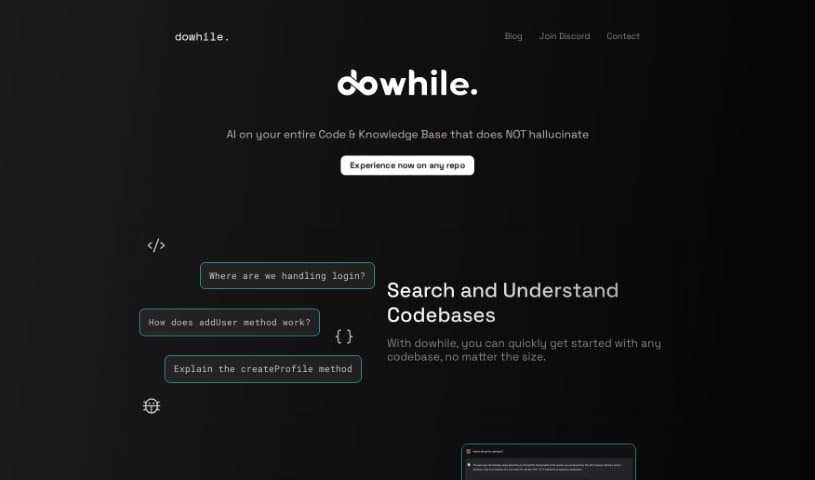
Screenshot of DoWhile AI

DoWhile AI

Discover what DoWhile AI is and how to use it effectively in 2025. We'll explore its features and see how it stacks up against other Software Development Tools.

Screenshot

What is DoWhile AI?

DoWhile AI is a super-smart assistant for developers. It’s designed to help you quickly search through and understand codebases, even really big or unfamiliar ones, without needing to install anything or dig through tons of documentation. It makes navigating new code super fast, supports popular languages like JavaScript and Python, and really makes it easier to jump into open-source projects. You can even integrate libraries without a hassle – no lengthy guides needed. Since it’s browser-based, there’s nothing to install, making it super accessible. They also have a waitlist feature to help manage connections and meetings with the team, which is a nice touch. Plus, it’s a fantastic way to boost your coding skills by really getting to grips with different codebases and contributing to them. DoWhile AI also keeps you in the loop with a blog and active social media communities on platforms like Discord, LinkedIn, and Twitter, all aimed at building a collaborative coding environment.

Who created DoWhile AI?

DoWhile AI, originally known as Collectivai, first launched on July 23, 2023. The main idea behind creating this tool was to give developers a way to search and understand any codebase much faster and more effectively. The goal was to remove the usual hurdles of installation and lengthy documentation. The founders wanted to help users navigate unfamiliar codebases up to 100 times quicker and make it simpler to contribute to open-source projects, ultimately helping developers sharpen their coding abilities. The platform supports a variety of programming languages, places a strong emphasis on protecting user privacy, and actively works to build a developer community that’s diverse and inclusive.

What is DoWhile AI used for?

  • It helps build a community for developers.
  • You can ask coding questions and get interactive answers.
  • It helps you avoid spending time on lengthy documentation.
  • It offers a quick way to get started with any codebase.
  • It welcomes a diverse range of users.
  • There are over 2,000 codebases available to explore and collaborate on.
  • It’s really useful for exploring codebases.
  • It makes contributing to codebases much simpler.
  • You can explore codebases easily.
  • It simplifies the process of contributing to codebases.
  • It helps you quickly understand unfamiliar codebases.
  • Integrating libraries becomes effortless.
  • You can easily participate in open-source projects.

Who is DoWhile AI for?

  • Developers

How to use DoWhile AI?

To get the most out of DoWhile AI, here’s a simple guide:

  1. Get Access: Head over to the DoWhile AI website and join their waitlist to get access to the tool. It’s a good way to manage demand and ensure everyone gets a smooth experience.
  2. Browser-Based Convenience: Since it’s a tool you use right in your browser, there’s absolutely no installation needed. Just open it up and start coding!
  3. Language Support: DoWhile AI is built to work with many programming languages, including popular ones like JavaScript and Python.
  4. Navigate Codebases Faster: You can use DoWhile AI to understand codebases really quickly, often up to 100 times faster than usual, and without needing to read through extensive documentation.
  5. Jump into Open Source: Dive into over 1500 open-source codebases. It’s a great way to improve your coding skills and make meaningful contributions to projects you care about.
  6. Effortless Library Integration: Need to use a new library? DoWhile AI makes it easy to integrate them instantly, just by asking quick questions instead of hunting down documentation.
  7. Discover More Resources: Check out their blog and social media channels for extra tips, updates, and community discussions.
  8. Connect with the Community: Join the DoWhile AI community! You can schedule meetings and connect with other developers to share knowledge and collaborate.
  9. Understand the Policies: It’s always a good idea to take a look at the tool’s terms of service and privacy policies on their website to know what’s what.
  10. Keep Learning and Growing: Use DoWhile AI as a continuous learning tool. Contribute to different codebases and engage with the community to keep enhancing your coding expertise.
  11. Get Interactive Help: Need assistance with the tool itself? Use DoWhile Chat for community interaction and help on how to use the platform effectively.

By following these steps, you’ll be able to efficiently use DoWhile AI for exploring code, boosting your coding skills, and getting involved in open-source projects.

Related AI Tools

Discover more tools in similar categories that might interest you

Stay Updated with AI Tools

Get weekly updates on the latest AI tools, trends, and insights delivered to your inbox

Join 25,000+ AI enthusiasts. No spam, unsubscribe anytime.