What Exactly is Digest Diff?
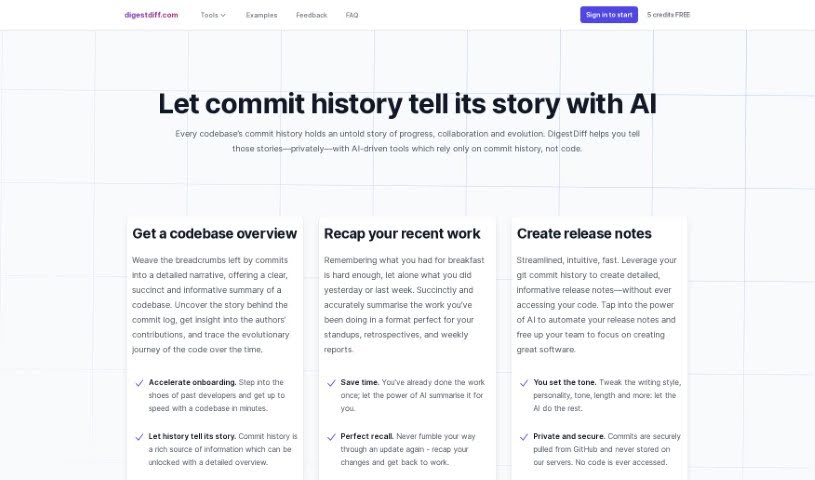
Digest Diff is a smart assistant for your code’s history. It’s an AI-powered tool that dives into your codebase’s commit history – all the changes, updates, and who made them. What’s really neat is that it figures out what’s going on, like tracking progress, how people are collaborating, and how the code itself has grown over time, all without ever needing to look at the actual code. This makes it super handy for things like writing release notes, helping new team members get up to speed quickly, and giving you a clear picture of your code’s journey.
Who’s Behind Digest Diff?
Digest Diff was developed by a company called “Strongly Typed” and first came out on May 17, 2023. Their main focus with this tool is to analyze the commit history of codebases. They generate detailed overviews from this history, but importantly, they don’t access your actual code. Privacy is a big deal for them; they only need read-only access to your GitHub repositories. This means they never actually see or store your code. You can even start off with 5 free credits, and they let you customize how the release notes are written.
What Can You Do with Digest Diff?
Digest Diff offers a bunch of useful features:
- Get a Clear Picture of Your Code: It helps you really understand your codebase by digging into its commit history.
- Summarize Team Contributions: It’s great for summarizing what everyone’s been up to, perfect for things like daily stand-ups or team retrospectives.
- Automate Release Notes: Forget the manual grind; it can automatically create release notes based on your commit history.
- Speed Up New Developer Onboarding: New folks on the team can get up to speed much faster by getting a solid overview of the codebase’s commit history.
- Track Code Evolution: It provides detailed overviews that show how the code has progressed, how collaboration has happened, and how it’s evolved over time, all without needing to access the actual code.
- Customize Your Output: You can tweak the writing style, personality, tone, and even the length of the release notes you create with DigestDiff.
- Keep Things Private: It’s designed with privacy in mind, only needing read-only access to your commit history and never accessing your actual code.
- Share Your Findings: You can export the overviews and release notes as markdown files, making them easy to share and discuss with your team.
- Recap Recent Work: It helps you quickly summarize recent contributions, which is ideal for stand-ups, retrospectives, and weekly reports.
- Integrate with GitHub: It works smoothly with GitHub, either by fetching commit history directly from your repositories or by letting you paste it in manually.
Who Should Use Digest Diff?
This tool is particularly helpful for:
- Developers: Anyone working directly with code.
- New Developers: Those just joining a project and needing to understand its history.
How Do I Get Started with Digest Diff?
Using Digest Diff is pretty straightforward. Here’s a simple step-by-step guide:
- Sign Up and Get Credits: First, sign up for DigestDiff. You’ll get 5 free credits just for registering, which is a great way to try it out.
- Connect Your Repository: You can connect DigestDiff to your GitHub repository. You’ll need to grant it read-only access so it can automatically pull the commit history. If you prefer not to connect directly, you can always just paste in your git log manually to get the same results.
- Let the AI Analyze: Once connected or with your history pasted, DigestDiff uses its AI to analyze everything. It gives you insights into how the codebase has evolved, how the team has collaborated, and the overall progress, all while keeping your actual code private.
- Tailor Your Release Notes: After the analysis, you can customize the writing style, tone, and length of the release notes that DigestDiff generates based on the commit history.
- Summarize Contributions: You can use DigestDiff to get a summary of what individual team members have done. It tracks who contributed what and helps you understand who worked on specific parts of the project.
- Share Your Work: Once you’ve got your overviews and release notes, you can export them as markdown files. This makes them super easy to share with your team for discussion or documentation.
- Recap Your Progress: DigestDiff is also excellent for recapping recent work. It summarizes contributions in a way that’s perfect for stand-ups, retrospectives, and reports, saving you time and making sure you remember everything accurately.
- Get Help When Needed: If you have questions, there’s an FAQ page available. You can also reach out directly using the Feedback link in the navigation for more assistance.
By following these steps, you’ll be able to use DigestDiff effectively to analyze your commit history, create useful release notes, and summarize team contributions, all without ever compromising your code’s security or privacy.