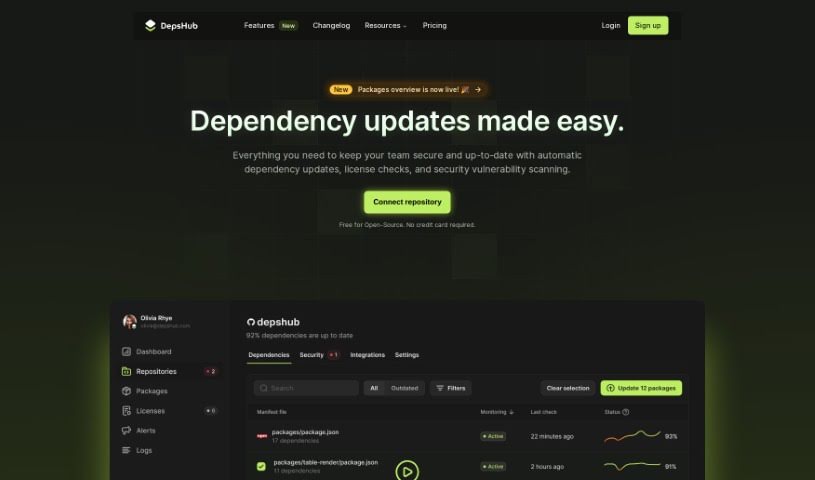
Screenshot of DepsHub

DepsHub

Discover what DepsHub is and how to use it effectively in 2025. We'll explore its features and see how it stacks up against other Software Development Tools.

Screenshot

What is DepsHub?

DepsHub is a handy tool designed to save you time by making it much simpler to keep track of and update your software dependencies. It works with a bunch of different languages and frameworks, like Javascript, Python, Go, PHP, Java, Swift, Ruby, Docker, C#, and C++. Plus, they’re adding support for even more soon!

This tool really focuses on updating dependencies and the code itself efficiently. It plays nicely with popular platforms such as Github, Gitlab, Bitbucket, Linear, Jira, and Zapier. You’ll find features like dependency management that cuts out the noise, a way to see all your repositories at a glance, checks for license compliance, and alerts for any security vulnerabilities. DepsHub also uses an AI-powered engine to analyze and update dependencies, looking at library changelogs and release notes. The whole idea is to make keeping your software secure and up-to-date a breeze, with automatic updates and vulnerability scans.

Who created DepsHub?

Laurence Green is the person behind DepsHub. He launched the platform on March 11, 2023, and it operates under the company DepsHub Inc. The tool offers a few key things: dependency management that doesn’t bombard you with unnecessary alerts, security tools, a way to view dependencies across different repositories, checks to make sure licenses are compliant, and alerts for security risks, all aimed at making software development smoother.

What is DepsHub used for?

  • It supports a wide variety of languages and frameworks.
  • You can save time by monitoring and updating your dependencies.
  • It helps you focus on writing the code that truly matters.
  • It integrates with popular tools like GitHub, GitLab, Bitbucket, Linear, Jira, and Zapier.
  • You get dependency management that’s free from unnecessary noise.
  • It provides a clear overview of dependencies across all your repositories.
  • You can easily monitor license compliance.
  • It sends out security alerts for any vulnerabilities you might have.
  • Dependencies get updated automatically based on smart analysis.
  • You can connect with over 2,000 apps through Zapier.
  • It supports a broad range of languages and frameworks.
  • Connect your favorite tools to create tickets and get notified about new issues.
  • With GitHub integration, it can automatically open Pull Requests, create issues, and do more.
  • GitLab integration lets you get automatic updates, create issues, and more.
  • Bitbucket integration also provides automatic updates and issue creation.
  • Linear integration allows you to create tickets and update them automatically when new commits are pushed.
  • Jira integration lets you create tickets and update them automatically when new commits are pushed.
  • You can integrate with over 2,000 apps using Zapier.
  • It supports a wide range of languages and frameworks.
  • Focus on developing code that matters.
  • Integrations with tools like GitHub, GitLab, Bitbucket, etc.
  • Automatically opens Pull Requests and creates issues.
  • Creates tickets and updates them automatically on new commits.
  • Integrates with over 2,000 apps via Zapier.
  • Dependencies are updated automatically using an AI-powered engine.
  • You get notified about security vulnerabilities in your dependencies.
  • It helps ensure license compliance and avoid legal issues.
  • Dependencies are updated automatically, keeping them secure and current.
  • It integrates with various tools like GitHub, GitLab, Bitbucket, Linear, Jira, and Zapier.
  • Provides dependency management that’s noise-free.
  • Offers a cross-repository overview of all your dependencies.
  • Ensures license compliance.
  • Provides security alerts for vulnerabilities.
  • Helps you focus on writing code that matters.
  • Creates tickets and updates them automatically based on new commits.
  • Dependencies are updated securely and efficiently.
  • Integrates with your favorite tools like GitHub, GitLab, Bitbucket, Jira, and Zapier.
  • Automatically opens Pull Requests, creates issues, and more.
  • Creates tickets and updates them automatically when new commits are pushed.
  • Integrates with over 2,000 apps via Zapier.
  • Ensures license compliance and provides security alerts for dependencies.
  • Navigate your dependencies with a noise-free management system.
  • Offers a cross-repository overview for all dependencies.

Who is DepsHub for?

  • Software developers
  • Web Developers
  • Programmers
  • DevOps Engineers
  • Project managers
  • IT professionals
  • IT Managers
  • System Administrators

How to use DepsHub?

Using DepsHub is pretty straightforward. Just follow these simple steps:

  1. Sign Up: First, sign up for a DepsHub account to get started. It’s the initial step to unlocking its features.
  2. Add Repositories: Next, connect your code repositories to DepsHub. This allows the tool to monitor all the dependencies across your various projects.
  3. Monitor Dependencies: Make good use of the noise-free dependency management feature. It helps you keep track of your dependencies efficiently without getting bogged down by irrelevant alerts.
  4. Stay Secure: Take advantage of the security alerts. They’ll let you know right away if there are any vulnerabilities in your dependencies, helping you stay protected.
  5. Update Dependencies: Save yourself time by using the platform to update your dependencies promptly. It streamlines the process considerably.
  6. License Compliance: Make sure you’re legally compliant by verifying that all your dependencies have the correct licenses. This avoids potential legal headaches.
  7. Integration: Connect DepsHub with tools you already use, like GitHub, GitLab, Bitbucket, Linear, Jira, and Zapier. This really boosts functionality and helps automate tasks.
  8. Customization: You can customize upgrade rules to fit your project’s specific needs and requirements. This gives you more control.
  9. Notifications: You’ll receive notifications that are concise and relevant, so you stay informed about any updates or issues without being overwhelmed.

DepsHub offers a user-friendly interface and supports a wide range of programming languages and frameworks, making it easy to fit into your development workflow. By following these steps, you can effectively manage and update your project dependencies, all while keeping security and compliance in check.

Related AI Tools

Discover more tools in similar categories that might interest you

Stay Updated with AI Tools

Get weekly updates on the latest AI tools, trends, and insights delivered to your inbox

Join 25,000+ AI enthusiasts. No spam, unsubscribe anytime.