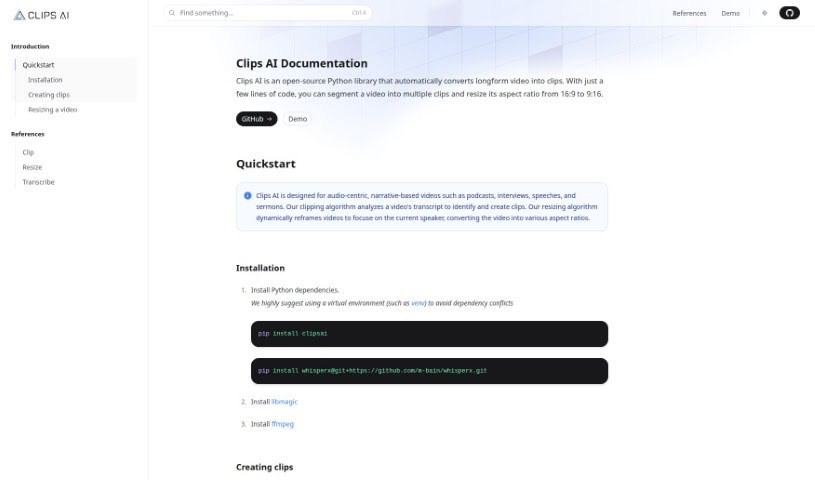
Screenshot of Clips AI

Clips AI

Discover what Clips AI is and how to use it effectively in 2025. We'll explore its features and see how it stacks up against other video editing tools.

Screenshot

What is Clips AI?

Clips AI is a handy, open-source Python library that makes it super easy to chop up long videos into smaller clips. Plus, it can resize them to different aspect ratios with just a few lines of code. It’s especially great for videos that tell a story, like podcasts, interviews, speeches, and sermons. The way it works is pretty neat: Clips AI looks at your video’s transcript to figure out the best places to cut clips. Then, its resizing feature automatically reframes the video to keep the current speaker front and center. To get started with Clips AI, you’ll first need to transcribe your video using WhisperX. This tool is helpful because it tells you exactly when each word starts and stops. You’ll also need a Hugging Face access token to resize videos using Pyannote, which helps with speaker diarization. You can find detailed instructions for using Pyannote on its HuggingFace page.

Who created Clips AI?

Clips AI was developed by M. Bain. This company focuses on creating an open-source Python library that automates turning long videos into shareable clips. Clips AI is specifically designed for videos where the audio and narrative are key, such as podcasts, interviews, speeches, and sermons. The technology analyzes video transcripts to find and create clips, and it also dynamically reframes videos to keep the focus on whoever is speaking at the moment.

What is Clips AI used for?

  • Creating social media clips: It automatically makes clips from long videos like podcasts, perfect for sharing.
  • Saving creators time: Spend less time editing and more time creating.
  • Growing audiences: Boost your reach organically by sharing more content.
  • Ideal for narrative videos: Great for podcasts, interviews, speeches, and sermons where the story is central.
  • Transcript analysis: It analyzes video transcripts to find and create clips.
  • Dynamic reframing: Automatically resizes videos to focus on the current speaker.
  • Aspect ratio conversion: Easily changes video aspect ratios, like from 16:9 to 9:16.
  • Speaker diarization: Uses Pyannote to identify different speakers.
  • Video transcription: Transcribes videos with WhisperX to get word start and stop times.
  • Trimming videos: Lets you trim your original video into the clips you want.
  • Streamlining content creation: Automatically turns long videos into clips for social media, saving time and helping you grow your audience naturally.
  • Converting longform video: Turns lengthy videos into clips, especially useful for audio-focused content like podcasts, interviews, speeches, and sermons.
  • Efficient segmentation and resizing: Splits videos into multiple clips and changes aspect ratios (e.g., 16:9 to 9:16) with minimal code.
  • AI-powered clipping: Uses a clipping algorithm that analyzes transcripts to identify and create clips.
  • Smart resizing: Employs a resizing algorithm to dynamically focus on the current speaker.
  • Hugging Face integration: Requires a Hugging Face access token for video resizing via Pyannote for speaker diarization.
  • Detailed transcription: Uses WhisperX to transcribe videos, capturing start and stop times for each word to help generate clips.
  • Resizing guidance: Provides instructions on the Pyannote HuggingFace page for resizing videos to your desired aspect ratio.
  • AI video generation alternatives: For creating professional videos without editing skills, consider platforms like Hour One AI. For automated video generation, transcription, collaboration, optimization, and publishing, Peech AI is another option.

Who is Clips AI for?

  • Podcasters
  • Interviewers
  • Speakers
  • Clergy
  • Anyone creating audio-centric, narrative-based content

How to use Clips AI?

Ready to turn your long videos into engaging clips? Here’s how to use Clips AI:

  1. Transcribe Your Video: First, you’ll need to transcribe your video. WhisperX is recommended because it also detects the start and stop times for every word, which is super helpful.
  2. Create Your Clips: Use Clips AI’s clipping algorithm. It analyzes the transcript to find the best parts for your clips. You can refer to the clipping guide to trim your original video exactly how you want it.
  3. Resize Your Video: You’ll need a Hugging Face access token for resizing. Pyannote handles the speaker diarization for this. Don’t worry, Pyannote is free to use! Just follow the instructions on the Pyannote HuggingFace page and check the resizing guide to get your video into the right aspect ratio.

By following these simple steps, you can efficiently convert your long videos into clips and resize them using Clips AI’s smart algorithms.

Related AI Tools

Discover more tools in similar categories that might interest you

Stay Updated with AI Tools

Get weekly updates on the latest AI tools, trends, and insights delivered to your inbox

Join 25,000+ AI enthusiasts. No spam, unsubscribe anytime.