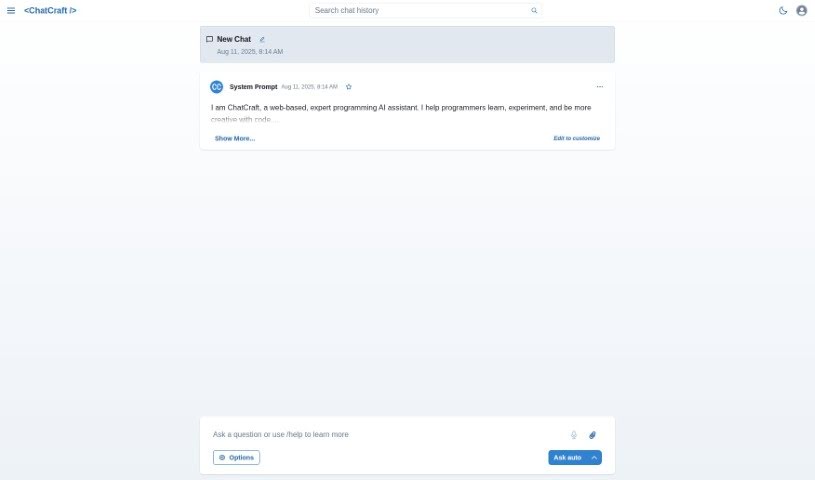
Screenshot of Chatcraft

Chatcraft

Discover Chatcraft in 2025! Learn what this tool is, how to use its features for software development, and how it stacks up against other development tools.

Screenshot

What Exactly is Chatcraft?

Chatcraft is a handy web-based tool built to help out with all sorts of software development jobs. It is your digital assistant for coding. It’s got some neat features, like keeping your API keys safe and stored offline, making it easy to chat about your projects, and offering support for development tasks. All of this is designed to help you get more done, faster.

However, it’s not perfect for everyone or every situation. Chatcraft stores its data locally in your browser, so there’s no mobile app to use on the go. You’ll also need an internet connection to use it. Right now, it’s really focused on helping with software development specifically, and it doesn’t offer support in multiple languages or let you talk to it using your voice. But, if you’re interested in the nitty-gritty, Chatcraft is open source, meaning you can check out its code and even make modifications yourself. You can find all the details on GitHub right here: chatcraft GitHub.

Who’s Behind Chatcraft?

Taras Glek is the creator of ChatCraft. He first launched it on May 9, 2023. The platform gives you a web interface to work with, securely stores your API keys offline, and lets you communicate via chat. It’s really there to assist with software development tasks and even lets you tweak the code. ChatCraft is open source, which means it supports your development workflow, helps boost productivity, and you can access it all on GitHub. Just remember those limitations we mentioned: data is stored locally in your browser, there’s no mobile app, you need internet access, and it’s primarily for software development help.

What Can You Do with Chatcraft?

Here’s a quick rundown of what Chatcraft is used for:

  • It’s Open Source – you can see and modify the code.
  • It Assists with software development tasks.
  • It offers Secure offline API key storage.
  • It provides a space for Chat communication.
  • It gives Assistance on development tasks.
  • It Supports your development workflow.
  • It’s designed to Increase productivity.
  • It Allows code modifications.
  • It has a user-friendly Web-based interface.
  • It’s easily GitHub accessible.

Who Should Use Chatcraft?

  • Software developers will find this tool most useful.

How Do I Use Chatcraft?

Getting started with Chatcraft is pretty straightforward. Here’s how you can make the most of it:

  1. First, just head over to the web-based interface. It’s built specifically to help you with your software development tasks.
  2. Take advantage of its cool features, like keeping your API keys securely stored offline, using the chat function, and getting guidance on your development tasks.
  3. You can really use Chatcraft to improve your development workflow, boost your productivity, and make those code modifications feel much easier.
  4. It’s good to keep in mind a few things about Chatcraft, though. Remember, it’s stored in your browser’s local storage, you’ll need an internet connection, and there isn’t a mobile app.
  5. Also, remember that Chatcraft is really geared towards software development assistance. It doesn’t offer multilingual support or voice interaction, and it might not be the easiest tool for absolute beginners.
  6. Definitely check out its open-source nature on GitHub. You’ll find more information and support there.

By following these simple steps, you should be able to use Chatcraft effectively for your software development projects and really benefit from what it offers.

Related AI Tools

Discover more tools in similar categories that might interest you

Stay Updated with AI Tools

Get weekly updates on the latest AI tools, trends, and insights delivered to your inbox

Join 25,000+ AI enthusiasts. No spam, unsubscribe anytime.