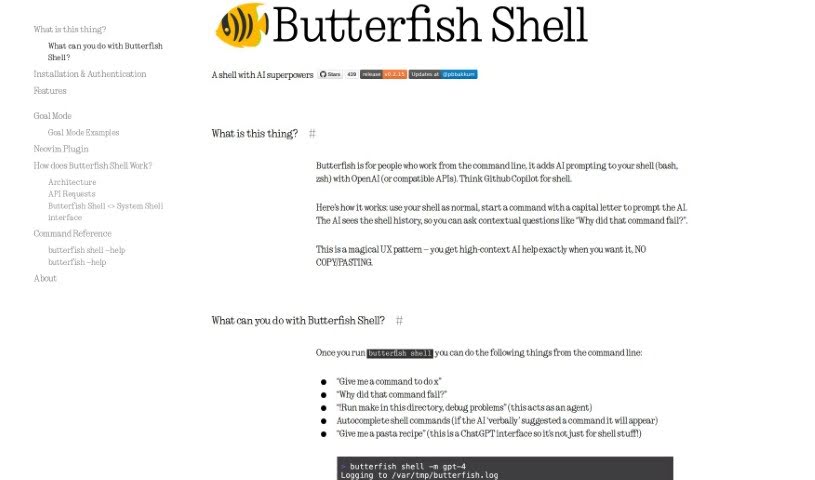
Screenshot of Butterfish Shell

Butterfish Shell

Discover Butterfish Shell, a command-line tool that brings OpenAI's AI into your bash and zsh shells. Learn its features, how it boosts productivity, and compare it to other Software Development Tools in 2025.

Screenshot

What is Butterfish Shell?

Butterfish Shell is a command-line tool that cleverly integrates AI prompting, specifically using OpenAI’s technology, right into your bash and zsh shells. It is having a smart assistant built directly into your command line. It offers context-aware help, suggests commands, and lets you have high-context AI conversations without ever leaving your terminal.

Peter Bakkum created this tool with a clear goal: to make using large language models (LLMs) faster and more effective. The aim is to keep the experience smooth, ergonomic, and natural within the shell. It’s designed to fit right into your existing workflows, meaning no extra windows or mouse clicks are needed to access AI capabilities.

Who created Butterfish Shell?

Peter Bakkum is the driving force behind Butterfish. He founded this open-source project to really boost user productivity by weaving OpenAI’s AI prompting directly into bash and zsh shells. Butterfish is all about providing contextual conversations, giving you AI-powered command suggestions, and offering seamless autocomplete. Plus, it plays nicely with your current shell setups. This innovative tool, released by Peter Bakkum under the MIT Open Source License, gives developers and tech enthusiasts a user-friendly way to tap into AI for their command-line tasks.

What is Butterfish Shell used for?

  • Smart Command Assistance: It integrates AI prompting into bash and zsh shells, offering intelligent command suggestions and help.
  • Contextual Conversations: You can chat with the AI using your shell history, which gives it context for more relevant interactions and problem-solving.
  • Boosted Efficiency: Improve your command line speed with AI-powered command autocomplete.
  • Goal Mode: Let Butterfish take the reins! Enter Goal Mode, and it can autonomously run commands to achieve your stated objectives.
  • Customization & Contribution: You can personalize your experience by editing prompt wrappers and even contribute to its open-source development.
  • Direct Command Line Queries: Ask questions, figure out why a command failed, autocomplete commands, or even handle non-shell tasks like asking for a pasta recipe, all directly from your terminal.
  • GPT-4 Support: If you have access to GPT-4, you can use it by running the command $ butterfish shell -m gpt-4.
  • Seamless Integration: It works alongside your existing shell by intercepting input and output, then communicating with the OpenAI ChatGPT API.
  • Initiating AI Help: Simply start a command with a capital letter to kick off AI suggestions and assistance.
  • Autosuggestions: Get command suggestions based on your recent history and prompts from ChatGPT.

Who is Butterfish Shell for?

  • Developers
  • Tech enthusiasts
  • Software developers
  • Data scientists
  • IT professionals

How to use Butterfish Shell?

Getting started with Butterfish is pretty straightforward. Here’s how:

  1. Installation: If you’re on macOS, you can install Butterfish using Homebrew with the command brew install bakks/bakks/butterfish. For Linux users, simply run go install github.com/bakks/butterfish/cmd/butterfish@latest.
  2. Start the Shell: Launch Butterfish Shell by typing butterfish shell in your command line interface.
  3. Use as Usual: Continue using your shell normally. To get AI help, just start typing a command with a capital letter.
  4. Explore Commands: You can ask for a command to do a specific task, find out why a command didn’t work, or switch to Goal Mode for the AI to handle tasks automatically.
  5. Leverage Context: Make the most of contextual conversations by letting the AI use your shell history to understand your needs better.
  6. Customize and Contribute: Feel free to personalize your experience by tweaking prompt wrappers. You can also contribute to the open-source development of Butterfish.
  7. API Key Setup: To get the full benefit, make sure you’ve set up your OpenAI API key. The installation process usually guides you through this.

Butterfish really does integrate smoothly with bash and zsh shells. It makes your autocomplete smarter and lets you have engaging conversations with the AI, leading to a more efficient and intelligent way to operate your command line.

Related AI Tools

Discover more tools in similar categories that might interest you

Stay Updated with AI Tools

Get weekly updates on the latest AI tools, trends, and insights delivered to your inbox

Join 25,000+ AI enthusiasts. No spam, unsubscribe anytime.