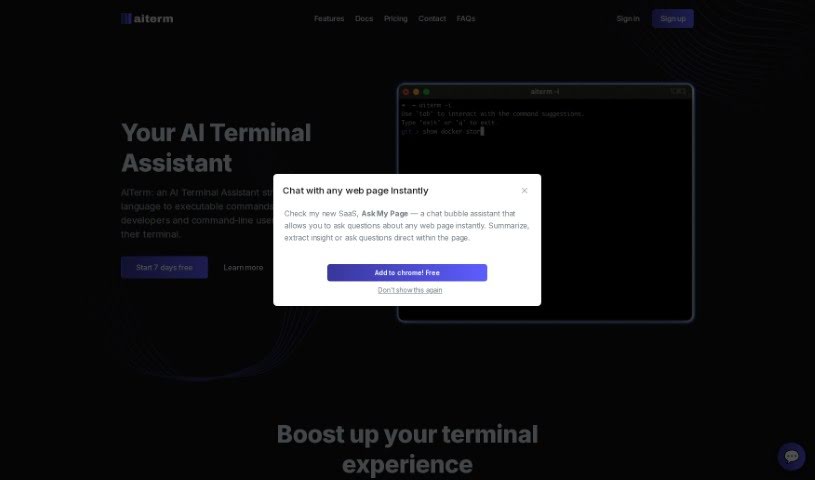
Screenshot of Aiterm (Beta)

Aiterm (Beta)

Discover Aiterm (Beta) in 2025! Learn what this AI terminal assistant does, how to use its features, and how it stacks up against other Software Development Tools.

Screenshot

What is Aiterm (Beta)?

Aiterm (Beta) is an AI assistant built right into your terminal. It is your personal helper for turning everyday language into the commands your computer understands. It’s designed to make working in the terminal much smoother and more productive for developers and anyone who uses command-line tools. Aiterm offers a bunch of helpful features, like an AI assistant that can pull up documentation whenever you need it, autocompletion that works like in your favorite code editor, ways to keep your terminal workflow organized, and generally just boosts your overall productivity. Plus, your privacy is a big deal here; Aiterm doesn’t store any of your terminal activity on outside servers. You can use it with popular terminals like iTerm, VS Code Terminal, cmd, PowerShell, and many others. When it comes to paying, Midtrans handles all transactions securely, accepting major credit and debit cards. There are no ongoing subscriptions or hidden costs – you simply pay once for the amount of time you need.

Who created Aiterm (Beta)?

Aiterm (Beta) was developed with a clear goal: to help developers and command-line users easily translate natural language into executable commands, all directly within their terminal environment. The team behind Aiterm is focused on improving the terminal experience by offering features such as an AI assistant that helps execute commands, provides documentation on demand, offers IDE-style autocompletion, and helps organize your workflow. They accept payments via all major credit and debit cards, with secure processing handled by Midtrans. You won’t find any subscriptions or hidden fees here; it’s a straightforward, one-time payment for the time you need. If you have any questions, feel free to reach out to their support team at [email protected].

What is Aiterm (Beta) used for?

  • It helps developers and command-line users turn natural language into executable commands.
  • It acts as an AI assistant for easily running terminal commands.
  • You can get on-demand documentation for terminal commands.
  • It offers IDE-style autocompletion for the commands you use most often.
  • It helps you organize your workflow commands efficiently.
  • It boosts your overall terminal productivity.
  • It speeds up development with its fast and lightweight performance.
  • It works with popular terminals like iTerm, VS Code Terminal, cmd, PowerShell, and more.
  • Payments are securely processed by Midtrans for all major credit and debit cards.
  • There are no subscriptions or hidden fees; you pay once for the time you need.
  • It provides direct support within the terminal for seamless command execution.
  • It offers IDE-style autocompletion for your most frequently used terminal commands.
  • It helps you organize your workflow commands efficiently right inside the terminal.
  • It boosts terminal productivity and speeds up your development process.
  • You can get fully customized AI-generated content within your terminal.
  • It enhances your entire terminal experience with AI assistance.
  • It supports popular terminals such as iTerm, VS Code Terminal, cmd, and PowerShell.
  • It maintains user privacy by not storing terminal contents on servers.
  • It helps you find and run commands without ever leaving the terminal.
  • It assists developers in converting natural language into executable commands.
  • It lets you seamlessly execute terminal commands without leaving your current session.
  • It provides documentation for terminal commands and flags whenever you need it.
  • It offers IDE-style autocompletion for commands you use frequently.
  • It helps you organize your workflow commands effectively within the terminal.
  • It enhances terminal productivity through smart command suggestions and autocompletion.
  • You can customize AI-generated content for personalized assistance.
  • It protects your privacy by not storing terminal contents on external servers.
  • It supports many popular terminals, including iTerm, VS Code Terminal, cmd, and PowerShell.
  • It offers fast and lightweight performance, thanks to Go’s concurrent mechanisms.

Who is Aiterm (Beta) for?

  • Developers
  • Command-line users

How to use Aiterm (Beta)?

Here’s how you can get the most out of Aiterm (Beta):

  1. AI Assistant Features:
    • Aiterm offers on-demand documentation. You can simply type commands in natural language directly into your terminal, and it’ll help you execute them smoothly.
    • The customizable AI-generated content means you won’t have to worry about saving or memorizing commands anymore.
  2. Command Suggestions:
    • You’ll benefit from IDE-style autocompletion for the commands you use most often.
    • You can interact with these command suggestions right in your terminal, making your workflow much more efficient.
  3. Organized Workflow:
    • It’s easy to organize, edit, delete, and run commands to perfectly suit your workflow.
    • You can boost your terminal productivity by streamlining your command sequences.
  4. Privacy and Compatibility:
    • Aiterm really prioritizes your data privacy; it doesn’t store any of your terminal contents on external servers.
    • You can enjoy Aiterm’s support across many popular terminals, including iTerm, VS Code Terminal, cmd, PowerShell, and more.
  5. Payment and Subscription:
    • Aiterm accepts major credit and debit cards, with secure processing handled by Midtrans.
    • There are no subscriptions or hidden fees. You just pay once for the time you actually need.
  6. Package Details and Support:
    • If your Pro package runs out, you’ll be switched to the Free package until you decide to upgrade again.
    • Should you use up your AI request quota, you’ll need to upgrade to the Pro package or renew your current one.
  7. Contact Support:
    • If you have any questions about packages, pricing, or need any other kind of help, please get in touch with Aiterm’s support team at [email protected].

By following these steps, you can really harness Aiterm’s power to simplify your command-line tasks and make your terminal experience much better.

Related AI Tools

Discover more tools in similar categories that might interest you

Stay Updated with AI Tools

Get weekly updates on the latest AI tools, trends, and insights delivered to your inbox

Join 25,000+ AI enthusiasts. No spam, unsubscribe anytime.