What is VideoProc Converter?
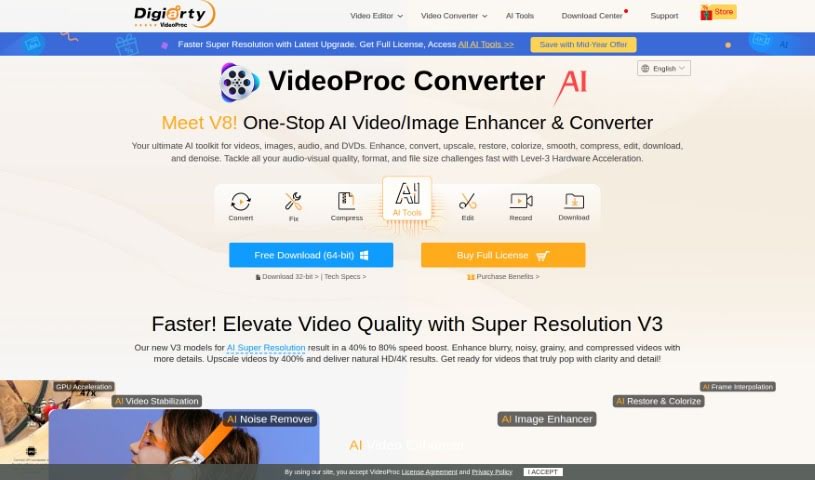
VideoProc Converter is a really versatile software tool that uses AI to make your videos better. It is an all-in-one solution for editing, converting, downloading, recording, enhancing, and even compressing your video files. It’s packed with features like Super Resolution, which can upscale your footage to stunning 4K quality, and Frame Interpolation to make playback super smooth. If your videos are a bit shaky, its Video Stabilization feature can help fix that. Plus, with Level-3 Hardware Acceleration, it processes all sorts of formats – like MP4, 4K, and 8K – really efficiently. It also supports many different devices and languages, so it’s easy for people all over the world to use.
Who created VideoProc Converter?
Digiarty Software is the company behind VideoProc Converter. They’ve been around since 2006, focusing on creating multimedia solutions that are powered by AI and accelerated by GPUs. Their goal is to make digital experiences better through new technologies. VideoProc Converter itself was launched on October 27, 2023, giving users a comprehensive way to enhance, edit, convert, download, record, and compress videos.
What is VideoProc Converter used for?
This tool is incredibly useful for a wide range of tasks:
- Video Editing: Make your videos look exactly how you want them.
- Batch Conversion: Convert multiple files at once, saving you time.
- Format Support: It handles a massive library of 320 video codecs and formats, so you’re covered no matter what.
- Device Compatibility: Convert videos to formats that play smoothly on all your different devices.
- Audio Conversion: It also supports 50 audio codecs, so you can convert audio files too.
- DVD Management: Easily convert DVDs and create backups in various formats.
- Subtitle Features: Work with subtitles, whether you need to add them, extract them, or search for them.
- AI-Powered Enhancements:
- Super Resolution: Upscale your videos and images to crystal-clear 4K quality.
- Frame Interpolation: Make your videos look much smoother by boosting the frame rate.
- Video Stabilization: Reduce that annoying shakiness in your footage.
- All-in-One Processing: You can transcode videos and audio, edit and record both video and audio, and even download videos directly from the web.
- Video Recording: Capture your screen or webcam footage.
- Video Enhancement: Improve the overall look and feel of your videos.
- Video Compression: Make your video files smaller without losing quality.
- Video Conversion: Change video files into different formats.
- Video Downloading: Grab videos from online sources.
- Remastering: Give your old videos and images a new lease on life with AI.
- Format Management: Easily handle all sorts of video formats and file sizes.
- Quality Preservation: Convert videos to play on devices like iPhones, iPads, Android phones, HDTVs, and social media platforms like Instagram and YouTube, all while keeping the original quality.
- Audio Quality: Convert videos to audio formats, even preserving Dolby Digital 5.1 channel surround sound, and extract audio.
- DVD Backup: Quickly back up your DVDs, convert them to various formats for playback anywhere, and copy them while keeping the original quality.
- Subtitle Control: You have full control over subtitles – enable, disable, extract, add them (hardcoded or softcoded), and even search for them online.
- AI Remastering: Use AI technology to enhance both videos and images.
- Smooth Playback: Boost frame rates with Frame Interpolation for a smoother viewing experience.
- Shaky Footage Fix: Use Video Stabilization to smooth out shaky clips.
- Comprehensive Transcoding: Transcode videos, audio, and DVDs, all while you edit, record, and download.
- Hardware Acceleration: Benefit from Level-3 Hardware Acceleration for super-efficient processing across many formats like MP4, 4K, and 8K.
- Device Compatibility: It works with footage from all sorts of devices, including mobile phones, GoPros, DJI drones, and cameras from Canon and Sony.
- Adjust Quality: You can fine-tune the original video quality.
- Playback Versatility: Convert videos so they play perfectly on iPhones, iPads, Android devices, HDTVs, and social media platforms like Instagram and YouTube, without any loss in quality.
Who is VideoProc Converter for?
This tool is perfect for anyone who works with video, including:
- Video editors
- YouTubers
- Videographers
- Content creators
- Media professionals
- Digital marketers
- Multimedia professionals
- Photographers
- Vloggers
- Social media influencers
- Graphic designers
- Social media managers
How to use VideoProc Converter?
Using VideoProc Converter is pretty straightforward. Just follow these steps:
- Install It: First, download and install VideoProc Converter from its official website onto your computer.
- Open Up: Once it’s installed, launch the software.
- Pick What You Need: Choose the main function you want to use – whether that’s editing, converting, downloading, recording, enhancing, or compressing.
- Add Your Files: Bring the video, audio, or DVD files you want to work with into the program.
- Set Up the Output: Decide on your output settings. This includes things like the format, resolution, and frame rate you want for your finished file.
- Edit (If You Want): You can also edit your files here. Trim clips, crop them, add cool effects, subtitles, or even watermarks.
- Start the Process: Click the “Start” or “Convert” button to begin.
- Watch It Go: You can keep an eye on the progress to see how far along the process is.
- Save Your Work: When it’s all done, save your processed files wherever you like on your computer.
- Explore More: Don’t forget to check out the other handy features like video stabilization, super resolution, and frame interpolation for even more advanced video enhancements.
- Speed Things Up: Make sure to take advantage of the Level-3 Hardware Acceleration to get things done faster.
- Choose Your Language: You can also pick your preferred language for the software interface.
By following these steps, you’ll be able to use VideoProc Converter effectively to edit, convert, enhance, and manage all your multimedia files with ease.