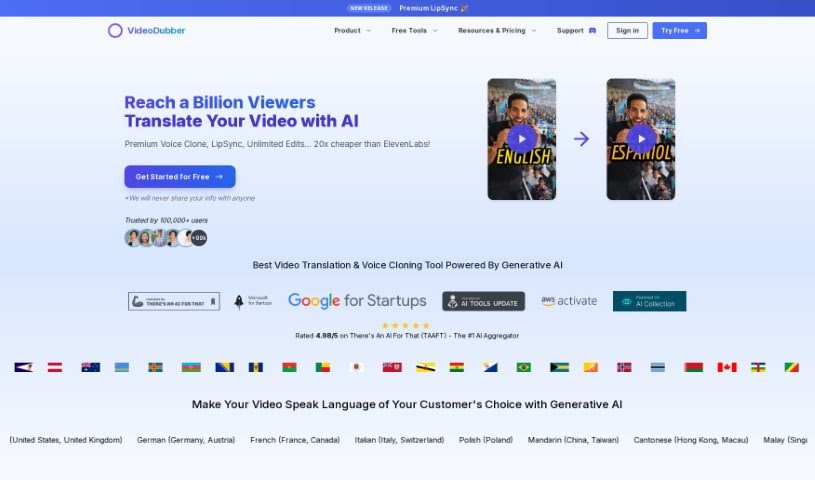
Screenshot of VideoDubber

VideoDubber

Discover VideoDubber in 2025! Learn what this AI-powered platform does, how to use its features for video translation, dubbing, and voice cloning, and how it stacks up against other video editing tools.

Screenshot

What is VideoDubber?

VideoDubber.ai is a platform that uses AI to offer video translation, dubbing, voice cloning, and text-to-speech services. It’s designed to help creators connect with audiences worldwide by providing automated voiceovers and dubbing in many languages. VideoDubber really focuses on quality, efficiency, reaching a global audience, being easy to use, offering customization, and providing 24/7 customer support. Their main goal is to break down language barriers, making multimedia content accessible everywhere. This lets creators share their stories on a global scale, building more understanding and connection across different cultures. The services include AI-powered video translation, voice cloning, text-to-speech, subtitle editing, and direct integration with YouTube. It’s built for YouTubers, businesses, and any content creator looking to overcome language differences and reach more people internationally.

Plus, VideoDubber offers voice cloning, which is a really important feature. It helps make content more authentic, unique, and emotionally expressive, boosting personal branding and building trust and engagement with viewers.

Who created VideoDubber?

Souvic Chakraborty, Ph.D., is the person behind VideoDubber. He’s the founder and CEO of VideoDubber.ai, which he started in 2023. His vision was to create high-quality voiceover and dubbing services that are accessible to everyone around the world. Souvic is a solopreneur with a Ph.D. in AI, and he’s dedicated to building a platform that truly changes audio localization in the global media industry. The company’s mission is simple: to get rid of language barriers by offering automated voiceover and dubbing services, so creators can share their stories globally.

What is VideoDubber used for?

VideoDubber is used for a variety of tasks to help creators reach a wider audience:

  • Voice cloning: This lets you use your own voice for different languages.
  • Automating voiceovers and dubbing: It speeds up the process of adding audio to your videos.
  • Translating content: You can easily transform your videos into many different languages.
  • Reaching a global audience: Do this without spending a lot of time on post-production.
  • Expanding into new markets: Open up opportunities in different regions.
  • Making content accessible worldwide: Ensure everyone can understand your multimedia content.
  • Empowering creators: Share your stories on a global scale.
  • Broadening reach: Connect with more viewers through translation and dubbing.
  • Maintaining authenticity: Keep your original voice’s feel when dubbing into other languages.
  • Enhancing content: Improve credibility, emotional expression, and personal branding.
  • Bridging language gaps: Foster a more connected global community.
  • YouTube URL Support: Easily work with your YouTube videos.
  • AI-Powered Video Translation: Translate videos for a global audience.
  • Text-to-Speech Services: Turn written text into spoken audio.
  • Subtitle Modification: Auto-generate and edit subtitles in different languages.
  • Streamlining processes: Filmmakers, content creators, e-learning providers, and businesses can automate voiceovers and dubbing.
  • Global content transformation: Convert your content into multiple languages for a worldwide audience.
  • Cost-effective market expansion: Enter new markets without lengthy and expensive post-production.
  • Worldwide accessibility: Break down language barriers to make multimedia content available globally.
  • Authentic voice preservation: Use your own voice in different languages to keep its original feel.
  • Multi-language translation and dubbing: Translate and dub videos into many languages.
  • Voice cloning for depth: Maintain the original voice’s authenticity and emotional depth.
  • Text-to-speech for content: Convert written content into audible speech.
  • Extensive language and voice support: Access over 15 top languages and 180+ voices.
  • AI translation for global reach: Cater to a worldwide audience with AI-powered video translation.
  • Voice cloning for branding: Maintain authenticity, emotional depth, and personal branding.
  • Subtitle editing: Auto-generate and edit subtitles in various languages.
  • YouTube integration: Upload, translate, and dub YouTube videos directly.
  • Cost-effective global accessibility: Make multimedia content accessible worldwide without expensive post-production.
  • Global storytelling: Break down language barriers to share stories globally.
  • Natural-sounding audio: Offer top-notch voiceovers and dubbing that sound natural and professional.
  • Customization options: Fine-tune dubbing to perfectly match your specific project needs.

Who is VideoDubber for?

VideoDubber is a great tool for:

  • Content creators
  • Filmmakers
  • E-learning providers
  • Businesses
  • Filmmakers
  • Content creators
  • E-learning providers
  • Businesses

How to use VideoDubber?

Using VideoDubber is straightforward. Just follow these steps:

  1. Sign Up and Log In: First, create your account on the VideoDubber platform and then log in to start using the services.
  2. Upload Your Video: Upload the video content you want to translate or dub into different languages.
  3. Select Translation Options: Choose the languages you want your video translated into. VideoDubber supports many languages, including Mandarin, Spanish, and Hindi.
  4. Voice Cloning: If you want to keep your content authentic, use the voice cloning feature to use your own voice in different languages.
  5. Text-to-Speech Conversion: You can convert written text into audible speech using VideoDubber’s text-to-speech service.
  6. Subtitles Modification: The platform can auto-generate video subtitles in various languages. You can also edit these subtitles to make sure they’re accurate and fit the context perfectly.
  7. Integration with YouTube: Make the most of the direct YouTube integration. It makes it easy to upload, translate, and dub your videos, helping you reach non-native speakers more effectively.
  8. Explore Pricing Plans: Take a look at the different pricing plans VideoDubber offers to find the one that best fits what you need.
  9. Customer Support: VideoDubber offers 24/7 customer support, so they can help you with any questions or issues you might run into.
  10. Test and Finalize: Once you’re happy with the translation, dubbing, and subtitle modifications, finalize the process and download your finished video.

By following these steps, you can effectively use VideoDubber to translate, dub, and improve your video content for a global audience.

Remember, VideoDubber.ai is all about breaking down language barriers and making multimedia content accessible to people all over the world.

Related AI Tools

Discover more tools in similar categories that might interest you

Stay Updated with AI Tools

Get weekly updates on the latest AI tools, trends, and insights delivered to your inbox

Join 25,000+ AI enthusiasts. No spam, unsubscribe anytime.