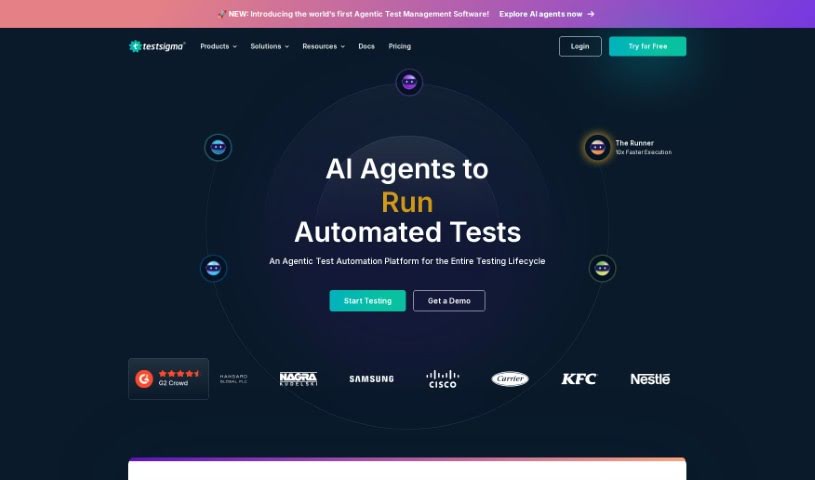
Screenshot of Testsigma

Testsigma

Discover Testsigma in 2025! Learn what this AI-driven test automation tool is, how to use its features effectively, and how it stacks up against other testing tools.

Screenshot

What is Testsigma?

Testsigma is a really smart test automation tool that uses artificial intelligence. It lets you create tests using plain English, so you don’t need to be a coding expert. People love Testsigma because it’s stable, reliable, and does a great job of reducing test flakiness – you know, those tests that fail for no good reason. It handles all sorts of testing, whether it’s for websites, mobile apps, or APIs. You can use it for things like regression testing and visual testing. What makes it stand out is how it uses natural language processing to help you write tests, has an ‘auto-healing’ feature to keep tests running even if things change, and an AI Suggestions Engine that helps you debug faster and even predict where defects might pop up. Plus, it connects with popular tools like JIRA, Jenkins, Azure DevOps, GitHub, and Bamboo, which is super helpful for continuous testing. This all means you can release your software faster and get it to market quicker. It also offers advanced features like visual testing and that AI Suggestion Engine to really boost your testing process.

Who created Testsigma?

Sampath Maka, who heads up Quality Engineering at Testsigma, is the person behind creating this platform. It officially launched on May 14, 2021. Since then, it’s been offering a whole suite of features designed to make testing easier. Think AI-powered test automation, writing tests in plain English thanks to natural language processing, tests that can fix themselves (‘auto-healing’), and even a way to predict defects before they become big problems. The whole idea is to simplify test automation with a low-code approach, making it accessible even if you’re not a deep coder. It supports testing for all sorts of applications and plays nicely with tools you probably already use, like JIRA and Jenkins.

What is Testsigma used for?

  • Regression testing
  • API testing
  • Mobile app testing
  • Data-driven testing
  • Visual testing
  • Web application testing
  • Continuous testing
  • Developing tests
  • Running tests
  • Managing test data
  • Building test capabilities
  • Executing tests effectively

Who is Testsigma for?

  • Quality assurance professionals
  • Software testers
  • Test Engineers
  • Test Automation Engineers
  • Quality Assurance Specialists
  • QA Managers

How to use Testsigma?

Getting started with Testsigma is pretty straightforward. Here’s a breakdown of how you can use it:

  1. Create Your Tests: You can write tests using plain English, thanks to Testsigma’s low-code approach. It uses natural language processing to help you write them, and there’s also that handy ‘auto-healing’ feature to keep your tests running smoothly even when your application changes.
  2. AI-Powered Automation: Lean into artificial intelligence for creating tests, spotting issues, and debugging. Testsigma’s AI Suggestions Engine is a real lifesaver for figuring out why tests might be failing.
  3. Write with Natural Language: Using Natural Language Processing makes writing tests much simpler. You can use pre-written statements or even create your own add-ons.
  4. Benefit from Auto-Healing: This feature is great because it automatically adjusts your test elements when your application updates. This keeps your tests robust and reliable over time.
  5. Spot Defects Early: Testsigma’s predictive defect identification helps you anticipate which areas might be affected if a test fails, making your testing much more efficient.
  6. Test Anywhere: You can run your tests either on the cloud or locally, giving you flexibility to match your device environments and how you prefer to work.
  7. Keep Testing Continuously: Integrate Testsigma with your CI/CD platforms to enable continuous testing. This is key for quickly updating applications and code changes.
  8. Manage Everything: Testsigma helps you manage the entire testing process. This includes writing tests, running them, getting reports, looking at analytics, and managing your test data.
  9. Explore Advanced Features: Don’t forget to check out the advanced features like Visual Testing, the AI Suggestion Engine, and how easily it integrates with different tech stacks.
  10. Handle Regression and Visual Testing: Use Testsigma to perform regression and visual testing. This ensures your application’s functionality stays consistent and looks right across different versions.

By following these steps, you’ll be able to use Testsigma effectively for AI-driven test automation, writing tests with natural language, and integrating seamlessly with CI/CD pipelines. It’s all about making your testing process efficient and reliable.

Related AI Tools

Discover more tools in similar categories that might interest you

Stay Updated with AI Tools

Get weekly updates on the latest AI tools, trends, and insights delivered to your inbox

Join 25,000+ AI enthusiasts. No spam, unsubscribe anytime.