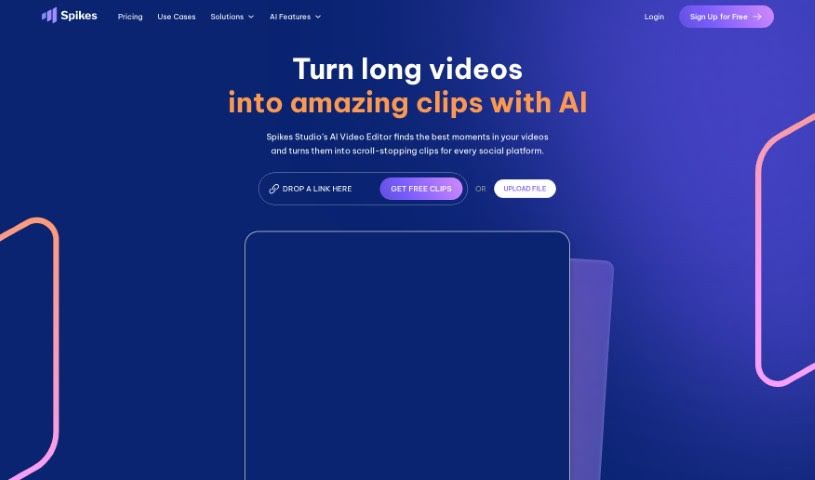
Screenshot of Spikes Studio

Spikes Studio

Discover Spikes Studio in 2025! Learn what it is, how to use its features effectively, and how it stacks up against other video editing tools. Get insights into its AI capabilities and creator-focused benefits.

Screenshot

What is Spikes Studio?

Spikes Studio is a platform designed to help creators easily pull out engaging short clips from their longer videos. It is your go-to tool for quickly repurposing content. It comes packed with features that make editing a breeze, like automatically creating titles, descriptions, and hashtags to boost discoverability. Plus, it offers AI styling for super-fast edits and auto-captions that are highly accurate. You can even download your clips straight to your phone, making sharing on social media incredibly simple. What’s really neat is the free plan, which renews every month without needing a credit card. The AI behind Spikes Studio actually learns from how you use it, personalizing its suggestions and getting better over time. It handles all sorts of content, provides those all-important hashtags and descriptions, and makes sure your highlights look just as good as the original video. For those who need more, it also offers advanced editing, including those accurate auto-captions and automatic processing for things like Twitch broadcasts. Many users have found Spikes Studio to be a real game-changer, praising how efficient, easy to use, and time-saving it is for their content creation workflow.

Who created Spikes Studio?

Spikes Studio was actually created by Hadrael, who was one of the platform’s very first users. It’s a tool built with creators in mind, specifically to help them extract engaging short clips from videos. It offers handy features like auto-captions, AI styling, and straightforward editing options, all designed to make sharing and connecting with your audience much easier.

What is Spikes Studio used for?

Spikes Studio is incredibly versatile for video creators. Here’s a breakdown of what you can do with it:

  • Tailor video clips to your exact needs: Easily set the duration for the clips you want to extract.
  • Bulk edit multiple videos: Work with an unlimited number of videos at once, saving you tons of time.
  • Get precise auto-captions: Benefit from captions that are accurate down to the word level.
  • Boost discoverability: Automatically generate relevant hashtags and descriptions for your content.
  • Process Twitch broadcasts: It specifically supports processing streams from Twitch.
  • Create shorts from streams efficiently: Quickly turn your live streams into engaging short-form content.
  • Extract highlights fast: Pull out the best moments from any video in a flash.
  • Download clips to your phone: Get your edited clips directly onto your mobile device for easy sharing.
  • Maintain original quality: Your extracted highlights will keep their original video quality.
  • Automate broadcast processing: Have broadcasts processed automatically once they’re finished.

Who is Spikes Studio for?

Spikes Studio is a fantastic tool for anyone involved in creating or sharing video content. This includes:

  • Content creators
  • Social media influencers
  • Streamers
  • YouTubers
  • Podcasters

How to use Spikes Studio?

Using Spikes Studio is pretty straightforward, and here’s a step-by-step guide to get you started and making the most of it:

  1. Sign Up/Log In: First things first, head over to the Spikes Studio website and create your account, or log in if you already have one.
  2. Upload Your Video: Once you’re in, upload the video content you want to work with to the platform.
  3. Let the AI Work: Spikes AI will then automatically get to work, generating captions, hashtags, descriptions, and even performing initial edits on your videos.
  4. Edit and Customize: You can then easily refine your video using the intuitive editor. It’s simple to trim, extend, or customize your clips exactly how you want them.
  5. Captions & Hashtags: Take advantage of the accurate auto-captions and get those helpful, relevant hashtags that will make your content more discoverable.
  6. Review and Download: Before you finish, preview your edited content and make any last-minute adjustments. Then, you can download the final version straight to your device or share it across your favorite platforms.
  7. Explore More Features: Don’t forget to check out the extra capabilities, like Twitch support for processing broadcasts, the ability to do bulk editing for multiple videos, and mobile support so you can edit on the go.
  8. Connect with the Community: You can also engage with the Spikes Studio community, get 24/7 support through Discord, and use the platform’s multi-language support.
  9. Upgrade as Needed: Start with the free plan to get a feel for it, and then upgrade if you need access to more advanced features.

Remember, Spikes Studio is all about making video editing simpler and more efficient with its powerful AI. It’s a great way to save time and create engaging video content without the usual hassle. Enjoy creating!

Related AI Tools

Discover more tools in similar categories that might interest you

Stay Updated with AI Tools

Get weekly updates on the latest AI tools, trends, and insights delivered to your inbox

Join 25,000+ AI enthusiasts. No spam, unsubscribe anytime.