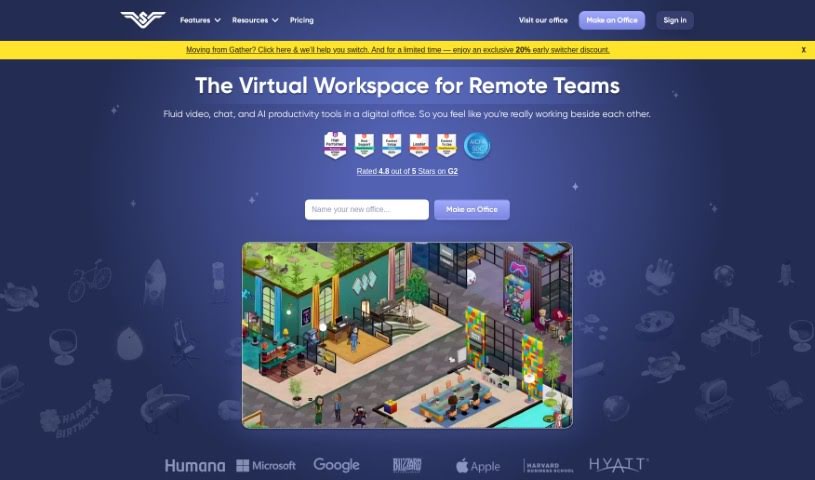
Screenshot of SoWork

SoWork

Discover what SoWork is and how to use it effectively in 2025. We'll walk through its features, compare it to other AI Note Takers, and show you how to boost your remote team's productivity.

Screenshot

What is SoWork?

SoWork is a virtual workplace tool built to help remote teams work more efficiently, be more productive, and collaborate better. It is a ‘Smart Virtual Office’ where your team can interact in real-time, which really helps boost engagement and get more done. It comes with some great features like high-definition video and recording, screen sharing, AI-powered meeting summaries, easy meeting scheduling, customizable office spaces, and even avatar creation. You can really make the digital office your own using SoWork’s MapMaker tool, creating a space that fits your team’s culture and makes collaboration smoother.

Who created SoWork?

SoWork was brought to life by a team that includes co-founders Emma Giles and Mark Liu. They launched the company with a clear goal: to give remote teams a digital office space where they could collaborate effectively and keep a strong team culture alive. Their inspiration actually came from their own experiences in online gaming communities, like World of Warcraft. The platform offers features designed to boost team productivity and connection, such as customization options, background noise cancellation, and integrations with popular tools like Zapier, Google Calendar, Slack, and Outlook. SoWork officially opened its doors to the public after the founders saw firsthand how much it improved their own team’s cohesion and productivity.

What is SoWork used for?

SoWork is used for a bunch of things to help remote teams thrive:

  • Boosting overall productivity
  • Making teams more productive
  • Increasing team engagement
  • Supporting office events
  • Managing both asynchronous and synchronous work
  • Encouraging high accountability and responsibility
  • Enabling real-time collaboration and connection
  • Creating custom avatars
  • Designing personalized workspaces
  • Providing built-in video chat
  • Offering screen sharing capabilities
  • Improving efficiency, productivity, and collaboration for remote teams
  • Enhancing team productivity through real-time collaboration features
  • Generating AI-powered meeting summaries
  • Scheduling meetings easily
  • Creating customizable workspaces and avatars
  • Providing team insights, badges, and achievements
  • Using MapMaker to tailor the digital office environment
  • Boosting team engagement
  • Facilitating virtual collaboration with features like HD video and screen sharing
  • Giving insights into team engagement, overlap hours, team relationship strength, and productivity health
  • Making real-time collaboration easier for remote teams
  • Serving as a virtual workplace tool to improve efficiency and collaboration
  • Enabling seamless team engagement
  • Customizing digital office space to reflect team culture
  • Storing HD video and meeting recordings
  • Managing both asynchronous and synchronous work
  • Supporting public and private meetings
  • Offering an AI Meeting Assistant (Sophia Bot) for note-taking
  • Featuring a Smart Virtual Office environment
  • Providing advanced sharing features

Who is SoWork for?

SoWork is a great tool for a variety of people and teams:

  • Managers
  • HR Professionals
  • Executives
  • Remote teams of all kinds
  • Team Managers
  • Organizations of any size or industry
  • Business owners
  • Unity Managers

How to use SoWork?

To get the most out of SoWork, here’s a simple guide:

  1. Sign Up and Log In:
    • Start by creating your account on SoWork. Just sign up using your email address.
  2. Explore the Features:
    • Take some time to get familiar with everything SoWork offers. This includes the Smart Virtual Office, HD video, screen sharing, AI meeting summaries, meeting scheduling, avatar creation, and how to customize your workspace with MapMaker.
  3. Enhance Productivity:
    • Make sure to use the real-time collaboration tools, the meeting scheduling features, and the AI Meeting Assistant (Sophia Bot) to really boost your team’s productivity.
  4. Customize Your Space:
    • Personalize your digital office using MapMaker. This helps reflect your team’s unique culture and creates a more productive work environment.
  5. Facilitate Collaboration:
    • Engage in real-time collaboration by using the smooth video chat, screen sharing, and scheduled meetings to connect effectively with your remote team members.
  6. Store Meeting Materials:
    • Capture meeting notes efficiently with Sophia Bot’s help. You can also easily access HD video recordings and meeting summaries whenever you need them for reference.
  7. Upgrade for Additional Benefits:
    • If you’re looking for more, consider upgrading to the Premium plan. You’ll get advanced features like priority access to new tools, a team analytics dashboard, and dedicated concierge support.
  8. Utilize Mobile Accessibility:
    • Remember that you can access SoWork on your mobile devices. This gives you the flexibility to work from wherever you are.
  9. Maximize Team Engagement:
    • Take full advantage of team insights, badges, achievements, and customizable avatars. These features are designed to enhance team engagement and boost overall productivity.
  10. Participate in Office Events:
    • Get involved in office events, use the tools for managing both asynchronous and synchronous work, and benefit from the high accountability and responsibility features that SoWork provides.

By following these steps, you can effectively use SoWork to build a productive and engaging virtual workspace for your remote team.

Related AI Tools

Discover more tools in similar categories that might interest you

Stay Updated with AI Tools

Get weekly updates on the latest AI tools, trends, and insights delivered to your inbox

Join 25,000+ AI enthusiasts. No spam, unsubscribe anytime.