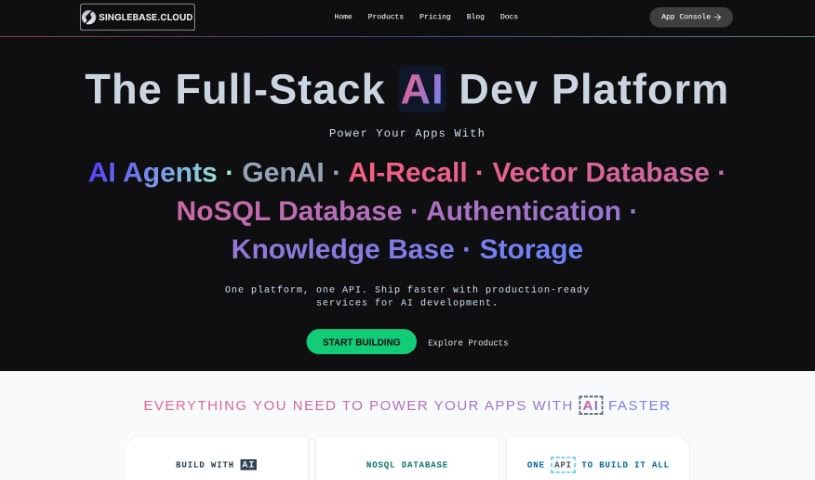
Screenshot of SinglebaseCloud

SinglebaseCloud

Discover SinglebaseCloud in 2025! Learn what this AI-powered low-code backend platform is, how to use its features like VectorStore and AI+Search, and how it stacks up against other Software Development Tools.

Screenshot

What is SinglebaseCloud?

SinglebaseCloud is a really neat AI-powered platform that uses low-code principles to help you build web and mobile apps faster and more efficiently. It is a backend assistant that speeds things up. It comes packed with useful features, like VectorStore, which is great for boosting Natural Language Processing and building search applications powered by Generative AI. You also get AI+Search for super-fast, accurate searches, and a NoSQL Document Database that’s perfect for storing data efficiently. Plus, it handles advanced querying, offers secure cloud storage with versioning and access controls, and supports standard authentication protocols. There are also analytics capabilities to give you insights, and developer support to help you build better apps, quicker.

Who created SinglebaseCloud?

SinglebaseCloud was actually created by a company called SinglebaseCloud, Inc. They launched the platform on April 9, 2023. As I mentioned, Singlebase is an AI-powered low-code backend platform designed to help developers build web and mobile applications with greater efficiency. It offers some key features, including VectorStore, which is fantastic for improving Natural Language Processing, and AI+Search, ensuring your search functions are both fast and accurate. It also includes a NoSQL Document Database for managing your data effectively. On top of that, you’ll find industry-standard authentication protocols, secure cloud storage, analytics tools, and dedicated developer support.

What is SinglebaseCloud used for?

Here are some of the common things you can do with SinglebaseCloud:

  • Create a new user: You can easily set up a new user account with their email, password, and a display name.
  • Add documents: It’s straightforward to insert documents into a collection, specifying details like the title, content, and whether it’s a draft.
  • Insert vectors: You can also insert vectors, which involves providing a title, content, and the corresponding vector data.
  • Search with vectors: Looking for something specific? You can search using vectors to retrieve relevant document IDs and titles.
  • Upload files: The platform supports file uploading, allowing you to upload files with a defined title.
  • Run X-SQL queries: You can execute queries using X-SQL to select specific fields from collections, like articles, based on your defined criteria.
  • Boost AI capabilities: It’s excellent for enhancing Natural Language Processing and Generative AI search applications.
  • Improve search speed: You can enable fast and accurate search functions.
  • Secure storage: It provides secure and flexible cloud-based storage for all your files and media.
  • Gain insights: The analytics capabilities help you understand your app data better.

Who is SinglebaseCloud for?

This platform is a great fit for:

  • Developers
  • Data scientists
  • AI engineers
  • App builders

How to use SinglebaseCloud?

Getting started with Singlebase is pretty straightforward. Just follow these steps:

  1. Create a User: You’ll use a provided code snippet to create a new user. You’ll need to specify their email, password, and display name.
  2. Insert a Document: Next, you can use the code to insert a document. Just define the title, content, and whether it’s a draft.
  3. Insert Vectors: To insert vectors, you’ll provide a title, content, and the corresponding vector.
  4. Perform a Vector Search: When you need to search for vectors, you’ll specify a vector and then retrieve the relevant document IDs and titles.
  5. Upload a File: If you need to implement file uploading, you’ll select a file and upload it with a defined title.
  6. Using X-SQL: Finally, you can run a query using X-SQL. This lets you select specific fields from collections, like articles, based on criteria you define.

Singlebase.cloud is an AI-powered low-code backend platform that really streamlines how you build web and mobile apps. It offers features like VectorStore, which is great for NLP applications, and AI+Search for super-fast, accurate searches. You also get a NoSQL Document Database for efficient data management, plus secure cloud-based storage and analytics capabilities. The platform is designed to speed up development, offer industry-standard security, and provide predictable pricing, all with helpful developer support.

Related AI Tools

Discover more tools in similar categories that might interest you

Stay Updated with AI Tools

Get weekly updates on the latest AI tools, trends, and insights delivered to your inbox

Join 25,000+ AI enthusiasts. No spam, unsubscribe anytime.