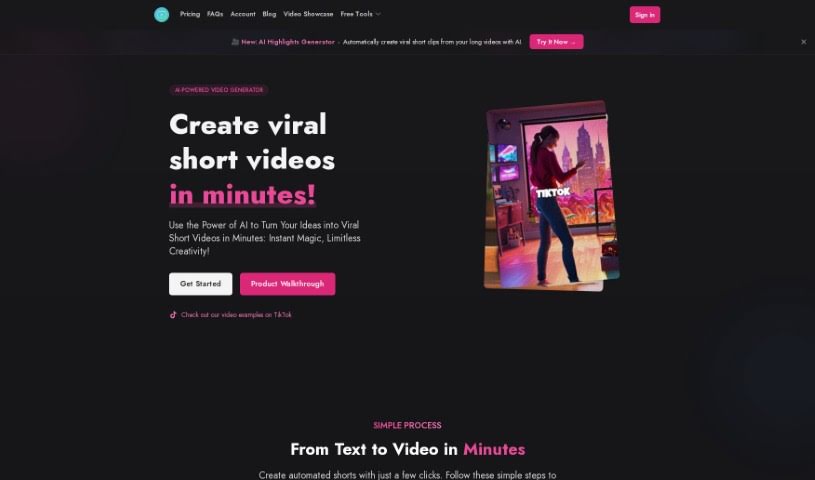
What is Shorts Generator?
Shorts Generator is a handy tool that helps you create viral YouTube Shorts. It works by letting you use successful, high-performing videos as inspiration. You get features like ModeScript, which can transcribe and summarize videos in pretty much any language you need. Plus, there’s StoryBullet Points to help you whip up video descriptions quickly. You can even work directly with YouTube URLs, which is super convenient. If you’re a content creator looking to make engaging YouTube Shorts without a ton of hassle, this tool is a real game-changer.
Who created Shorts Generator?
An individual or company that hasn’t been specified created Shorts Generator. This tool first launched on September 4, 2023, and it’s designed to help users create viral YouTube Shorts fast and easily by drawing on the success of existing videos. You can make really engaging, attention-grabbing Shorts for your YouTube channel using its features. For example, ModeScript helps transcribe and summarize videos in many languages, and StoryBullet Points makes generating descriptions a breeze.
What is Shorts Generator used for?
- Create Viral YouTube Shorts: You can make popular Shorts by using successful, well-performing videos as a base.
- Transcribe & Summarize Videos: The ModeScript feature lets you transcribe and summarize videos in any language.
- Generate Descriptions: Use the StoryBullet Points feature to easily create descriptions for your YouTube Shorts.
- Extract Key Points: Get the main ideas from videos to create concise, structured descriptions.
- Direct YouTube URL Integration: Work directly with specific YouTube URLs to leverage particular videos.
- Engaging Shorts: Make attention-grabbing Shorts that stand out on YouTube.
- Multi-Language Accessibility: Ensure your content is accessible with transcription and summarization available in multiple languages.
- Convenient & Efficient Creation: Enjoy easy and effective ways to produce compelling Shorts.
- AI Script Writing: You can either generate a script using AI or paste in your own.
- AI Voiceovers: Create voiceovers using high-quality AI voices.
- Scene Generation: The tool automatically creates scenes and images based on your script.
- Customizable Export: Export your finished video with settings you can adjust.
- ModeScript for All Languages: Access ModeScript to transcribe and summarize videos in any language you need.
- StoryBullet Points for Descriptions: Utilize this feature to generate descriptions for your YouTube Shorts.
- Direct URL Input: Work directly with specific YouTube URLs.
- Leverage Proven Strategies: Tap into successful content approaches by using established, high-performing videos.
- Broad Language Support: Provide accessibility with transcription and summarization options in multiple languages.
- Effective & Compelling Shorts: Create YouTube Shorts that are both engaging and effective, thanks to convenient features.
- Streamlined Descriptions: Use the StoryBullet Points feature to create descriptions for YouTube Shorts.
- Concise Key Points: Extract key points from videos and present them clearly for informative descriptions.
- Specific Video Input: Work directly with specific YouTube videos by simply entering the URL.
- Use Successful Content: Leverage established and high-performing videos to inform your content strategy.
- Efficient Short Creation: Create compelling and effective Shorts for YouTube efficiently.
- Style Customization: Adjust settings like fonts, positioning, and video styles.
- Boost Channel Engagement: Create engaging, attention-grabbing Shorts to improve your YouTube channel’s interaction.
Who is Shorts Generator for?
- Content creators
- YouTubers
- Social media managers
- Digital marketers
- YouTube channel owners
- YouTube creators
- Marketers
- Video creators
How to use Shorts Generator?
Using the Shorts Generator tool is pretty straightforward. Just follow these simple steps:
- Generate or Paste Your Script:
- You can use the AI script writer to help you create a script, or if you already have one, just paste it in.
- Start with a title or a basic idea, and then let the AI build out the rest of the script for you.
- Create AI-Generated Voiceover:
- Pick a high-quality AI voice from the available selection to narrate your script. You can also upload your own voice clip if you prefer.
- Generate Scenes:
- The tool will automatically create scenes based on your script, complete with matching images. You can always customize these scenes if you want to make changes.
- Export Video:
- Once your scenes are all set up, you can customize things like fonts, where elements are positioned, and the overall video style.
- After you’ve made your customizations, you can export your video to finish the process.
Plus, Shorts Generator offers different pricing plans to fit what you need:
- Hobby Plan: This is great for beginners. It comes with monthly limits on text, speech, images, and videos.
- Standard Plan: This is our most popular choice, offering more generous monthly limits.
- Professional Plan: Designed for users who need more, this plan provides higher monthly limits for text, speech, images, and videos.
By following these steps and checking out the different features and pricing plans, you can create really engaging and visually appealing YouTube Shorts efficiently with the Shorts Generator tool.